
Print Passport Photos in Singapore: Prices, Shops & 4R Guide (2026)
Compare passport photo printing options in Singapore, see verified prices, and learn how to print six 35 × 45 mm photos on one 4R sheet.
Last updated: September 2026
Quick answer: If you already have a correctly sized passport-photo file, the cheapest verified option in Singapore is usually to place six 35 × 45 mm photos on one 4R sheet and print it at a photo lab. Standard Photo currently lists 4R photo printing at S$0.50 per sheet. Select actual size and disable fit, fill, zoom, or automatic cropping. For any hardcopy submission to Singapore's Immigration & Checkpoints Authority (ICA), use matte or semi-matte, non-reflective photo paper. Most Singapore passport applications are submitted online and use a digital colour photo; print copies only when your specific form, agent, or other document application asks for them.
If you prefer to prepare the file online, the Singapore passport photo maker can help check the crop, background, and passport-photo format before submission.
In this guide
- Where to print passport photos in Singapore
- Current verified prices
- How to arrange six photos on a 4R sheet
- The difference between ICA's digital and printed-photo requirements
- Printing mistakes that change the final size
- Frequently asked questions
Where to Print Passport Photos in Singapore
Your best option depends on whether you already have a compliant file or still need a new photo taken.
| Option | Published price | Can use your own file? | Best for |
|---|---|---|---|
| Standard Photo 4R printing | S$0.50 per 4R print | Yes | Printing a prepared 4R layout cheaply |
| Standard Photo passport service | S$16 for a photo shoot and six 35 × 45 mm hard copies | Ask the outlet for file-only reprints | People who still need the photo taken |
| FotoHub in-store service | Check the current outlet price | FotoHub advertises photo-printing and passport/visa photo services | People who want staff assistance |
| Home photo printer | Paper and ink cost | Yes | People with a calibrated photo-quality printer |
Prices and service details can change. The figures above were checked against the merchants' own pages in September 2026. Confirm the paper finish, file-transfer method, and latest price before travelling to a store.
If you already have a print-ready sheet, ask for a normal 4R photo print, not a new passport-photo shoot. Tell the staff not to resize or crop the file.
Digital Upload or Printed Photo: Which One Do You Need?
For a Singapore passport application, ICA says you need a recent digital colour photograph. Its recommended online-upload size is 400 × 514 pixels, with JPG, JPEG, HEIC, HEIF, and PNG accepted up to 8 MB. ICA also states that the photo must not be altered or enhanced in a way that changes facial features.
A 400 × 514 pixel upload file and a 4R print sheet serve different purposes:
- Digital ICA file: use this for an online passport application through ICA e-Services.
- 35 × 45 mm printed photo: use this only when a hardcopy application, visa process, agent, school, employer, or other document specifically requests a physical photo.
- 4R print-ready sheet: this is a 102 × 152 mm image containing several correctly sized 35 × 45 mm photos for cutting.
Do not assume that printing the 400 × 514 pixel upload file automatically produces a 35 × 45 mm physical photo. Printer scaling can change the result.
For the complete official specification, see ICA's Photo Guidelines and PhotoOmni's Singapore passport photo requirements.
How to Print Six Passport Photos on One 4R Sheet
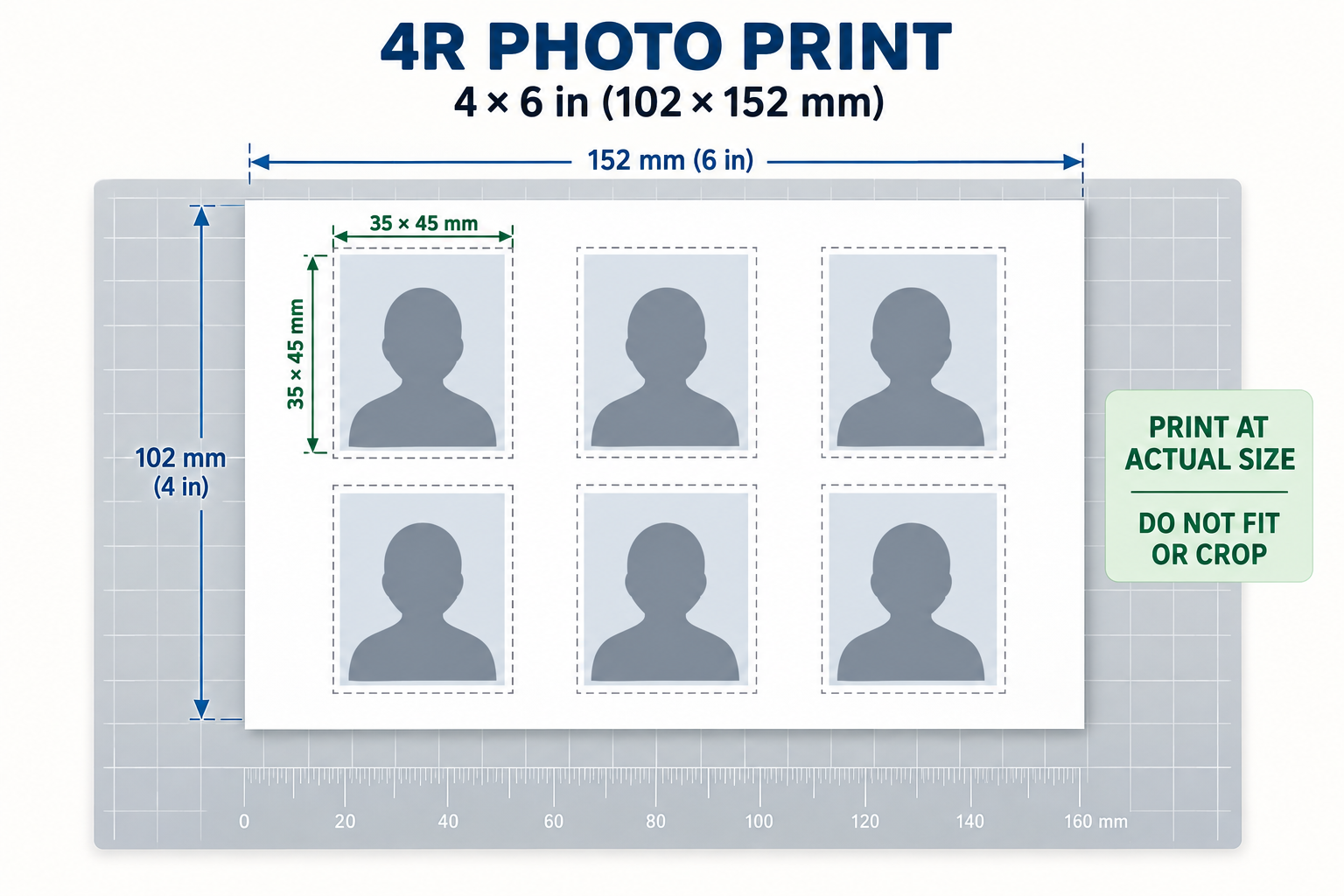
A landscape 4R sheet measures 4 × 6 inches, or approximately 102 × 152 mm. It can hold six portrait photos measuring 35 × 45 mm in a three-column, two-row layout.
Step 1: Prepare a 4R print-ready layout
Use a layout created specifically for a 4R sheet. It should contain six 35 × 45 mm photos with enough space between them for cutting. Do not stretch individual photos to fill the sheet.
Step 2: Keep the original file dimensions
Transfer the file to the lab by phone, USB drive, or the merchant's upload system. Avoid messaging apps that may compress or resize the image.
Step 3: Choose 4R paper
Select a landscape 4R / 4 × 6 inch print. If the shop offers paper-finish options and the prints are for an ICA hardcopy submission, request matte or semi-matte, non-reflective paper.
Step 4: Disable automatic scaling
Use settings such as actual size, 100%, or no crop. Turn off:
- Fit to page
- Fill page
- Borderless expansion or zoom
- Auto crop
- Image enhancement or face retouching
Borderless printers often enlarge an image slightly to remove white edges. That enlargement can make a 35 × 45 mm photo too large.
Step 5: Measure before cutting
After printing, measure one photo with a ruler. Its finished rectangle should be 35 × 45 mm when that size is required. If it is larger or smaller, do not compensate by trimming inside the image; reprint with the correct scaling.
Step 6: Cut along the guides
Use a paper trimmer or sharp scissors and keep all four edges straight. Do not cut into the head, shoulders, or background area.
ICA Requirements to Check Before Printing
ICA's current guidance is the final authority. Before ordering physical copies, check that the source photo:
- Is a recent colour photograph
- Shows the full face with the head straight and eyes open
- Has a plain white background, or light grey where ICA permits it for white hair
- Has no filter, beauty effect, or facial-feature alteration
- Has no distracting shadow, glare, or reflection
- Uses matte or semi-matte, non-reflective paper when a hardcopy is required
ICA does not recommend selfies because the result is often unsuitable; it recommends asking another person to take the photo. This is different from saying that every phone photo is automatically rejected.
Common Printing Mistakes
Printing the digital upload file as if it were a print layout
The 400 × 514 pixel specification describes an online-upload file. Its physical size depends on the printer's resolution and scaling settings. Use a dedicated print-ready sheet instead.
Selecting “fill” or borderless enlargement
These options crop the sheet or enlarge every photo. Choose actual size or 100% and verify the first print with a ruler.
Assuming glossy paper is suitable for an ICA hardcopy
ICA explicitly requires matte or semi-matte, non-reflective paper for printed photographs submitted in hardcopy. Ask the shop which finish it will use before paying.
Paying for a new photo shoot when you only need printing
If you already have a compliant 4R file, request ordinary 4R photo printing. A full passport-photo service normally includes taking and preparing a new photo and therefore costs more.
Frequently Asked Questions
Where can I print passport photos in Singapore?
Photo labs such as Standard Photo and FotoHub offer photo printing and passport-photo services. If you already have a prepared 4R sheet, ask whether the outlet can print your file at actual size without cropping.
How much does passport photo printing cost in Singapore?
Standard Photo's published price list currently shows S$0.50 for a normal 4R photo print and S$16 for a photo shoot with six 35 × 45 mm hard copies. Other stores may charge differently, so confirm the current price directly.
How many 35 × 45 mm passport photos fit on a 4R sheet?
Six fit comfortably in a three-by-two landscape layout, provided the file is designed at the correct 4R dimensions.
Can I print the ICA 400 × 514 pixel file directly?
Not reliably. It is designed for online upload, and the physical output size changes with printer settings. Use a separate 4R print-ready layout for physical copies.
Should Singapore passport photos be matte or glossy?
For a printed photograph submitted in hardcopy to ICA, the official guideline says matte or semi-matte, non-reflective paper.
Do I need printed photos for a Singapore passport renewal?
Most passport applications use a digital colour photo through ICA's online service. Print copies only if the specific application route or another organisation asks for them.
Can I use a selfie?
ICA does not recommend selfies because they often produce an unsuitable result and may delay an application. Ask another person to take a front-facing photo at eye level.
Official and Merchant Sources
- ICA Photo Guidelines, including online file dimensions, accepted formats, selfie guidance, and hardcopy paper finish
- ICA Apply for Passport, including the requirement for a recent digital colour photograph
- Standard Photo service price list, including 4R and passport-service prices
- Standard Photo locations
- FotoHub in-store services
Prepare the Photo Before You Print
PhotoOmni prepares the ICA-recommended digital file and a separate print-ready output while checking composition, background, lighting, and image quality. It does not replace ICA's final decision, and the source photo should not contain filters or altered facial features.
Related Guides
- How to Take a Passport Photo at Home
- Why Was My Passport Photo Rejected?
- Passport Photo: Glossy or Matte?
- Complete Passport Photo Requirements Guide
About the Author
PhotoOmni Editorial Team
PhotoOmni publishes practical passport and ID photo guides based on current government requirements and clearly identified merchant information. Official authorities remain the final source for application decisions.