




United Arab Emirates Visa Online Photo Maker

Upload a phone photo and use the UAE visa photo maker to crop, resize, and prepare a 300 × 369 pixel JPEG for an Emirates-linked online visa application. AI pre-check and expert review help you catch visible photo problems before submission.

Mit einem Foto beginnen

KI-geprüftVon Experten geprüftExpertenoptimierungGeld-zurück-Garantie
United Arab Emirates Visa Online Photo Maker

Fotospezifikationen

Online photo size
300 × 369 px
Aspect ratio
100:123
File format
JPEG
Background
Plain, light-coloured
Application route
Emirates-linked online visa applications
Offline photo reference
43 × 55 mm (confirm with your filing channel)

How PhotoOmni Works

Get your document photo in just three simple steps.

  1. Upload a photo

    Upload a clear, recent front-facing photo from your phone or camera.

  2. AI + expert review

    The tool crops and resizes the image to 300 × 369 pixels while checking pose, lighting, background, and quality.

  3. Download 300 × 369 JPEG

    Download the reviewed 300 × 369 pixel JPEG for the online route. If your channel asks for a physical photo, the commonly listed offline size is 43 × 55 mm; confirm before printing or filing.

UAE visa photo guide

UAE Visa Photo Requirements and 300×369 Online Maker

Use this guide to make a UAE visa photo online, understand where the 300 × 369 pixel format applies, and avoid common upload and portrait errors.

UAE visa photo requirements

Emirates publishes visible portrait requirements but does not present 300 × 369 pixels as a universal UAE standard. Use this size for the matching Emirates-linked route and always check the live upload form for ICP, GDRFA, or another sponsor.

Official source: Emirates: UAE visa information and photo requirements

Online dimensions
300 × 369 pixels for the matching Emirates-linked route
Format
JPEG
Offline photo reference
43 × 55 mm; confirm before printing or filing
Background
Plain and light-coloured; some UAE authority routes specify white
Pose
Face forward, head centred, face filling most of the frame
Expression
Neutral and natural, mouth closed, eyes open
Image quality
Sharp, evenly lit, no filters or colour effects

Where the UAE visa photo is used

The correct file depends on who submits or sponsors the application. Match the output to the portal you are actually using.

Emirates online visa route

Use the 300 × 369 pixel tool when the Emirates-linked upload flow requests this format.

UAE government portals: ICP and GDRFA

ICP visa and entry-permit services commonly request a recent white-background colour portrait, while Dubai applications may use GDRFA. Check the live portal because each service can publish its own file limits and upload instructions.

Travel agent or sponsor filing

An airline, hotel, travel agent, employer, resident sponsor, or typing centre may request a different file.

How to take a UAE visa photo at home

Start with a natural, high-resolution portrait so the online editor can crop without losing quality.

  • Ask another person to take the photo at eye level instead of using a close selfie.
  • Face the camera directly and keep your head upright and centred.
  • Use soft, even front lighting and avoid shadows on the face or wall.
  • Use a clean white or light-coloured wall and wear clothing that contrasts with it.
  • Keep both eyes visible; remove hats, dark glasses, and distracting accessories.
  • Do not use beauty filters, portrait blur, skin smoothing, or colour effects.

Common UAE visa photo mistakes

Check these visible issues before uploading; the receiving authority makes the final decision.
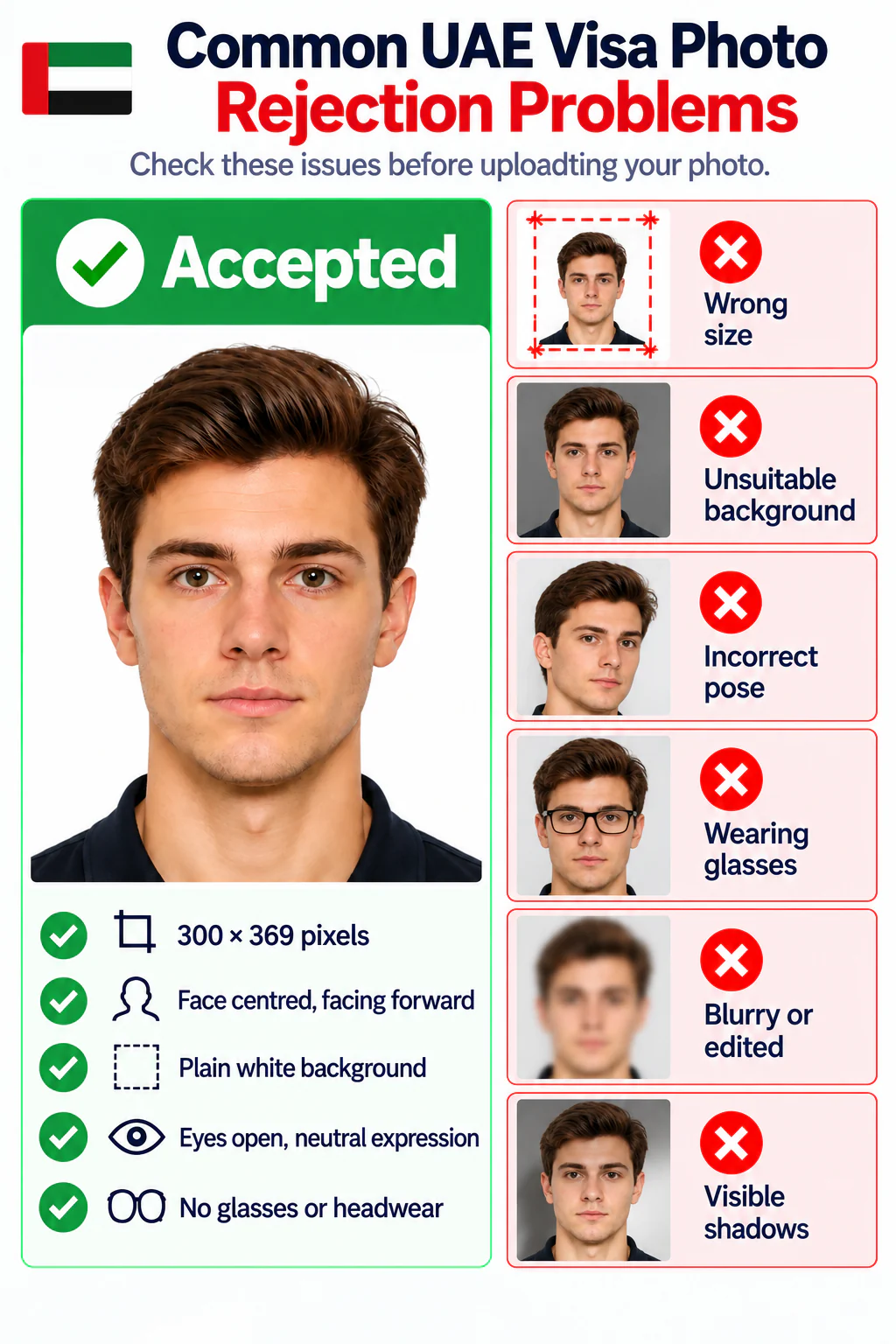
Accepted UAE visa photo and common rejection problems
  • The file is not 300 × 369 pixels when that exact format is requested.
  • The wrong portal specification was assumed for an ICP, GDRFA, or sponsor-led application.
  • The face is off-centre, turned, tilted, too small, or cropped too tightly.
  • The background is dark, patterned, cluttered, or visibly shadowed.
  • Eyes are obscured by hair, glare, tinted glasses, or heavy shadows.
  • The image is blurry, compressed, filtered, retouched, or poorly lit.

PhotoOmni vs. other UAE visa photo options

Choose a method that delivers the correct digital file and helps you check the current application route.

  • 300 × 369 resize

    PhotoOmni
    Purpose-built pixel output
    Other online tools
    May only resize
    Photo studio
    Ask before visiting
  • Photo checking

    PhotoOmni
    AI pre-check plus expert review
    Other online tools
    Often automated only
    Photo studio
    Depends on local experience
  • Online convenience

    PhotoOmni
    Upload from home
    Other online tools
    Usually online
    Photo studio
    Requires a visit
  • Rejection protection

    PhotoOmni
    100% refund for photo-related rejection
    Other online tools
    Policy varies
    Photo studio
    Policy varies
  • Total price & inclusions

    PhotoOmni
    One-time fee of $5.99
    Other online tools
    Add-ons can cost $3–$10+
    Photo studio
    Often $15+; files vary

Offizielle Anforderungen

  • Look directly at the camera with your head centred and your face occupying most of the frame.
  • Keep a neutral, natural expression with your mouth closed and both eyes open and visible.
  • Use even front lighting, a plain light background, sharp focus, and no filters or colour effects.
  • Remove hats and dark glasses. Clear medical glasses may be accepted only when the eyes remain unobstructed and glare-free.

Häufig gestellte Fragen

What is the UAE visa photo size for an Emirates online application?
300 × 369 pixels for the matching Emirates-linked online route. Check your live form because other UAE channels may differ.
Can I resize a photo to 300×369 pixels online?
Yes. Upload a clear portrait; PhotoOmni crops, centres, and resizes it to 300 × 369 pixels.
What background should a UAE visa photo use?
Emirates uses a plain light background; UAE ICP commonly requires white. Follow your application channel.
Is 300×369 pixels required for every UAE or Dubai visa?
No. This size is for the matching Emirates-linked route; ICP, GDRFA, agents, and sponsors may use different specifications.
Can I make a UAE visa photo online from a phone picture?
Yes. Upload a clear recent phone photo for cropping, resizing, face positioning, and background checking.
What does the PhotoOmni UAE visa photo maker check?
It checks dimensions, crop, face position, background, lighting, sharpness, and quality, followed by expert review.
How quickly will my 300×369 UAE visa photo be ready?
Most usable uploads are ready in 3–15 minutes after payment.
What file will I receive from the UAE visa photo generator?
A reviewed 300 × 369 pixel JPEG. Check your portal because other sponsors may require another format.
How many photos do I need for a UAE visa application?
Online submission usually uses one portrait. Confirm the quantity with your sponsor or application channel.
What happens if my PhotoOmni UAE visa photo is rejected?
Send the rejection evidence to support. Eligible photo-related cases receive a 100% refund.

Real feedback from some PhotoOmni customers

“Really convenient. I got my UAE visa photo sorted without leaving home.”
James Walker
“I wasn’t sure about the photo requirements, so having it checked before submission was reassuring.”
Olivia Bennett
“Much easier than going to a photo shop. I uploaded a phone photo, had it reviewed, and downloaded the finished version quickly.”
Michael Harris

Bereit, Ihr Foto zu erstellen?

Laden Sie ein Foto hoch und erhalten Sie in wenigen Minuten ein fertiges Dokumentenfoto.

3–15 Min.100 % Geld-zurück-Garantie