Australian Visa Photo Online

Prepare an Australian visa photo for ImmiAccount or a paper application. Check the required JPG format, file size, background, paper dimensions, and photo-quality rules before uploading. Requirements can vary by visa subclass, so always follow the instructions shown in your application. Upload a clear phone photo for an AI pre-check, expert review, and digital or print-ready output.

Mit einem Foto beginnen

KI-geprüftVon Experten geprüftExpertenoptimierungGeld-zurück-Garantie
Australian Visa Photo Online

Fotospezifikationen

Paper photo range
35–40 mm wide × 45–50 mm high
ImmiAccount facial image
Original JPG; 70 KB–3.5 MB
Background
Neutral or light grey, with contrast to the face
Photo age
Taken within the last 6 months

How PhotoOmni Works

Get your document photo in just three simple steps.

  1. Upload your photo

    Take or upload a recent colour source photo with a full, unobstructed face.

  2. AI + expert compliance review

    AI checks size, framing, lighting, background, and image quality; an expert reviews the result before delivery.

  3. Get an Australian visa photo, 35–40 × 45–50 mm

    Download your Australian visa photo in the format your route requires. For standard paper requests, use the 35–40 × 45–50 mm range with a neutral or light-grey background and a 32–36 mm face height.

Australian visa photo guide

Australian Visa Photo Requirements for ImmiAccount and Paper Applications

Australian visa photo requirements can differ by visa subclass and application channel. For a visa photo in ImmiAccount, select Facial image and upload an original JPG. Use this guide to prepare a genuine photo, then verify the exact instruction in ImmiAccount or on your form before submission.

Australian visa photo: quick requirements check

There is no single photo size or pixel setting for every Australian visa. ImmiAccount facial-image uploads, paper forms, and app-based live identity checks can use different instructions. The requirement shown for your visa subclass or application takes priority.

Official source: Department of Home Affairs: attach a visa facial image in ImmiAccount

Recency
No more than 6 months old
Background
Neutral or light grey; clean and contrasting with your face
Expression
Full face, centred, eyes open, mouth closed, neutral expression
Digital request
Select Facial image in ImmiAccount; upload an original JPG between 70 KB and 3.5 MB
Paper request
Where the form uses the Department's standard paper-photo guidance: 35–40 mm wide × 45–50 mm high; face 32–36 mm from chin to crown
Do not use
Filters, beauty retouching, AI-generated likenesses, or edited photos

How to Take an Australian Visa Photo at Home

An iPhone or other phone can provide a suitable source photo when you follow the same visible requirements as a professional photograph.

  • Ask another person to take the photo at eye level; avoid close selfies and wide-angle distortion.
  • Use bright, even front light and remove shadows from your face and background.
  • Stand against a smooth neutral or light-grey wall with no objects, patterns, or other people visible.
  • Face the camera directly with your eyes open and mouth closed; keep hair away from the sides of your face.
  • Remove glasses if practical and remove accessories that obscure your face or create reflections.
  • Do not use filters, portrait blur, beauty effects, face reshaping, or AI-generated edits.

Common Australian Visa Photo Rejection Reasons

These are common visible risks. Final acceptance remains with the Department. If a PhotoOmni photo is rejected for a photo-related issue caused by our service, request a 100% refund within 30 days under our Refund Policy.

  • The image is a scan, screenshot, photo of a print, or an old image that no longer shows your current appearance.
  • The face is turned, poorly framed, shadowed, blurred, obscured by hair, or not clearly visible.
  • The background is patterned, dark, coloured, glossy, or contains objects or another person.
  • The photo uses a filter, retouching, AI face generation, or an edit that changes the applicant's appearance.
  • The JPEG, file size, pixels, print dimensions, or photo count does not match the instruction for the visa route.
  • A printed photo is used where a digital original is requested, or vice versa.
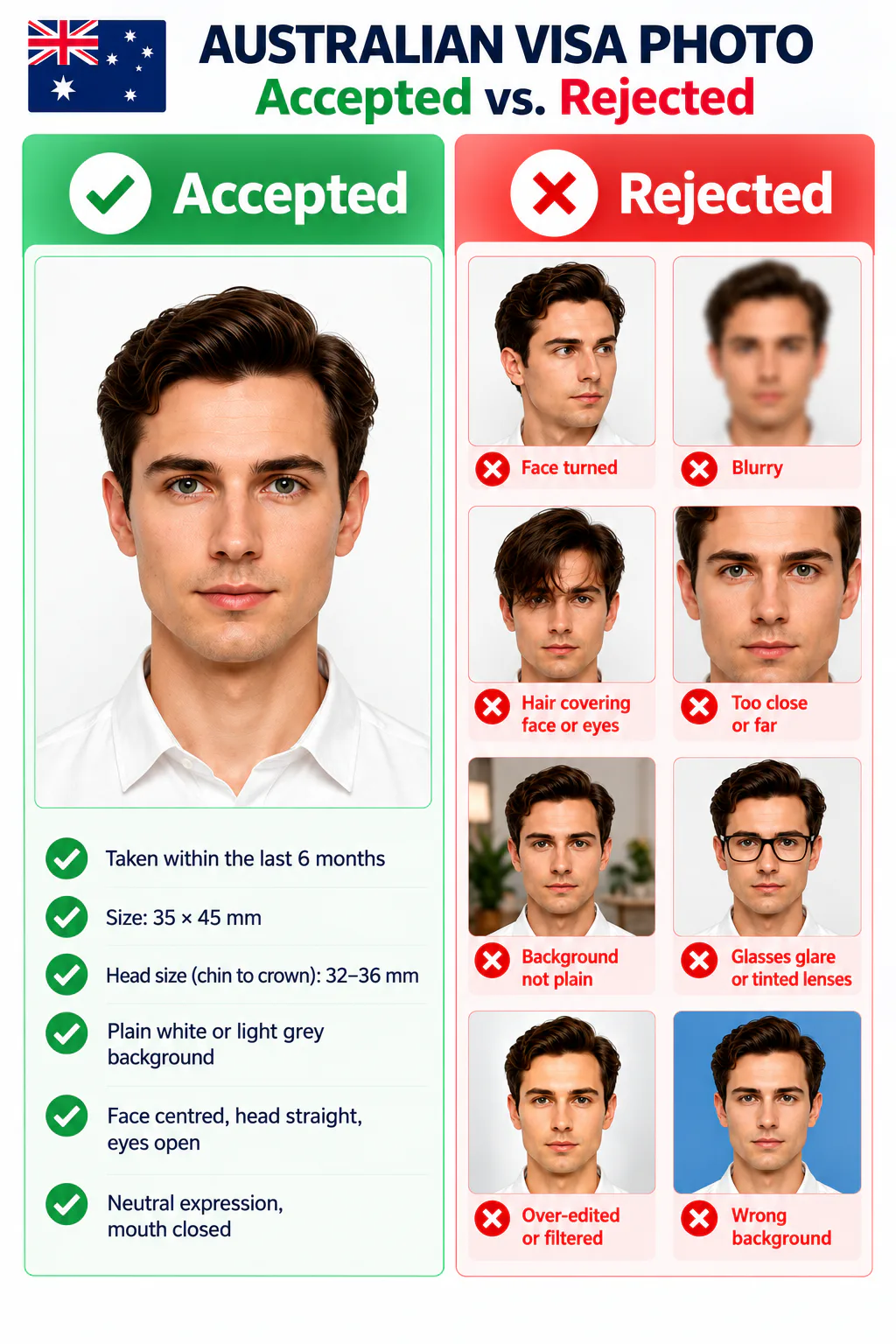
Accepted and rejected Australian visa photo examples showing correct pose, background, sharpness, framing, and facial visibility

PhotoOmni vs. other ways to prepare an Australian visa photo

For every route, use an authentic source photo and follow the exact instruction shown for your visa subclass or ImmiAccount request.

  • Convenience

    PhotoOmni
    Upload from home in minutes
    Other online tools
    Usually online
    Traditional photo studios
    Requires a store visit
  • Application guidance

    PhotoOmni
    Digital and print route guidance
    Other online tools
    Varies by service
    Traditional photo studios
    Depends on local staff
  • Photo checks

    PhotoOmni
    AI pre-check plus expert review
    Other online tools
    May be basic or extra
    Traditional photo studios
    Usually retake-based
  • Final format

    PhotoOmni
    Digital and print-ready output
    Other online tools
    May be limited or extra
    Traditional photo studios
    Digital copy may not be included
  • Rejection protection

    PhotoOmni
    100% refund for covered photo-caused rejection
    Other online tools
    Varies by service
    Traditional photo studios
    Varies by provider
  • Total price & inclusions

    PhotoOmni
    One-time fee of $5.99
    Other online tools
    Add-ons can cost $3–$10+
    Traditional photo studios
    Often $15+; files vary

Offizielle Anforderungen

  • Use a recent, clear, full-colour photo that shows your full face and the visible edges of your face.
  • Face the camera directly with eyes open, mouth closed, and a neutral expression.
  • Use a neutral or light grey background without shadows, patterns, other people, or objects.
  • Submit an original, unedited photo. Do not use beauty filters, face retouching, AI-generated likenesses, or edits that change your appearance.
  • Follow the requirements shown for your exact visa subclass and ImmiAccount request; photo count and digital limits can differ by application route.

Häufig gestellte Fragen

What photo do I upload to ImmiAccount for an Australian visa?
Choose 'Facial image' when attaching a visa photo in ImmiAccount. Upload an original JPG rather than a scan or photograph of a printed photo. Digital photographs should be 70 KB–3.5 MB, but the instructions shown for your application take priority.
Is an Australian visa photo 35 x 45 mm?
35 x 45 mm is a common passport-photo format. For paper routes using the Department's standard photo guidance, the permitted paper range is 35–40 mm wide by 45–50 mm high, with a 32–36 mm chin-to-crown face height. Confirm your visa form before printing.
What size should an Australian visa photo be in pixels?
Do not assume one pixel size applies to every visa. ImmiAccount's general visa-photo upload guidance specifies an original JPG between 70 KB and 3.5 MB without publishing one universal pixel size for every visa. Follow the instructions shown for your application.
Can I take an Australian visa photo with an iPhone?
Yes, if the final photo meets the application requirements. Use even light, a plain neutral or light-grey background, a front-facing pose, and an original image without filters, portrait effects, or appearance-changing edits.
Do I need printed photos if I apply through ImmiAccount?
Usually follow the digital upload instructions shown in your online application. Some visa forms, paper applications, or identity-declaration requests can also require printed photos, so follow the instructions for your exact route.
What if my Australian visa photo is rejected?
If a final photo prepared by PhotoOmni is rejected because of a photo-related compliance issue caused by our service, PhotoOmni will refund 100% of the amount paid for that order. Request the refund within 30 calendar days of receiving the final photo and include your order details and the rejection notice. Application decisions and issues unrelated to the delivered photo are not covered.

Real feedback from some PhotoOmni customers

“Very easy to use and not complicated at all. The steps were clear from start to finish.”
Emily Carter
“Worked great the first time, so I came back and bought it again for my second visa application.”
Daniel Wilson
“Our whole family applied while living abroad, so getting photos taken was inconvenient. We used PhotoOmni together and submitted our photos without any photo-related issues.”
Sophie Martin

Bereit, Ihr Foto zu erstellen?

Laden Sie ein Foto hoch und erhalten Sie in wenigen Minuten ein fertiges Dokumentenfoto.

3–15 Min.100 % Geld-zurück-Garantie