UK Driving Licence Photo Online

Prepare a UK driving licence photo online for the application route you use. Great Britain's DVLA and Northern Ireland's DVA support different online and postal routes, so check whether your application needs a digital photo, an existing passport photo, a photo code, or a printed photo.

Mit einem Foto beginnen

KI-geprüftVon Experten geprüftExpertenoptimierungGeld-zurück-Garantie
UK Driving Licence Photo Online

Fotospezifikationen

Application area
Great Britain (DVLA) or Northern Ireland (DVA)
Online routes
Passport photo, uploaded photo, or photo code, depending on the application
Printed photo size
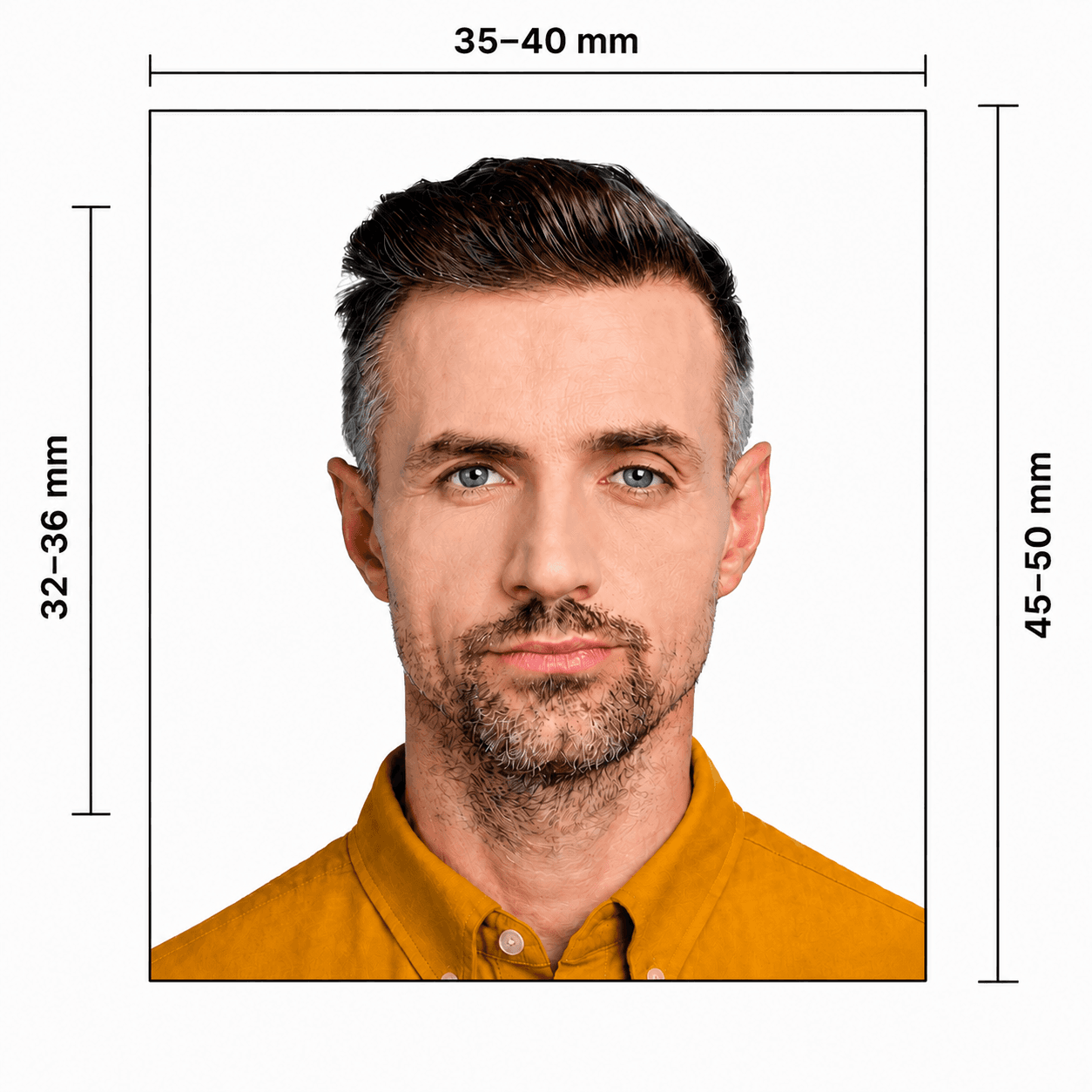
35 × 45 mm for applicable postal routes
Background
Plain and light-coloured; printed DVA guidance specifies light grey or cream
Quality
Colour, clear, in focus

How PhotoOmni Works

Get your document photo in just three simple steps.

  1. Upload your photo

    Take or upload a recent colour photo with your full face clear against a plain light grey or cream background.

  2. AI + expert compliance review

    AI checks size, framing, lighting, background, and image quality; an expert reviews the result before delivery.

  3. Get your UK driving licence photo

    Download the format prepared for your selected route. This may include a 35 × 45 mm print-ready file for an applicable postal application and a digital file when your application accepts an upload.

UK driving licence photo guide

UK Driving Licence Photo Online: DVLA and DVA Application Routes

The photo route depends on where and how you apply. DVLA manages driving licences in Great Britain, while DVA manages applications in Northern Ireland. Online applications may use an existing passport photo, a newly uploaded digital photo, or a photo code. Postal applications may require a printed photo. For a detailed checklist, see our UK driving licence photo requirements guide. For Northern Ireland, check the official DVA photo guidance on nidirect.

UK driving licence photo requirements

Use the photo method shown for your exact application. GB DVLA online services may use a passport photo or a new upload, while Northern Ireland DVA supports digital photos and photo codes for applicable online routes. Postal routes may require a printed photo.

Official source: GOV.UK: Change the photo on your driving licence

Application area
Great Britain (DVLA) or Northern Ireland (DVA)
Online route
Passport photo, new digital upload, or photo code, depending on the service
Applicable postal size
45 mm high × 35 mm wide
Printed DVA photo age
Taken within the last month
Background
Light grey or cream; plain and shadow-free
Quality
Colour, sharp, in focus, with no red-eye
Pose
Face forward, look straight at the camera, eyes open
Headwear and glasses
Only medical or religious headwear; no tinted glasses or eye-obscuring glare

How to take a suitable driving licence photo at home

A phone can produce a suitable source photo when you use even light and keep the image natural and clear.

  • Ask another person to take the photo at eye level rather than using a close selfie.
  • Use a plain light grey or cream wall with even front light and no shadows.
  • Keep your full face visible, eyes open, and expression natural. Remove hair from your eyes.
  • Avoid glasses if possible; remove tinted glasses and eliminate lens glare.
  • Do not use filters, beauty effects, face reshaping, or edits that change your appearance.

Why a UK driving licence photo may be rejected

Incorrect size is only one risk. These issues can delay a paper or digital application.

  • The photo is old, not in colour, blurred, damaged, shadowed, or has red-eye.
  • The size, print quality, or paper handling does not match the requested application route.
  • The face is turned, eyes are obscured, the expression is unsuitable, or hair and glasses glare cover facial features.
  • The background is dark, patterned, or contains another person or object.
  • The image is filtered, retouched, or does not reflect your current appearance.
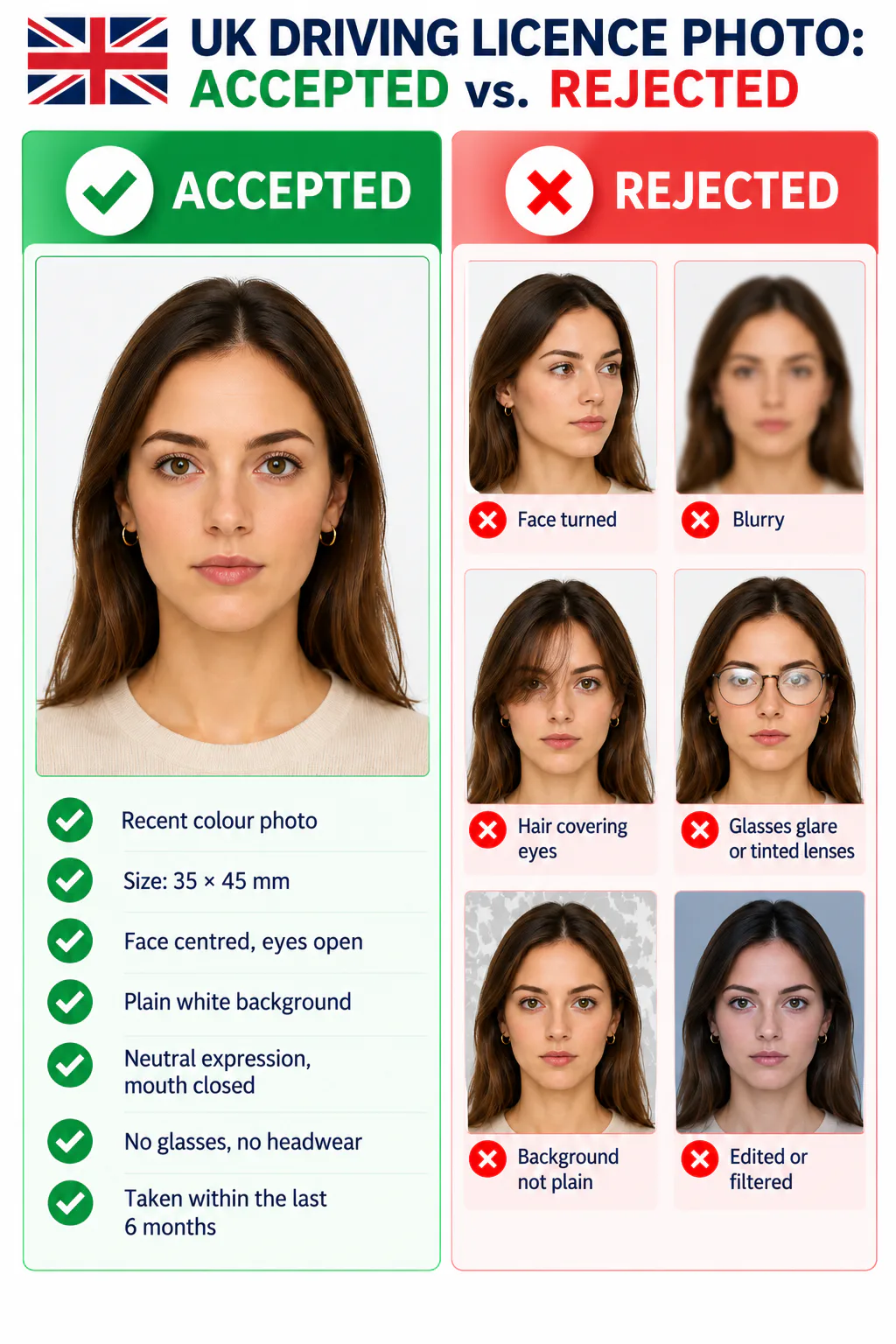
Accepted and rejected UK driving licence photo examples

PhotoOmni vs. other ways to prepare a driving licence photo

Check the exact GB DVLA or Northern Ireland DVA route before using the final file or print.

  • Convenience

    PhotoOmni
    Upload from home in minutes
    Other online tools
    Usually online
    Traditional photo studios
    Requires a store visit
  • Application guidance

    PhotoOmni
    DVLA / DVA route guidance
    Other online tools
    Varies by service
    Traditional photo studios
    Depends on local staff
  • Photo checks

    PhotoOmni
    AI pre-check plus expert review
    Other online tools
    May be basic or extra
    Traditional photo studios
    Usually retake-based
  • Final format

    PhotoOmni
    Digital and print-ready output
    Other online tools
    May be limited or extra
    Traditional photo studios
    Digital copy may not be included
  • Rejection protection

    PhotoOmni
    100% refund for photo-related rejection
    Other online tools
    Policies vary
    Traditional photo studios
    Policies vary by shop
  • Total price & inclusions

    PhotoOmni
    One-time fee of $5.99
    Other online tools
    Add-ons can cost $3–$10+
    Traditional photo studios
    Often $15+; files vary

Offizielle Anforderungen

  • For applicable paper routes, use a recent 35 × 45 mm colour photo. Do not trim a larger photo yourself.
  • Use a light grey or cream background, even lighting, and a clear full-face image with no red-eye or shadows.
  • Face forward and look straight at the camera with your eyes open and a natural expression. Keep hair and glasses glare away from your eyes.
  • Online, postal, renewal, and first provisional-licence routes can use different identity and photo methods. Always follow the instructions shown for your exact DVLA or DVA application.

Häufig gestellte Fragen

What are the DVLA driving licence photo requirements?
Your photo must be recent, clear, in colour, and show a true likeness of you with your full face visible, eyes open, and a natural expression. The exact submission method depends on the DVLA service: it may use your UK passport photo, accept a new digital photo, or require a printed 35 × 45 mm photo for an applicable postal route.
How do I submit a digital photo to DVLA?
Start the relevant DVLA online application and follow the photo option displayed for your identity and application type. Depending on the service, DVLA may retrieve your UK passport photo or let you provide a new digital photo. Do not send a file separately unless the official application asks for it.
Can I upload a photo for my driving licence online?
Some online driving-licence services allow a new digital photo, but availability depends on whether you apply through DVLA or DVA, the type of application, and how your identity is verified. Begin the official application first and use only the photo method it offers.
What are the photo requirements for a provisional driving licence?
A first provisional licence application needs an acceptable photo as part of the identity process. An online DVLA application may use the photo linked to an accepted identity document, while a postal D1 application may require a recent printed photo. Northern Ireland DVA applications follow their own instructions.
What background should a UK driving licence photo have?
Use a plain, light-coloured background with no patterns, objects, or strong shadows. For a printed Northern Ireland DVA photo, official guidance specifies a light grey or cream background. Keep clear contrast between your face, hair, and the background.
How do I make a UK driving licence photo with PhotoOmni?
Take a recent photo with your phone, then upload it to PhotoOmni and select UK Driving Licence Photo. We prepare the crop, background, head position, size, and final file for the selected application format. Before you start, check whether your DVLA or DVA route asks for a digital upload, a photo code, an existing passport photo, or a printed photo. See our UK driving licence application guide if you are unsure.
What kind of photo should I upload?
Upload a recent colour photo taken in even light. Face the camera, keep your eyes open and your expression natural, and leave enough space around your head and shoulders. A clear phone photo is fine; avoid blur, heavy shadows, filters, beauty retouching, and anything covering your face or eyes.
What does PhotoOmni do after I upload my photo?
PhotoOmni prepares the image for the selected UK driving licence format, checks common compliance risks with AI, and has a human expert review the result before delivery. This covers details such as framing, background, head position, lighting, and image quality.
How long will my driving licence photo take?
Most PhotoOmni orders are prepared and reviewed within 3–15 minutes. When the result is ready, you can download it directly from the website without visiting a photo booth or studio.
Will I receive a digital file or a printable photo?
PhotoOmni prepares a digital result and a print-ready 35 × 45 mm layout for application routes that use a printed photo. Use only the format requested in your specific DVLA or DVA application; some online routes use an existing passport photo or a photo code instead of a direct file upload.
Can PhotoOmni reduce the risk of my photo being rejected?
Yes. PhotoOmni checks the finished photo against the selected format and a human expert reviews it before delivery. This helps catch common photo problems, but the DVLA or DVA makes the final acceptance decision and can also reject an application for reasons unrelated to the photo.
What happens if my PhotoOmni photo is rejected?
If your photo is rejected because of a photo-related issue caused by PhotoOmni, we refund 100% of the amount paid for that order. Email [email protected] within 30 calendar days of receiving the final photo and include your order number, order email, and the rejection notice. See the full refund policy.
Is my uploaded photo kept private?
PhotoOmni uses your uploaded image to prepare your document photo and handles it under our privacy policy. Your photo is not published or shared as public content, and uploaded photos are automatically deleted within 24 hours.

Real feedback from some PhotoOmni customers

“Really easy to use. I took the photo at home and it worked perfectly for my driving licence application.”
Emily Carter
“Much easier than going to a photo booth. The instructions were clear and simple to follow.”
Oliver Harris
“I needed a new photo for my licence renewal. Uploaded a selfie and everything went smoothly.”
Sophie Turner

Bereit, Ihr Foto zu erstellen?

Laden Sie ein Foto hoch und erhalten Sie in wenigen Minuten ein fertiges Dokumentenfoto.

3–15 Min.100 % Geld-zurück-Garantie