Vietnam ID Card Photo Online – 3×4 cm Photo Maker

Make a 3 × 4 cm (30 × 40 mm) Vietnam ID photo online. Upload a phone photo to crop, resize, and check the background, face position, and quality. Important: current Vietnam Citizen ID cards normally require the authority to capture your portrait and biometrics in person.

Mit einem Foto beginnen

KI-geprüftVon Experten geprüftExpertenoptimierungGeld-zurück-Garantie
Vietnam ID Card Photo Online – 3×4 cm Photo Maker

Fotospezifikationen

3×4 reference size
3 × 4 cm (30 × 40 mm)
Digital output
354 × 472 px at 300 DPI
Background
Plain white
Pose
Front-facing, head uncovered, no glasses
Current Citizen ID
Portrait normally captured in person by the authority

How PhotoOmni Works

Get your document photo in just three simple steps.

  1. Upload a portrait

    Upload a clear front-facing image from your phone or camera.

  2. Crop, resize + check

    PhotoOmni prepares the 3:4 crop and checks background, centring, lighting, sharpness, glasses, and facial visibility, with expert review before delivery.

  3. Download 3×4 files

    Download a 30 × 40 mm JPEG or PNG—354 × 472 px at 300 DPI—and a print-ready sheet; confirm that the receiving organisation accepts a supplied photo.

Vietnam ID photo guide

Vietnam ID Card Photo Size, Requirements, and Online Maker

Prepare a 3 × 4 cm Vietnam ID-style photo for a form or organisation that accepts a supplied image. Current Citizen ID issuance is different: the authority normally captures the portrait and biometrics in person.

Vietnam ID photo requirements and current scope

Vietnam's legacy identity-card regulation published a 3 × 4 cm portrait. Official photo guidance calls for a colour, straight-on portrait with the head uncovered, face and ears visible, no glasses, formal appearance, and no face-altering Photoshop edits. Current Citizen ID applications normally complete portrait and biometric capture at the authority.

Official source: Vietnam legal database — legacy identity-card photo size

Reference size
3 × 4 cm (30 × 40 mm), portrait 3:4
300 DPI output
Approximately 354 × 472 px
Background
PhotoOmni defaults to plain white; older official CMND guidance allowed blue or white
Pose
Front-facing, head uncovered, face and both ears visible
Glasses
Not allowed in the official photo guidance
Editing
No face-altering Photoshop edits
Current Citizen ID
Portrait and biometrics normally captured in person by the authority

Where the Vietnam 3×4 ID-style photo is used

Use this file only when a form or organisation asks you to supply a 3 × 4 cm photo.

Legacy identity-card records

The 3 × 4 cm format comes from Vietnam's legacy identity-card design and may appear in older records or instructions.

Forms and organisations

Use the digital or printed file when a school, employer, local office, or other organisation explicitly requests a 3 × 4 cm ID photo.

Current Citizen ID

Current Citizen ID issuance normally captures the portrait and biometrics in person, so this file does not replace that appointment.

How to take a Vietnam 3×4 ID photo with a phone

These steps help create a natural source image when a supplied photo is accepted.

  • Ask another person to use the phone's rear camera at eye level; avoid a close selfie.
  • Use soft, even front light and a simple background without shadows.
  • Face the camera directly, keep the head upright, and make both ears visible.
  • Remove glasses and headwear, and keep hair away from the eyes and facial outline.
  • Leave space around the head and shoulders for the 3:4 crop.
  • Disable beauty filters, portrait blur, skin smoothing, and face reshaping.

Common Vietnam 3×4 ID photo problems

Check these issues before sending the file to a form or organisation that requests it.
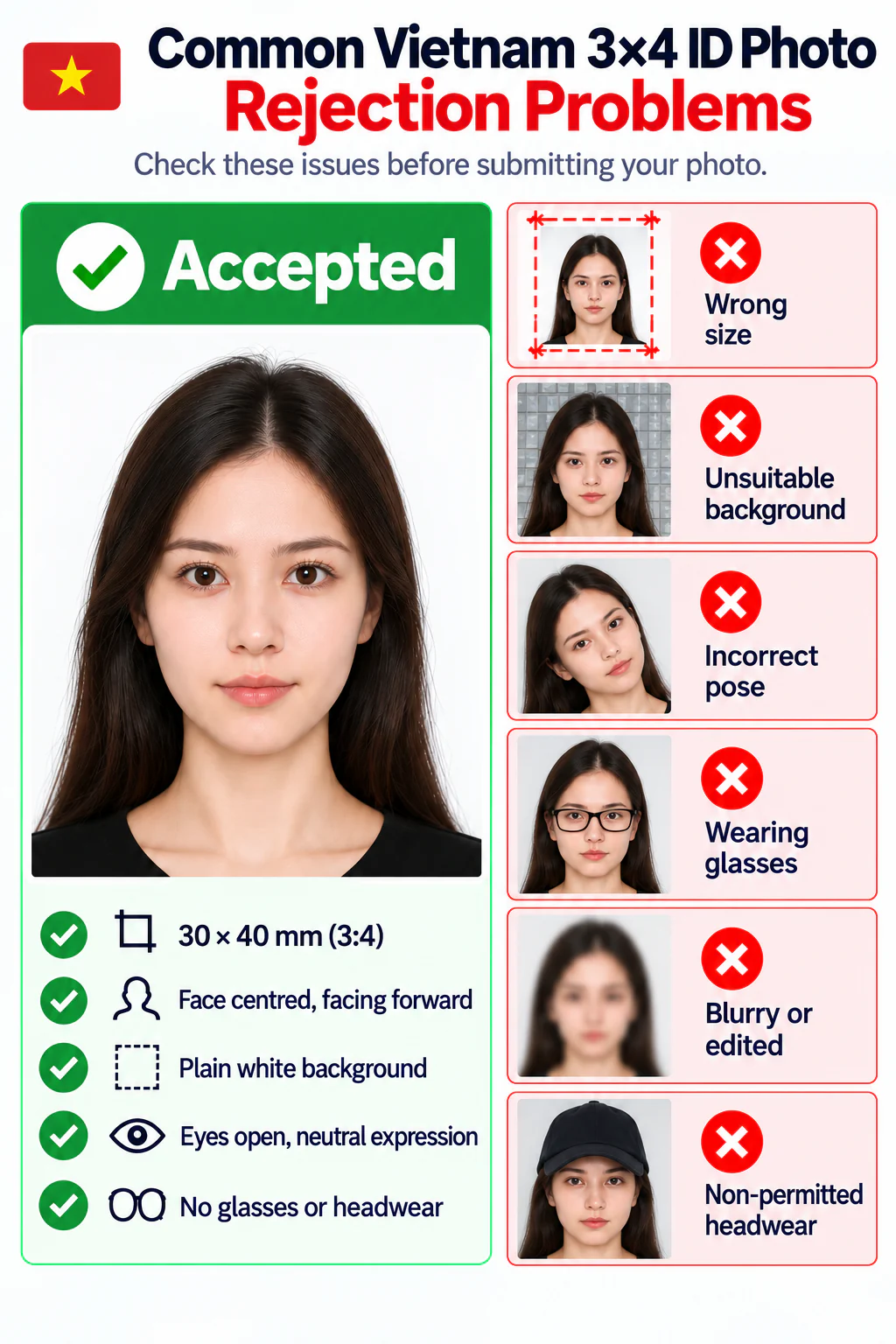
Accepted Vietnam 3×4 ID photo beside examples rejected for wrong size, an unsuitable background, incorrect pose, glasses, blur or editing, and non-permitted headwear.
  • The image is not 30 × 40 mm or does not use a 3:4 portrait frame.
  • The background is patterned, uneven, or contains visible shadows.
  • The face is turned, tilted, partly hidden, or the ears are covered.
  • The applicant is wearing glasses or non-permitted headwear.
  • The image is blurred, compressed, overexposed, filtered, or face-altered.
  • The file is submitted where the authority requires in-person capture instead.

PhotoOmni vs. other Vietnam 3×4 photo options

Compare PhotoOmni with a basic crop tool and a traditional studio for accepted supplied-photo use cases.

  • Make the photo from home

    PhotoOmni
    Upload from a phone
    Basic online tools
    Usually online
    Photo studios
    Requires a visit
  • Photo checks

    PhotoOmni
    AI pre-check plus expert review
    Basic online tools
    May only crop or resize
    Photo studios
    Depends on the operator
  • Ready-to-use output

    PhotoOmni
    3×4 digital and print files
    Basic online tools
    Formats vary
    Photo studios
    Digital file may cost extra
  • Rejection protection

    PhotoOmni
    100% refund for photo-caused rejection
    Basic online tools
    Policy varies
    Photo studios
    Policy varies by shop
  • Total price & inclusions

    PhotoOmni
    One-time fee of $5.99
    Basic online tools
    Add-ons can cost $3–$10+
    Photo studios
    Often $15+; files vary

Offizielle Anforderungen

  • Use the 3 × 4 cm file only when a form or organisation specifically asks you to provide one
  • Face the camera directly with your head uncovered, both ears visible, and no glasses
  • Do not use face-altering edits; current Citizen ID capture is completed at the authority

Häufig gestellte Fragen

What size is a Vietnam ID card photo?
The legacy Vietnamese identity-card design published a 3 × 4 cm (30 × 40 mm) portrait size. This remains a common Vietnamese ID-style photo format, but it does not mean every current Citizen ID process accepts an uploaded or printed photo.
Is this photo for Vietnam CCCD or the current Citizen ID card?
Use caution. CCCD is a common search term, but current Citizen ID issuance normally requires an in-person appointment where the authority captures the portrait, fingerprints, iris data, and other biometrics. This online 3×4 output is for forms or organisations that specifically request a supplied ID photo.
Can I make a Vietnam 3×4 ID photo online?
Yes. PhotoOmni can crop and resize a clear portrait to 30 × 40 mm, prepare a white background, run visible quality checks, and provide digital and print-ready files.
Can I take a Vietnam ID photo with my phone at home?
Yes, when the receiving form accepts a supplied photo. Ask someone to use the rear camera at eye level and leave room for the 3:4 crop. See our at-home document photo guide for lighting and posing tips.
What is the 3×4 photo size in pixels?
A 30 × 40 mm photo is approximately 354 × 472 pixels at 300 DPI. Keep the 3:4 portrait ratio when resizing.
Can I use JPEG or PNG?
PhotoOmni can prepare JPEG or PNG output, but the receiving form's current upload instructions determine the accepted format and file-size limit.
What background should a Vietnam ID photo use?
Use a clean plain white background for the most broadly reusable 3×4 file. Older official CMND guidance allowed blue or white, while PhotoOmni defaults to white.
Can I retouch a Vietnam ID photo?
Do not alter facial features. Older official guidance explicitly says the identity photo should not be Photoshop-edited. Basic crop, size, exposure, and background preparation must preserve your real appearance.
How does PhotoOmni check my Vietnam 3×4 photo?
PhotoOmni checks the crop, dimensions, background, face position, lighting, sharpness, glasses, and facial visibility, followed by expert review. Final acceptance rests with the receiving authority or organisation.
What files will I receive from PhotoOmni?
You receive a 30 × 40 mm digital photo at approximately 354 × 472 pixels and 300 DPI, plus a print-ready sheet. Confirm that the recipient accepts supplied photos and check its file rules.
How long does PhotoOmni take to prepare the photo?
PhotoOmni usually prepares and reviews the photo within 3–15 minutes. Extra correction or a replacement image may take longer.
What if my PhotoOmni photo is rejected?
A photo rejected because of a PhotoOmni error qualifies for a 100% refund. The guarantee does not cover applications requiring in-person capture or rejecting supplied photos.
Can I use the same PhotoOmni photo for another document?
Yes, only when the size, background, pose, recency, file, and submission rules match. Otherwise choose the exact document in PhotoOmni; do not use this file where in-person capture is required.

Bereit, Ihr Foto zu erstellen?

Laden Sie ein Foto hoch und erhalten Sie in wenigen Minuten ein fertiges Dokumentenfoto.

3–15 Min.100 % Geld-zurück-Garantie