




Mexican Visa Photo Maker Online

Upload a phone photo to make, crop, resize, and check a Mexican visa photo online. PhotoOmni prepares a 31 × 39 mm white-background file within Mexico's official accepted size range, with AI pre-check and expert review before delivery.

Mit einem Foto beginnen

KI-geprüftVon Experten geprüftExpertenoptimierungGeld-zurück-Garantie
Mexican Visa Photo Maker Online

Fotospezifikationen

Prepared size
31 × 39 mm
Official accepted range
26–31 mm wide × 32–39 mm high
Background
Plain white
Photo
Colour, front-facing
Glasses
Not permitted

How PhotoOmni Works

Get your document photo in just three simple steps.

  1. Upload a photo

    Upload a clear, recent front-facing photo from your phone or camera.

  2. AI + expert review

    The tool prepares a white background, centres the face, and crops the image to 31 × 39 mm within the official range.

  3. Download 31 × 39 mm photo

    Download the reviewed file and compare it with the latest checklist from the consulate handling your appointment.

Mexican visa photo guide

Mexican Visa Photo Requirements, Size, and Online Maker

Prepare a Mexican visa photo from home, understand the official size range, and check whether your nationality or immigration document means you need a visa before booking a consular appointment.

Mexican visa photo requirements

Mexico's consular rules specify a colour, front-facing passport photo with a visible face, no glasses, and a white background. The permitted dimensions run from 26 × 32 mm to 31 × 39 mm; PhotoOmni uses the 31 × 39 mm upper-size format.

Official source: Mexican Secretariat of Foreign Affairs: visa requirements

Accepted size range
26–31 mm wide × 32–39 mm high
PhotoOmni output
31 × 39 mm JPEG
Background
Plain white
Pose
Front-facing, head upright, full face visible
Eyeglasses
Not permitted
Colour
Natural colour photo

Who needs a Mexican visa

Visa need depends on nationality, travel purpose, stay, and other valid visas or residence documents. The examples below cover common applicant groups, not the complete legal list.

Asia-Pacific visa-required nationalities

Common examples include China, India, Indonesia, the Philippines, Thailand, Vietnam, Pakistan, Bangladesh, Nepal, and Sri Lanka.

Middle East, Africa, Europe, and the Americas

Common examples include Egypt, Morocco, Nigeria, South Africa, Saudi Arabia, Qatar, Jordan, Lebanon, Russia, Ukraine, Türkiye, Serbia, Cuba, Haiti, the Dominican Republic, and Ecuador.

Travellers who may qualify for an exemption

A valid visa from Canada, the US, Japan, the UK, or a Schengen country—or qualifying permanent residence—may remove the need for a separate Mexican visa for eligible short visits.

How to take a Mexican visa photo at home

A clear phone photo is enough when the original image is natural, sharp, and correctly posed.

  • Ask another person to take the photo at eye level instead of using a close-up selfie.
  • Face the camera directly with your head upright and shoulders square.
  • Remove all eyeglasses and keep hair away from the eyes and face edges.
  • Use soft, even front lighting and avoid shadows on the face or background.
  • Stand in front of a clean white wall and wear clothing that contrasts with it.
  • Do not use filters, beauty mode, portrait blur, or facial retouching.

Common Mexican visa photo mistakes

Avoid these problems before taking the photo to your consular appointment.
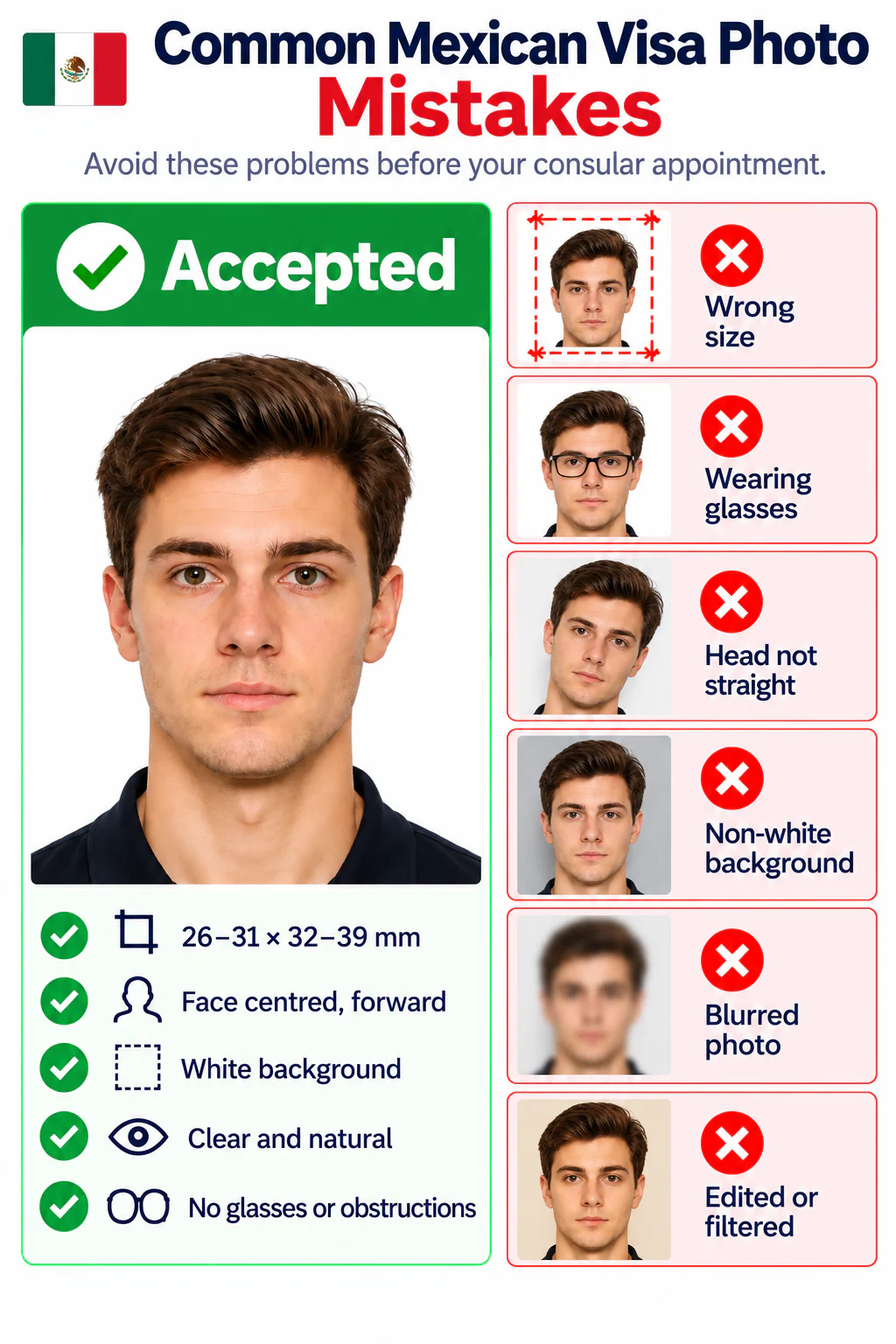
Accepted Mexican visa photo and common rejection examples
  • The dimensions fall outside the official 26–31 mm by 32–39 mm range.
  • The applicant is wearing eyeglasses or facial features are obstructed.
  • The face is turned, tilted, off-centre, or cropped too tightly.
  • The background is not white or contains shadows, objects, patterns, or borders.
  • The photo is blurred, pixelated, overexposed, underexposed, or heavily compressed.
  • Filters, beauty effects, or facial retouching change the applicant's appearance.

PhotoOmni vs. other Mexican visa photo options

Choose a service that understands the unusual Mexican visa size range and delivers a reviewed file.

  • Mexico visa sizing

    PhotoOmni
    31 × 39 mm within the official range
    Other online tools
    May use a generic passport crop
    Photo studio
    Depends on local experience
  • Photo checking

    PhotoOmni
    AI pre-check plus expert review
    Other online tools
    Often automated only
    Photo studio
    Usually retake-based
  • Convenience

    PhotoOmni
    Upload from home
    Other online tools
    Usually online
    Photo studio
    Requires a visit
  • Rejection protection

    PhotoOmni
    100% refund for covered photo rejection
    Other online tools
    Policy varies
    Photo studio
    Policy varies
  • Total price & inclusions

    PhotoOmni
    One-time fee of $5.99
    Other online tools
    Add-ons can cost $3–$10+
    Photo studio
    Often $15+; files vary

Offizielle Anforderungen

  • Use a recent colour passport-style photograph with a plain white background.
  • Face the camera directly with your full face visible and your head upright and centred.
  • Remove eyeglasses and avoid hair, headwear, shadows, or accessories that obscure the face.
  • Confirm your appointment consulate's live checklist because local instructions may simply request a passport-size photo.

Häufig gestellte Fragen

What is the Mexican visa photo size?
Accepted range: 26–31 mm wide × 32–39 mm high. PhotoOmni delivers 31 × 39 mm; confirm with your consulate. See why a correct crop needs more than a basic resize in our photo sizing guide.
Can I make a Mexican visa photo online from my phone?
Yes. Upload a clear front-facing photo for cropping, white-background preparation, checks, and expert review. Follow our phone photo guide.
Who needs a visa to travel to Mexico?
Travellers on Mexico's official visa-required list generally need one. Check the current INM list because nationality rules and exemptions change.
Can a valid US, Canada, UK, Japan, or Schengen visa replace a Mexican visa?
Often yes for eligible short visits. A qualifying valid visa or permanent residence may exempt you; confirm the current official conditions.
What background is required for a Mexico visa photo?
Use a plain white background with even lighting and no shadows, patterns, objects, or borders. Read the white-background guide.
Can I wear glasses in a Mexican visa photo?
No. The face must be fully visible and glasses are not permitted.
How quickly can PhotoOmni prepare my Mexico visa photo?
Most usable uploads are ready in 3–15 minutes after payment and expert review.
What if my PhotoOmni Mexican visa photo is rejected?
Send the rejection evidence to support. Eligible photo-related cases receive a 100% refund. Compare common issues in our accepted and rejected photo examples.

Real feedback from some PhotoOmni customers

“Quick and easy. My Mexican visa photo was ready in minutes.”
Emily Carter
“The expert review was really helpful. I felt much more confident that my photo met the requirements.”
Daniel Brooks
“I made visa photos for both myself and my husband at home. The process was simple, and having an expert check everything before downloading saved us a trip to a photo studio.”
Sophie Mitchell

Bereit, Ihr Foto zu erstellen?

Laden Sie ein Foto hoch und erhalten Sie in wenigen Minuten ein fertiges Dokumentenfoto.

3–15 Min.100 % Geld-zurück-Garantie