
Best Photo ID App in 2026: Create Passport and ID Photos From Your Phone
Compare the best photo ID apps in 2026. PhotoOmni combines AI compliance checking against ICAO standards with expert human review for $5.99 — covering 100+ countries.
Best Photo ID App in 2026: Create Passport and ID Photos From Your Phone
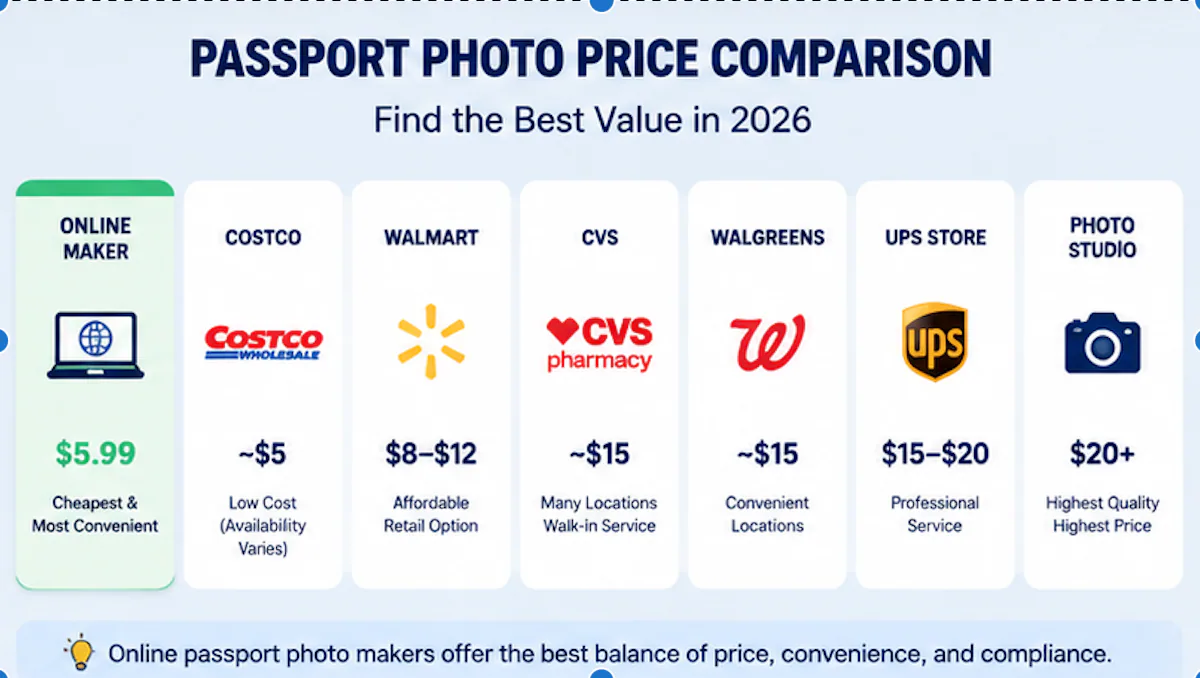
If you prefer to prepare the file online, the US passport photo maker can help check the crop, background, and passport-photo format before submission.
Here's the uncomfortable truth about [passport photo app](/en/documents)s: most of them are just cropping tools with a clean interface. They'll resize your picture. They won't warn you when your head is 2mm out of position — a deviation that triggers automatic rejection at border control.
The numbers back this up. Roughly 5-6 million Americans redo passport applications each year because of photo problems. The UK Home Office flagged 230,000+ applications in 2023. That's not a rounding error — those are real people who booked flights, made embassy appointments, and then got told their photo doesn't pass.
The apps worth using catch these issues before you submit. Better yet, they combine AI that understands biometric standards with a human reviewer who handles the edge cases algorithms get wrong.
PhotoOmni runs AI compliance checks against ICAO Doc 9303 standards and backs them up with expert human review. It covers multiple countries, costs $5.99, and works entirely from your phone.
What a Photo ID App Actually Does
A photo ID app turns a phone selfie into a document a government agency accepts. Not "looks nice" — meets the spec. The use cases:
- Passports
- Visas
- Driver's licenses
- National ID cards
- Immigration documents
- Work permits
- Student IDs
This is fundamentally different from a photo editor. Snapseed and Lightroom don't know that ICAO Doc 9303 — the international standard for travel documents, now in its 8th edition — specifies exact biometric measurements for every passport photo on the planet. An ID photo app needs to.
ISO/IEC 19794-5 defines the biometric interchange format for face images. It's the reason every e-passport chip expects the same data structure, whether you're flying out of Berlin or Bangkok. 150+ countries now issue e-passports with these embedded biometric chips — and the chip reads the photo at the gate. If it doesn't match spec, the gate stays closed.
Best Photo ID Apps Compared in 2026
There's no single "best" tool. Different apps optimize for different things. Here's how the major categories stack up:
| Photo ID Solution | Best For | AI Compliance Check | Expert Review | Price |
|---|---|---|---|---|
| PhotoOmni | Overall reliability + accuracy | ✅ Yes | ✅ Yes | From $5.99 |
| Dedicated passport photo apps | Quick single-country photos | Usually | Sometimes | $7–$10 |
| Professional photo studios | In-person service | Limited | Yes | $15–$50+ |
| Free photo editors | Emergency cropping | No | No | $0 |
The free option is tempting. But a rejected photo costs time, not money — and if you're up against a visa deadline, time is the one thing you can't buy more of.
What Separates a Good ID Photo App From the Rest
Four things matter. Everything else is UI polish.
1. Background Removal That Actually Works
Most passport authorities want a plain background. The UK specifies cream or light grey with ≤10% luminance variance. Schengen countries want RAL 7035 light grey, no pattern. The US and China both require white.
 for passport photo](https://firebasestorage.googleapis.com/v0/b/photoomni.firebasestorage.app/o/blog%2Fcontent%2F97e2793f-9884-4f08-a871-7939b8bec04b.webp?alt=media&token=e8ac1654-8673-41d9-aa53-a81888a87a97)
Modern AI background removal is genuinely fast — transformer-based models process an image in about 2 seconds and hit 95%+ accuracy on hair-edge detection. But note the "hair-edge" qualification: algorithms trained on 100,000+ annotated portrait images still struggle with flyaway hair and complex backgrounds. That's where the human review layer earns its keep.
2. Auto-Sizing That Knows the Rules
Every country has its own dimensions. A US passport photo is 2×2 inches. A China visa photo is 33×48mm. Schengen photos have their own spec. A photo ID app needs to know all of them.
But size is the easy part. The real constraints are biometric:
- Eye position: 56-69% of the distance from chin to crown
- Head width: 50-75% of the frame horizontally
- Face height (chin to crown): 70-80% of the photo height
A 2mm deviation in face position triggers rejection at most agencies. A 1° head tilt can fail biometric matching at the gate. These aren't guidelines — they're machine-enforced specs.
3. AI Compliance Checking
Compliance checking isn't face recognition. It uses the same underlying technology — 468-point facial landmark mapping, the same approach that powers modern face detection — but it measures geometric relationships, not identity. No biometric data gets stored or matched against databases.
NIST's March 2024 Face Recognition Vendor Test (FRVT Part 3) found that AI face analysis still has a 3-8% higher error rate on non-white faces. That's a real and documented problem, and it means anyone claiming 100% AI accuracy isn't reading the literature. The fix isn't better AI alone — it's AI plus a human pair of eyes on the borderline cases.
4. Output That Prints Without Surprises
Most smartphone cameras capture at 72 DPI. The universal printing standard for ID photos is 300 DPI — roughly a 4× resolution gap. A good app upscales correctly and outputs in sRGB color space (Adobe RGB and Display P3 profiles get rejected). US and UK agencies accept JPEG only; Schengen countries also accept JPEG 2000.
PhotoOmni: How It Works
PhotoOmni takes a different approach than most photo ID tools. Instead of just formatting an image, it runs AI compliance checks against ICAO standards, then has a human expert review the result. For passport or visa applications where a rejection means weeks of delay, that extra layer matters.
A US passport photo maker can apply these dimensions and formatting checks to the uploaded photo.
Step 1: Take a Photo With Your Phone
No studio equipment needed. Face the camera straight on, use even natural light, keep a neutral expression, and stand against a plain wall. The AI handles the rest.
Step 2: AI Checks Your Photo Against Country-Specific Specs
The system maps 468 facial landmarks, measures geometric ratios against ICAO Doc 9303, and flags anything out of spec — eye position, head tilt, background issues, lighting variance.
Step 3: Expert Human Review
AI handles the clear-cut cases. A human reviewer looks at the borderline ones: unusual lighting, tricky backgrounds, photos where the algorithm isn't confident. ISO/IEC 19794-5 compliance isn't fully automatable — some edge cases need judgment.
Step 4: Download Your Ready-to-Use Photo
You get a high-resolution file that's correctly sized, formatted, and checked for your specific document type. Use it for online applications, print it at a drugstore, or submit it digitally.
Can You Take a Good Passport Photo With Your Phone?
Yes. Modern phones have 12-48MP sensors — more than enough resolution. Roughly 40% of passport applicants now take photos at home instead of visiting studios. The hardware isn't the bottleneck. Android users should first follow the Android passport photo camera setup guide to disable beauty filters, choose the correct lens, and retain the original full-resolution file.
What goes wrong: lighting, background, and face position. These three account for about 85% of all photo rejections.
Lighting: The Most Common Problem
Shadows on your face, strong side lighting, underexposure — all of these confuse the landmark detection. Face position algorithms need even illumination to place those 468 points correctly.
What works: Natural daylight, evenly distributed. Stand facing a window. Avoid direct overhead light that casts nose shadows.
Background: More Specific Than You Think
About 30% of photo rejections are background-related. A plain wall isn't enough if it's the wrong color for that country's spec. The UK requires cream or light grey, not white. China requires white, not grey. These distinctions matter.
Face Position: 1° of Tilt = Failure
The hardest spec to hit without feedback. 1° of head tilt fails biometric matching. Your chin-to-crown distance needs to fill 70-80% of the photo height. These aren't things you can eyeball — you need software that measures them.
What to Wear for an ID Photo
Simple, dark clothing that contrasts with the background. No uniforms, hats, or anything that blends into the backdrop.
Small earrings are fine as long as they don't cover facial features. Heavy makeup that changes your appearance should be avoided — passport photos need to match how you actually look. Beauty filters, face editing, and portrait mode effects: all off. The photo needs to represent your real appearance for biometric matching.
Smiling, Makeup, Glasses: The Rules
Smiling: Most passport authorities require a neutral expression. No teeth, open mouth, squinting, or raised eyebrows — all prohibited under ICAO specs. A relaxed, natural expression with mouth closed and eyes open is the safest bet.
Makeup: Everyday makeup is fine. Anything that changes facial geometry — contouring, heavy foundation — can confuse biometric matching.
Glasses: The US banned glasses in passport photos in 2016, and most countries have followed. Hearing aids and medically necessary devices are allowed as long as your face is fully visible from chin to forehead.
Frequently Asked Questions
What is the best photo ID app?
The best app catches compliance issues before you submit — not after. PhotoOmni combines AI checking with human review, supports multiple countries and costs $5.99.
Can I use a free photo ID app?
Free tools crop and resize. They don't check 468-point facial landmarks against ICAO Doc 9303. If you're applying for something where rejection isn't an option (visa deadlines, travel bookings), free isn't the play.
Can I take an ID photo with my phone?
Yes. Phone cameras have the resolution. What you need is software that verifies the result meets biometric standards. The camera captures the image; the app ensures it passes.
Are passport photo apps accepted by government agencies?
Yes — if the output meets the spec. Agencies don't care how you made the photo. They care whether eye position is 56-69% from chin to crown, head width fills 50-75% of the frame, and the background color matches their requirements.
What's the most common reason photos get rejected?
Face position and background issues together account for about 85% of rejections. The 2mm position tolerance and 1° tilt limit are tighter than people expect.
About the Author
Emma Richardson Senior ICAO Photo Compliance Expert, PhotoOmni
Emma Richardson is the Senior ICAO Photo Compliance Expert at PhotoOmni. With 12+ years of experience in passport and visa photo verification, she has helped applicants achieve 820,000+ successful photo approvals across 100+ countries and territories. She specializes in global passport photo requirements, ICAO-compliant photo standards, and biometric image verification.
Chinese Resident ID card photos need a dedicated preset
A generic passport-photo crop is not enough for every identity document. A Chinese Resident ID card file uses a separate 358 × 441 pixel, 350 DPI, plain-white-background specification. Check the Chinese ID card photo size and requirements before choosing an app preset, and confirm whether your local Public Security Bureau accepts a prepared file or requires on-site capture.
Related Articles
- How to Take a Passport Photo at Home (2026 Guide)
- Passport Photo Requirements: The Complete 2026 Guide
- Why Was My Passport Photo Rejected? 15 Common Reasons & Fixes
Data: NIST FRVT Part 3 (March 2024), ISO/IEC 19794-5, ICAO Doc 9303 (8th edition). Pricing as of July 2026.