
Cheapest Place to Get Passport Photos in 2026
Compare passport photo costs in 2026: online services from $5.99, pharmacy options at $14-16, and DIY alternatives. Find the cheapest reliable option with compliance checking.
Content and product links checked: September 28, 2026
Cheapest Place to Get Passport Photos in 2026
A low advertised price is only useful if the final photo also meets the issuing authority's current requirements. Compare the total cost, included files, travel time and correction policy rather than price alone.
The cheapest passport photos aren't always the ones that cost the least up front. A $5 photo that gets rejected costs more than a $15 one that passes on the first try. Here's what the options actually cost — and which ones are worth it.
Ready to prepare the file? The PhotoOmni U.S. passport photo tool checks the crop, background, head position and output format, then provides a digital photo and print-ready sheet.
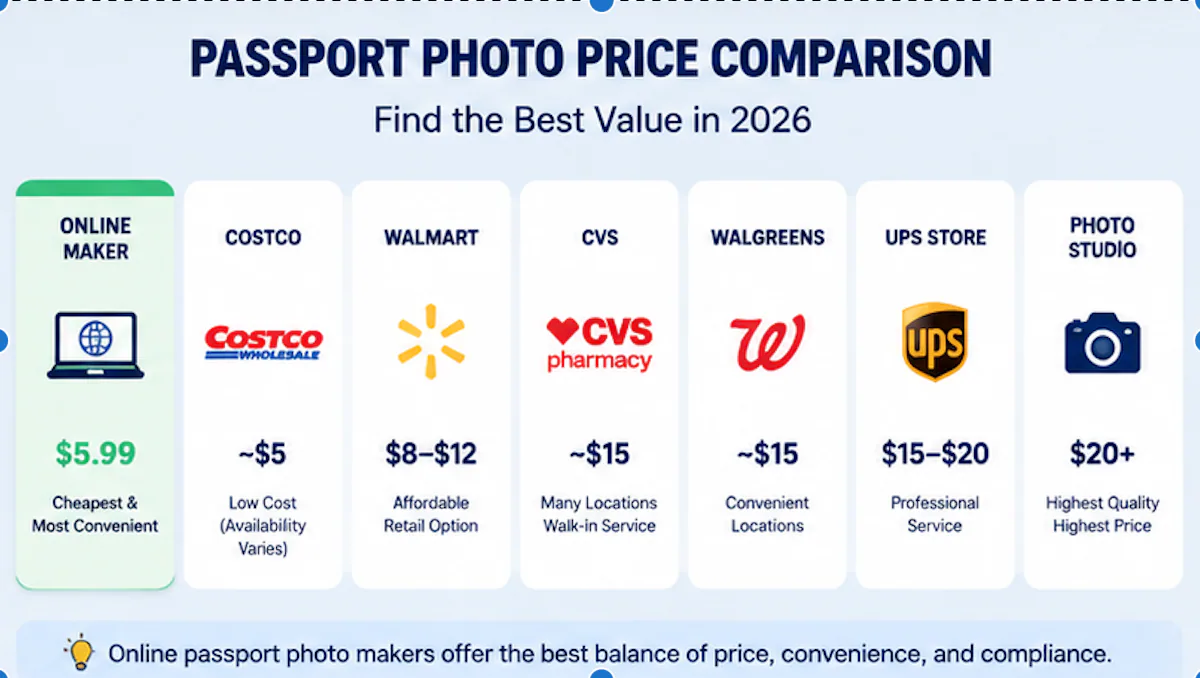
Passport Photo Prices: A Real Comparison
| Provider | Typical Price | Time (incl. travel) | Compliance Check |
|---|---|---|---|
| Online services (PhotoOmni) | $5.99 | 5-15 min | AI + human review |
| PhotoAiD | $7-9 | 5-10 min | Automated |
| Passport Photo Online | $8-10 | 5-10 min | Automated |
| Walmart | $8-12 | 20-30 min | Staff-assisted |
| CVS / Walgreens | $14-16 | 20-30 min | Staff-assisted |
| UPS Store | $15-20 | 20-30 min | Staff-assisted |
| Professional studio | $20-50+ | 30-60 min | Photographer |
| DIY (phone, no service) | $0 | 10 min | None |
About 40% of passport applicants now take photos at home instead of visiting stores. The math is straightforward: skip the drive, skip the wait, and pay less.
Online Passport Photo Makers: The Cheap Option That Works
Online passport photo tools have taken over for a reason. You take a photo with your phone, upload it, and the service crops and checks it against government requirements. No driving. No waiting for a store employee to figure out the camera.
Three things make online services cheaper than physical stores:
- No retail overhead. A pharmacy pays rent, staff wages, and equipment costs. An online service pays for servers and AI models. The difference shows up in your wallet.
- Automated compliance checking. Face position, background quality, and lighting account for roughly 85% of all photo rejections. Good online tools catch these before you submit.
- Multiple format support. The same photo can be formatted for US, UK, Schengen, or Indian requirements. A pharmacy employee usually only knows one standard.
The catch: not all online tools are equal. Some just resize images. Others run actual compliance checks against ICAO Doc 9303 standards. The second kind is what prevents rejections.
The Resolution Gap Nobody Talks About
Professional passport photo printers use 300 DPI. Smartphone cameras capture at 72 DPI — a 4x resolution gap. At 300 DPI, each pixel represents about 0.085mm. A human hair is 0.05-0.1mm thick, about one pixel wide at professional resolution.
All ICAO-compliant photos must use the sRGB color space. Adobe RGB or Display P3 profiles get rejected at submission. Both the US and UK require JPEG format — no PNG, no TIFF.
A service that doesn't handle resolution, color space, and file format correctly produces a photo that looks fine on screen but fails at the passport agency.
PhotoOmni: $5.99 With AI Compliance + Human Review
PhotoOmni charges $5.99 per photo. That puts it below PhotoAiD ($7-9) and Passport Photo Online ($8-10), while including something most competitors skip: a human expert reviewing the AI's work.
The AI checks the standard compliance points — face position, head size, lighting, background, expression. If something is borderline — an unusual face angle, tricky lighting, a shadow near the hairline — a human reviewer looks at it before the photo is finalized.
Most rejections come from official passport photo requirements that AI alone struggles with: inconsistent lighting across the face, reflections on glasses (where glasses are still allowed), or backgrounds that look white to a machine but show a slight color cast to a human inspector.
The resolution handling matters too. PhotoOmni outputs at print-ready 300 DPI in sRGB JPEG format. That matches what US and UK passport agencies expect.
Pharmacy and Retail Store Options
CVS and Walgreens: $14-16
Both chains offer walk-in passport photo services at most locations. The price is $14-16 for two printed photos. Staff use a point-and-shoot camera with a pull-down white screen.
The photos usually pass. The process takes 15-20 minutes. The problem is the cost: you're paying roughly triple what an online service charges, plus travel time. About 30% of rejections are background-specific issues — shadows, uneven lighting, or color casts that a tired pharmacy employee might not notice.
Walmart: $8-12
Walmart is the cheapest physical option that's widely available. Prices vary by location. The service is similar to CVS/Walgreens but with less consistent quality — Walmart photo centers are often understaffed, and not every employee knows the current passport photo specs.
Costco: Around $5 (If Available)
Costco used to offer in-store passport photos for around $5, making it one of the cheapest physical options. Availability has become inconsistent — many locations dropped the service, and others only offer it seasonally. If your local Costco still does passport photos and you're already a member, it's worth checking. If not, an online service is the more reliable bet.
UPS Store: $15-20
UPS Stores charge the most among retail options. The trade-off is that many locations also handle passport applications, so you can get the photo and submit the paperwork in one trip. Convenient, but not cheap.
Can You Take a Passport Photo Yourself for Free?
Yes. If you have a smartphone, decent lighting, and a plain light-colored wall, you can take a DIY passport photo for $0.
The question is whether the photo will pass. The UK Home Office flagged over 230,000 applications for photo problems in 2023 alone. Face position, background quality, and lighting account for roughly 85% of rejections — these are the things a compliance checker catches automatically.
DIY works when:
- You know the exact size and framing requirements for your document type
- Your background is genuinely uniform with no shadows
- The lighting is even across your face
- Your phone outputs a usable resolution and color profile
For most people, adding a $5.99 compliance check is cheaper than a rejection.
Online vs. In-Store: Side by Side
| Factor | Online Service | Retail Store |
|---|---|---|
| Price | $5-10 | $8-20 |
| Travel | None | 10-20 min each way |
| Hours | 24/7 | Store hours |
| Compliance check | AI (+ human for some) | Staff judgment |
| Resolution/color handling | Automatic (300 DPI, sRGB) | Varies |
| Multiple country formats | Yes | Rarely |
| Rejection risk | Low (if AI-checked) | Moderate |
What Actually Makes a Passport Photo Acceptable
A passport photo isn't just a headshot. It's a biometric document image that has to match specific technical standards.
Resolution and color space. 300 DPI, sRGB color profile, JPEG format. These are not optional for US and UK applications. A smartphone photo at 72 DPI in Display P3 color space will fail even if the composition is perfect.
Background. White or off-white for the US. Plain cream or light grey with ≤10% luminance variance for the UK. Schengen countries require RAL 7035 light grey. About 30% of all photo rejections are background-specific — wrong color, visible texture, or shadows behind the subject.
Face position. Eyes must sit between 56-69% of the distance from chin to crown. Head width fills 50-75% of the frame horizontally. These are not suggestions — they're ICAO Doc 9303 requirements that passport agencies enforce.
Expression and accessories. Neutral expression, mouth closed, eyes open. No glasses (US banned them in 2016; most countries followed). Hearing aids and medical devices are allowed. Religious head coverings are allowed if the full face from chin to forehead is visible.
FAQ
Where is the absolute cheapest place to get a passport photo?
DIY with your phone costs $0, but carries the highest rejection risk. Among paid options, best online passport photo maker services at $5-10 beat every physical store. Costco sometimes matches online pricing, but availability is unreliable.
Is a $5 passport photo safe to use?
Price doesn't determine safety — compliance checking does. A $5 photo from a service that runs ICAO-compliant checks is safer than a $15 drugstore photo that relies on an employee's judgment. Look for services that mention specific standards (ICAO Doc 9303, ISO/IEC 19794-5) rather than just "passport photo cropper."
Can I use a phone photo for my passport?
Yes, but the phone's native 72 DPI output needs to be upscaled and converted to 300 DPI sRGB JPEG. A proper online service handles this automatically. Sending a raw phone photo directly to the passport agency will get rejected.
Why do pharmacy passport photos cost so much?
Retail overhead. A CVS or Walgreens pays for the store lease, employee time, camera equipment, and photo paper. Online services replace all of that with software that processes thousands of photos for near-zero marginal cost. The $14-16 price isn't a ripoff — it's what in-person service actually costs to provide.
What's the most common reason passport photos get rejected?
Face position, background quality, and lighting account for about 85% of passport photo rejections, according to US Department of State data. Resolution and color space issues make up most of the remaining 15%. Size and format problems are rare when using a service that handles them automatically.
Are online passport photos accepted everywhere?
Yes, as long as the final image meets the specific country's requirements. The photo itself is the same digital file regardless of whether it was taken at a store or at home. What matters is that it passes the government's compliance checks, not where the camera was located.
Bottom Line
The cheapest reliable option in 2026 is an online passport photo service with compliance checking. At $5.99, PhotoOmni costs less than any physical store while adding AI checks and human expert review — two checks that can identify common problems before submission.
Physical stores still work if you need a photo immediately and don't mind paying more. DIY is viable if you're confident in your setup and comfortable checking the finished file against the official requirements. For everyone else, the math favors online.
PhotoOmni takes a different approach. Instead of just formatting an image, it runs AI compliance checks against ICAO standards, then has a human expert review the result. For passport or visa applications where a rejection means weeks of delay, that extra layer matters.
Data: US Department of State (FY2024), UK Home Office (2023), ICAO Doc 9303 (8th edition), ISO/IEC 19794-5. Pricing from publicly listed rates as of July 2026.
About the Author
Emma Richardson Senior ICAO Photo Compliance Expert, PhotoOmni
Emma Richardson is the Senior ICAO Photo Compliance Expert at PhotoOmni. With 12+ years of experience in passport and visa photo verification, she has helped applicants achieve 820,000+ successful photo approvals across 100+ countries and territories. She specializes in global passport photo requirements, ICAO-compliant photo standards, and biometric image verification.