
Passport Photo Template Guide: 2×2, 35×45mm and 4×6 Layouts
Passport photo templates give you dimensions — not compliance. Learn why ISO 19794-5 biometric checks matter, how AI maps 468 facial landmarks in ~2s at 95%+ accuracy, and why a $5.99 AI tool beats manual templates.
Template formats and links checked: September 28, 2026
Passport Photo Template: Why Templates Alone Won't Get Your Photo Approved (2026 Guide)
Quick Answer
A passport photo template gives you the right dimensions. It doesn't tell you whether your photo will pass.
Templates are useful for understanding layout — where your head goes, how much space the face should occupy. But a template cannot assess lighting, expression, background uniformity, image sharpness or whether the face is positioned correctly for a specific country. Use it for layout, then check the finished image against the issuing authority's current rules.
If you prefer to prepare the file online, the US passport photo maker can help check the crop, background, and passport-photo format before submission.
What Is a Passport Photo Template?
A passport photo template is a pre-designed overlay that shows:
- Image dimensions (2x2 inch, 35x45 mm, etc.)
- Head positioning zone
- Eye line alignment
- Crop boundaries
- Background area
People use templates in Photoshop, Canva, and free online editors to manually frame their photos. The template tells you where things should go. It doesn't verify whether they're actually in the right place.
The Gap Between Templates and Compliance
Here's the problem with relying on a template alone.
Official passport photo requirements are governed by ISO 19794-5, the international standard for face image quality in travel documents. This standard defines biometric parameters that automated inspection systems check:
| Parameter | ISO 19794-5 / ICAO 9303 Range |
|---|---|
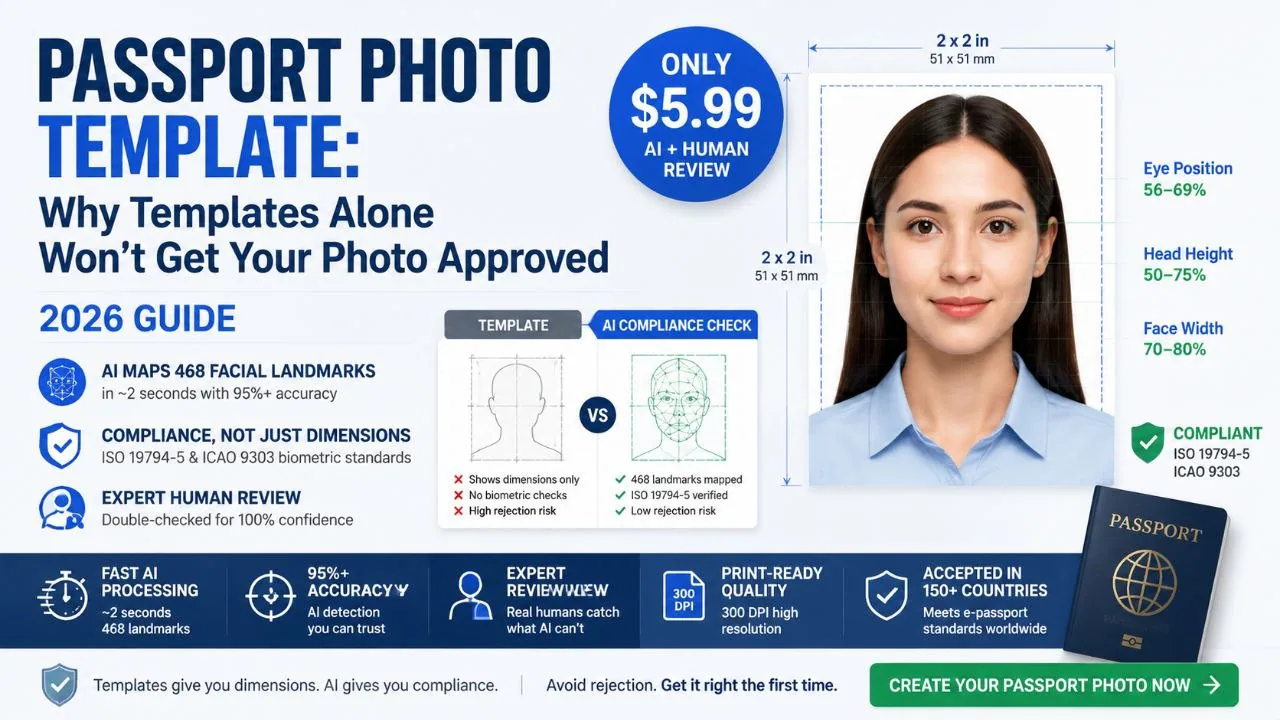
| Eye position relative to photo height | 56-69% |
| Head height relative to photo height | 50-75% |
| Face width relative to photo width | 70-80% |
| Positional tolerance | +/- 2 mm |
A template shows you where to put your face. It doesn't measure whether your eyes are at 62% of photo height or 71%. The difference between those two numbers is the difference between accepted and why passport photos get rejected.
This is why templates aren't compliance tools — they're layout references. And layout is only one of dozens of things automated passport photo inspection checks.
How Modern AI Closes the Gap
PhotoOmni doesn't use templates. It uses a transformer-based AI model that maps 468 facial landmarks in roughly 2 seconds, then checks every biometric parameter against ISO 19794-5 and country-specific requirements simultaneously.
The model operates at 95%+ accuracy on landmark detection, which means it catches the same positioning issues that government FRVT-aligned inspection systems catch. It's not guessing where your eyes are — it's measuring them to the pixel, then verifying the result against the same standard your passport application will face.
Template Sizes People Search For
2x2 Passport Photo Template (US)
US passports require 2x2 inches (51x51 mm) on a white or off-white background. A template helps you crop to the right dimensions. It won't check facial expression neutrality, shadow distribution, or background uniformity — three of the most common rejection triggers.
4×6 Template for Multi-Photo Printing
A 4x6 template arranges multiple passport photos on one sheet for cost-effective printing. The layout is straightforward, but spacing, alignment, and border consistency require precise manual adjustment. One misaligned photo on the sheet, and every copy is wrong.
Country-Specific Templates
A US template won't work for a Canadian application (50x70 mm). A China visa template (33x48 mm) is different from an India passport template (2x2 inches). Each country has unique biometric parameters, and templates rarely account for the differences beyond basic dimensions.
Template vs AI: What Actually Happens
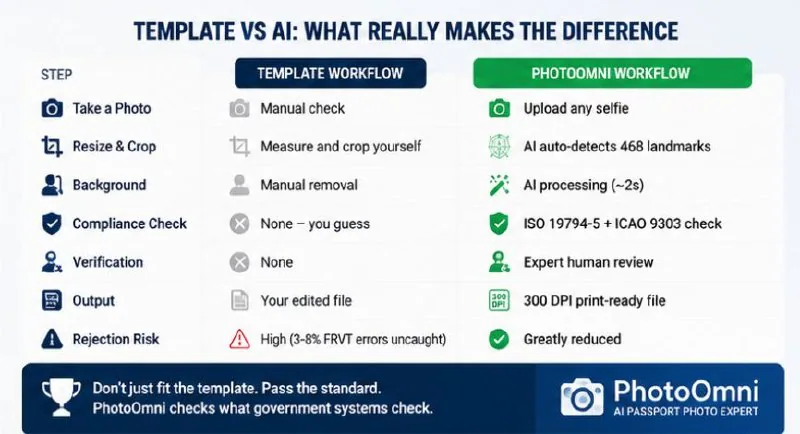
| Step | Template Workflow | PhotoOmni Workflow |
|---|---|---|
| Take a photo | Manual check | Upload any selfie |
| Resize | Measure and crop yourself | AI auto-detects 468 landmarks |
| Background | Manual removal | AI processing (~2s) |
| Compliance | None — you guess | ISO 19794-5 + ICAO 9303 check |
| Verification | None | Expert human review |
| Output | Your edited file | 300 DPI print-ready file |
| Rejection risk | High (3-8% FRVT errors uncaught) | Reduced |
The $5.99 you spend on PhotoOmni replaces all the manual steps — and adds the compliance verification that templates fundamentally can't provide.
Why Templates Fail Without AI Verification
Templates measure rectangles. Government systems measure faces.
NIST FRVT benchmarks show that even professionally taken photos fail automated matching 3-8% of the time. Those failures aren't because the photo was the wrong size — they're because facial biometrics didn't align with expectations. Lighting, expression, head tilt, eye closure, shadow patterns, background artifacts — templates don't analyze any of this.
PhotoOmni's AI does. It processes your photo through the same biometric framework that 150+ e-passport systems use, then a human expert reviews the result. That combination is what turns a passport photo from "looks right to me" into "meets the standard."
For printer scaling, paper finish, DPI and actual-size setup, follow the passport photo printing size guide. For provider and cost comparisons, use the online passport photo printing guide.
How to Use a Template Safely
Step 1 — Take a photo. take passport photos at home, even lighting, plain background. Don't overthink it.
A US passport photo maker can apply these dimensions and formatting checks to the uploaded photo.
Step 2 — Upload to PhotoOmni. The transformer model maps 468 landmarks immediately. Processing takes about 2 seconds.
Step 3 — Compliance check. Every parameter gets compared against ISO 19794-5 and your country's specific requirements. Eye position, head size, face width — all verified.
Step 4 — Expert reviews it. A real person looks at your photo. AI catches the numbers; humans catch the edge cases.
Step 5 — Download. 300 DPI, print-ready, compliant. No template file that still needs manual checking.
Frequently Asked Questions
Can I use a passport photo template in Photoshop?
You can. But you're manually verifying every biometric parameter that an AI checks automatically. If you know ISO 19794-5 well enough to measure eye position to 56-69% of photo height by hand, a template works fine. Most people don't.
Are 4x6 passport templates reliable for printing?
They're reliable for layout. They're not reliable for compliance. A 4x6 template arranges photos on a sheet — it doesn't verify that the photos themselves meet passport requirements.
Why do passport photos get rejected even with a template?
Because templates only address dimensions. The most common rejection reasons — incorrect head size, eye position, background quality, lighting, expression — are biometric parameters that templates can't check. Government systems align with NIST FRVT standards that measure 468 facial landmarks. Missing one by 2 mm is enough to fail.
What's the easiest way to make a compliant passport photo?
Skip the template. Upload a selfie to an AI passport photo maker that checks ISO 19794-5 and ICAO 9303 compliance automatically. PhotoOmni does this in about 2 seconds, then adds expert human review before delivery.
What does $5.99 get me that a free template doesn't?
468-landmark AI analysis, ISO/ICAO compliance verification, expert human review, and a 300 DPI passport photo that's been checked against the same biometric standards used by 150+ e-passport systems. A free template gives you a rectangle to crop inside.
The Bottom Line
A passport photo template is a measuring tape. It tells you the dimensions. It doesn't tell you whether your photo will pass an automated biometric inspection that checks 468 data points against ISO 19794-5 and ICAO 9303 — the standards behind 150+ e-passport systems worldwide.
PhotoOmni replaces the template — and the guesswork — with AI that measures what government systems measure, in about 2 seconds, at 95%+ accuracy. Then a human expert double-checks the result.
For $5.99, that's not a template upgrade. That's a different category.
Canva and Photoshop Passport Photo Templates: When They Help—and When They Don't
A Canva passport photo template or Photoshop passport photo template can be useful as a layout reference: it helps you see the intended 2 × 2-inch or 35 × 45-mm frame before printing. But a template is not a compliance check. It cannot tell you whether your head size, focus, shadows, expression, glasses, or background meet the issuing authority's rules.
If you use Canva or Photoshop, limit the work to placing and cropping an original photo. Do not smooth skin, replace the background, reshape facial features, or apply generative AI. If the original image has a problem, retake it instead of trying to edit it into compliance.
About the Author
Emma Richardson Senior ICAO Photo Compliance Expert, PhotoOmni
Emma Richardson is the Senior ICAO Photo Compliance Expert at PhotoOmni. With 12+ years of experience in passport and visa photo verification, she has helped applicants achieve 820,000+ successful photo approvals across 100+ countries and territories. She specializes in global passport photo requirements, ICAO-compliant photo standards, and biometric image verification.