July 25, 2026
US Passport Online Renewal Photo Requirements 2026
Complete guide to US passport online renewal photo requirements for 2026. Learn eligibility, digital photo upload rules, common rejection reasons, and how to avoid application holds.

US Passport Online Renewal Photo Requirements 2026: Digital Upload Guide, Eligibility & Common Renewal Mistakes
Renewing a U.S. passport has become much easier than it was just a few years ago. Instead of printing forms, mailing paper documents, and visiting a post office, many eligible Americans can now complete the renewal process entirely online—including uploading a digital passport photo from home.
This shift has made passport renewal faster and more convenient, but it has also introduced a new challenge: submitting a digital photo that meets the U.S. Department of State's online requirements.
Many applicants assume that if their photo looks similar to a traditional passport photo, it will automatically be accepted. In reality, online renewal uses a digital review process that evaluates uploaded images before a passport can be issued.
According to the U.S. Department of State, unacceptable photos are the number one reason online passport renewal applications are placed on hold. This means a simple photo issue can delay an otherwise complete application, even if all your personal information and payment have already been submitted.
As more travelers choose online renewal, understanding how digital photo uploads work has become just as important as knowing the passport photo requirements themselves.
In this guide, you'll learn:
- Who is eligible to renew a U.S. passport online
- How the online renewal process differs from traditional mail renewal
- Why digital photos are the most common cause of application delays
- What happens after you upload your photo
- The most common photo upload mistakes
- How PhotoOmni helps prepare digital photos for online passport renewal
Rather than repeating the standard passport photo specifications, this guide focuses on the digital upload process, helping you understand why online applications are delayed and how to avoid common mistakes before submitting your renewal.

Quick Answer
If you're eligible to renew your U.S. passport online, you'll need to upload a digital passport photo that meets current U.S. Department of State requirements.
Unlike traditional paper applications, online renewal involves a digital review process before your passport application can move forward.
The State Department specifically notes that:
Unacceptable photos are the number one reason why we put passport applications on hold.
Fortunately, most photo-related delays are preventable.
Preparing a compliant digital image before submission can help your application move through the review process more smoothly.
Why Online Passport Renewal Is Different
For decades, renewing a passport meant completing a paper application, attaching printed passport photos, and mailing everything to a passport processing center.
Today, eligible applicants can complete much of the process online.
The biggest difference isn't the application form—it's how your passport photo is submitted and reviewed.
Traditional renewal relied on printed photographs.
Online renewal relies on a digital image that is uploaded directly to the U.S. Department of State's secure renewal system.
That image becomes part of your electronic application and is reviewed before passport production begins.
The online workflow typically looks like this:
Confirm Online Eligibility
↓
Sign in to Your Online Account
↓
Complete Passport Renewal Application
↓
Upload Digital Passport Photo
↓
Photo Review
↓
Application Processing
↓
Passport Printing
↓
Passport Delivery
Unlike paper applications, there is no printed photo attached to your renewal package.
Everything depends on the quality of the uploaded digital image.
Who Can Renew a U.S. Passport Online?
Not everyone qualifies for online renewal.
The U.S. Department of State has established specific eligibility requirements, and applicants who don't meet them must renew by mail or apply in person.
Generally, online renewal is intended for adults renewing a standard passport that meets the Department of State's eligibility criteria.
You may be eligible if you meet the current requirements published by the Department of State, including situations such as:
- You are renewing an adult passport issued with a 10-year validity period.
- Your passport is within the renewal eligibility window specified by the Department of State.
- Your passport is not significantly damaged.
- You are not applying for your first U.S. passport.
- You can complete the online identity verification requirements.
Applicants generally cannot use online renewal if they are:
- Applying for their first U.S. passport.
- Renewing a child's passport.
- Replacing a lost or stolen passport.
- Required to apply using a different passport service.
Because eligibility rules may change over time, applicants should always verify their status using the official Department of State guidance before beginning the renewal process.
Who Benefits Most from Online Passport Renewal?
Although millions of Americans hold passports, online renewal is particularly valuable for people who travel frequently or have limited time to visit passport acceptance facilities.
Frequent Business Travelers
Business travelers often renew their passports between international trips.
For them, avoiding unnecessary paperwork and mailing delays is a major advantage.
Their biggest concerns include:
- Keeping travel schedules on track
- Avoiding renewal delays
- Ensuring uploaded photos are accepted the first time
Digital Nomads and Remote Workers
Many Americans now work remotely while living or traveling abroad.
For these applicants, online renewal can be far more convenient than relying on international mail services.
Their priorities usually include:
- Completing the application from anywhere
- Uploading a compliant digital photo
- Minimizing processing interruptions
Families Preparing for International Travel
Families often renew multiple passports before vacations or overseas visits.
If even one family member's application is delayed because of a photo issue, the entire trip may be affected.
Preparing compliant digital photos in advance helps reduce this risk.
Passport Demand Continues to Reach Record Levels
The importance of online renewal becomes clearer when looking at the scale of U.S. passport services.
According to the U.S. Department of State, passport demand has remained near historic highs in recent years. The Department processed more than 24 million U.S. passport books and passport cards during Fiscal Year 2023, one of the busiest years in its history.
This enormous volume explains why digital processing and standardized photo verification have become increasingly important.
Every day, thousands of online renewal applications are submitted, and each uploaded photo must be reviewed before a passport can be produced.
To keep applications moving efficiently, the Department of State emphasizes that applicants should carefully follow the official digital photo requirements.
Even a minor issue—such as an unacceptable digital image—can temporarily stop processing until a replacement photo is received.
Why Your Photo Matters More in Online Renewal
With traditional mail renewal, applicants enclosed printed passport photos that were manually reviewed as part of the application package.
Online renewal changes that process.
Your digital photo becomes one of the first items evaluated after submission.
If it doesn't meet the required standards, your application may be placed on hold while you provide a replacement image.
This doesn't mean your renewal has been denied.
Instead, it means the Department of State needs a photo that can be used confidently for identity verification and passport production.
Understanding this difference is essential.
The goal isn't simply to upload any passport-style photo—it's to submit a digital image that meets the technical and quality standards required for online processing.
Why Online Passport Renewal Photos Get Rejected
One of the biggest misconceptions about online passport renewal is that once you've uploaded your photo, the hardest part is over.
In reality, uploading a photo and having that photo accepted are two different things.
Unlike a traditional passport application that uses printed photographs, the online renewal system relies on digital image verification before your application moves through the processing pipeline.
The U.S. Department of State makes this point very clear:
"Unacceptable photos are the number one reason why we put passport applications on hold."
This statement highlights an important fact: in many cases, applicants aren't delayed because they completed the renewal form incorrectly—they're delayed because the uploaded photo doesn't meet the required digital standards.
The good news is that most of these issues are preventable.
What Happens After You Upload Your Photo?
Many applicants imagine that once they click Submit, their application immediately enters passport production.
The actual process is more sophisticated.
Your uploaded photo becomes part of your electronic passport renewal file and goes through several review stages before your application continues.
A simplified workflow looks like this:
Upload Digital Photo
↓
Basic Technical Validation
↓
Application Submission
↓
Passport Specialist Review
↓
Application Approved for Processing
↓
Passport Production
The first stage checks whether the uploaded file meets the system's basic technical requirements.
Later, passport specialists review the application—including the submitted photograph—to ensure it complies with official passport standards before production begins.
Because of this two-step review process, a successful upload doesn't automatically mean the photo will ultimately be accepted.
Why Are Passport Applications Placed "On Hold"?
Receiving an "On Hold" status can be stressful, especially if you've already paid the renewal fee and booked an upcoming trip.
Fortunately, an application placed on hold is not the same as a rejected application.
It simply means the Department of State needs additional information before processing can continue.
One of the most common reasons is an unacceptable digital photograph.
If the submitted image doesn't meet official standards, applicants are generally asked to provide a replacement photo before passport production resumes.
Because the application remains open, responding quickly can help minimize additional delays.
The Most Common Digital Photo Problems
Interestingly, many rejected photos appear perfectly acceptable to the human eye.
However, digital passport photos must satisfy technical standards that go beyond simply looking professional.
Below are some of the most common issues.
| Photo Issue | Why It May Cause Problems |
|---|---|
| Incorrect background | Background isn't plain white or off-white |
| Poor lighting | Shadows reduce facial visibility |
| Low image resolution | Facial details become difficult to verify |
| Incorrect crop | Head isn't positioned correctly |
| Blurry image | Camera movement reduces image quality |
| Heavy image compression | Fine details are lost |
| Beauty filters | Facial appearance has been digitally altered |
| Screenshot of another photo | Reduced quality and incorrect dimensions |
| Scanned printed passport photo | Scan quality may not meet digital requirements |
| Old photograph | No longer accurately reflects current appearance |
Notice that only a few of these issues relate to traditional passport photography.
Many are digital file quality problems, which are unique to online renewal.
Digital Photos vs. Scanned Photos
This is one of the most common mistakes made by applicants.
Some people already have a printed passport photo from a pharmacy or photo studio and simply scan it before uploading.
While this might seem like an easy shortcut, it often produces a lower-quality digital image.
Here's why.
| Original Digital Photo | Scanned Printed Photo |
|---|---|
| Captured directly by a camera | Created by scanning a printed image |
| Preserves original image quality | May introduce blur, glare, or texture |
| Better color accuracy | Colors may shift during scanning |
| Retains full resolution | Resolution often decreases |
| Preferred for online upload | More likely to require replacement |
Whenever possible, use the original digital image instead of scanning a printed photograph.
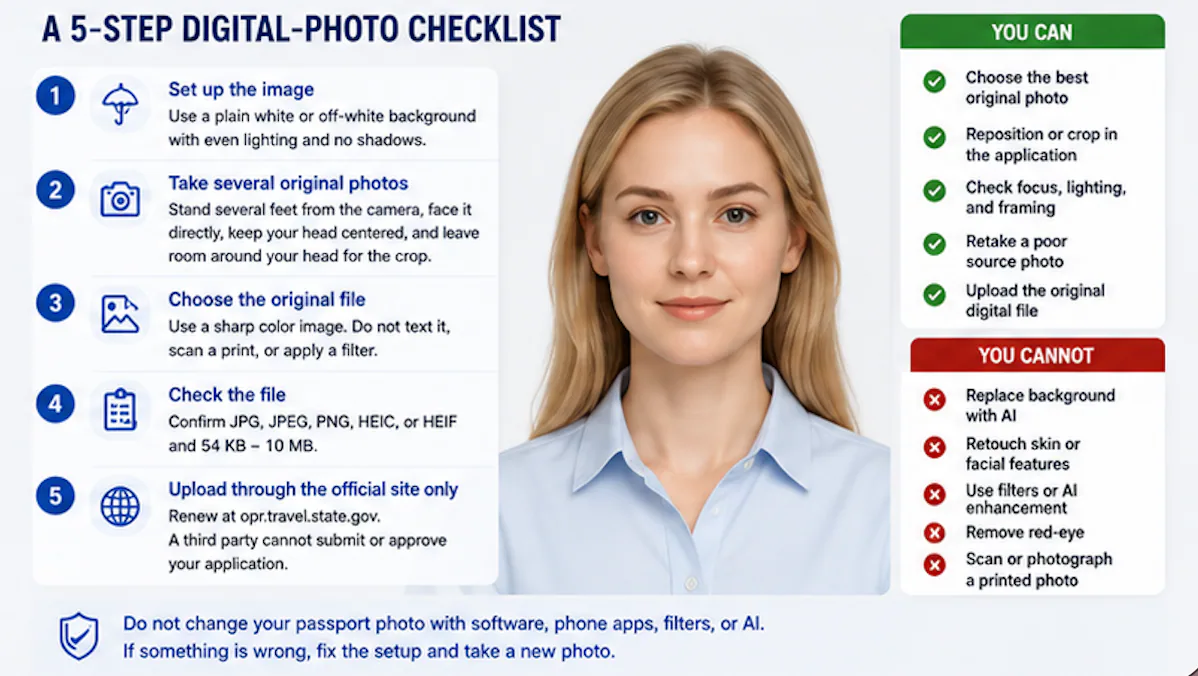
File Format Matters Too
The online renewal system accepts several common digital image formats.
According to the U.S. Department of State, applicants may upload photos in formats including:
- JPG / JPEG
- PNG
- HEIC
- HEIF
The uploaded image must also fall within the official file size limits published by the Department of State.
Choosing the original digital file instead of repeatedly saving or converting the image helps preserve quality and reduces the chance of upload problems.
Top 10 Mistakes That Delay Online Passport Renewal
Many applicants focus exclusively on photo size, but processing delays are often caused by broader application issues.
The table below summarizes the most common avoidable mistakes.
| Rank | Common Mistake | Possible Result |
|---|---|---|
| 1 | Uploading an unacceptable digital photo | Application placed on hold |
| 2 | Uploading a scanned printed photo | Request for replacement photo |
| 3 | Using beauty filters or AI face editing | Photo not accepted |
| 4 | Incorrect renewal eligibility | Must renew by mail or in person |
| 5 | Uploading the wrong file | Additional processing required |
| 6 | Waiting until travel is imminent | Increased travel risk if delays occur |
| 7 | Entering incorrect passport information | Processing delays |
| 8 | Poor internet connection during upload | Incomplete submission |
| 9 | Not checking confirmation messages | Missing requests from the Department of State |
| 10 | Ignoring official photo guidance | Avoidable application hold |
An important takeaway is that photo quality is only one part of a successful online renewal. Eligibility, application accuracy, and careful review before submission are equally important.
How PhotoOmni Helps Prepare Digital Passport Photos
Preparing a digital passport photo for online renewal is different from preparing one for printing.
PhotoOmni is designed specifically for digital passport applications and helps applicants create images ready for online submission.
AI Compliance Checks
Before you upload your photo, PhotoOmni automatically checks for common technical issues, including:
- Background quality
- Face positioning
- Image dimensions
- Resolution
- Cropping
- Lighting consistency
These automated checks help identify problems that could otherwise delay processing.
Optional Expert Verification
For applicants who want an additional level of confidence, PhotoOmni also offers an optional expert review.
Experienced reviewers examine your image against current U.S. passport photo requirements and look for issues such as:
- Incorrect head positioning
- Uneven lighting
- Visible shadows
- Background inconsistencies
- Image quality problems
While no service can guarantee passport approval or processing times, preparing a compliant digital photo before submission can help reduce the likelihood of photo-related application holds or replacement requests, allowing your online renewal to proceed with fewer avoidable interruptions.
Online vs. Mail Renewal, FAQs & How to Avoid Delays
By now, you've learned that a successful online passport renewal involves much more than uploading a passport-style photo. Understanding who can renew online, how digital photos are reviewed, and what causes applications to be placed on hold can help you avoid unnecessary delays before your next trip.
In this final section, we'll compare online renewal with traditional mail renewal, answer the most common applicant questions, and explain how to prepare a digital photo that meets current U.S. Department of State requirements.
Online Passport Renewal vs. Mail Renewal
Many applicants aren't sure whether they should renew online or continue using the traditional mail process.
The answer depends largely on your eligibility and circumstances.
| Feature | Online Renewal | Mail Renewal |
|---|---|---|
| Application | Completed online | Paper application (Form DS-82) |
| Photo | Digital upload | Printed passport photo |
| Submission | Online | Postal mail |
| Identity Verification | Online account verification | Paper documents |
| Photo Review | Digital review before processing | Printed photo reviewed with application |
| Best For | Eligible adults with standard renewals | Applicants who don't qualify for online renewal |
For eligible applicants, online renewal offers greater convenience by eliminating the need to print forms and mail photographs. However, because everything is submitted digitally, the quality of your uploaded image becomes even more important.
Why More Americans Are Renewing Passports Online
The U.S. Department of State has continued expanding digital passport services as demand for passports remains historically high.
According to the Department of State, more than 24 million passport books and passport cards were issued during Fiscal Year 2023, making it one of the busiest years on record.
At the same time, the Department fully launched its Online Passport Renewal system, allowing eligible Americans to complete the renewal process entirely online without mailing their application package.
This digital transformation offers several advantages:
- Faster application submission
- No printed passport photos to mail
- Online status tracking
- Reduced paperwork
- Greater convenience for frequent travelers
However, the shift to digital applications also means applicants are responsible for submitting a compliant digital photo from the beginning.
Before You Click "Submit": A Quick Renewal Checklist
Before paying your renewal fee, take a few minutes to review your application.
Eligibility
✅ You qualify for online renewal.
✅ Your passport meets current renewal eligibility requirements.
Application Information
✅ Passport number is correct.
✅ Personal information matches your passport.
✅ Mailing address is accurate.
Digital Photo
✅ Recent photo that reflects your current appearance.
✅ Plain white or off-white background.
✅ Original digital image (not a scanned print).
✅ Good lighting with no heavy shadows.
✅ No beauty filters or facial editing.
Final Review
✅ Double-check every answer before submitting.
A careful review takes only a few minutes and may help prevent weeks of unnecessary delays.
Why More Travelers Choose PhotoOmni
Creating a digital passport photo for online renewal isn't exactly the same as creating a printed passport photo.
Instead of preparing an image for printing, applicants need a digital file that meets the technical standards required by the U.S. Department of State's online renewal system.
PhotoOmni was designed with this workflow in mind.
AI-Powered Digital Photo Checks
Before you upload your image, PhotoOmni automatically analyzes key technical elements, including:
- Background quality
- Face positioning
- Cropping
- Lighting balance
- Image resolution
- Digital image dimensions
These automated checks help identify common issues before your application is submitted.
Optional Expert Verification
For applicants who want additional peace of mind, PhotoOmni also offers an optional expert review.
Experienced reviewers examine your photo against current U.S. passport photo requirements and look for common issues such as:
- Incorrect head positioning
- Uneven lighting
- Visible shadows
- Background inconsistencies
- Low image quality
- Improper cropping
While no photo service can guarantee passport approval or faster processing, identifying potential issues before submission can help reduce the likelihood of photo-related application holds or requests to upload a replacement image.
Frequently Asked Questions
Can I take my online renewal photo with an iPhone or Android phone?
Yes.
Modern smartphones are capable of capturing high-resolution images suitable for passport renewal, provided the photo meets current U.S. Department of State requirements and is taken under appropriate lighting conditions.
Can I upload a HEIC photo?
Yes.
The U.S. Department of State accepts several digital image formats for online renewal, including HEIC, HEIF, JPG, JPEG, and PNG.
If you edit or convert the file, make sure image quality is not reduced.
Can I scan an old printed passport photo?
It's generally not recommended.
Scanning a printed photograph may introduce blur, glare, color shifts, or reduced resolution, making it less suitable for digital processing.
Whenever possible, upload the original digital image.
Can I reuse my previous passport photo?
Only if it still reflects your current appearance and meets the Department of State's requirement that passport photos be recent.
If your appearance has changed significantly, take a new photo.
What happens if my passport photo is rejected?
If the Department of State determines that your uploaded image doesn't meet the required standards, your application may be placed On Hold until you provide a replacement photo.
This is one of the most common reasons online renewal applications experience delays.
Does "On Hold" mean my passport renewal has been denied?
No.
An On Hold status simply means additional information—such as a new passport photo—is needed before processing can continue.
Once the requested information is submitted and accepted, the application can continue through the normal review process.
Final Thoughts
Online passport renewal has transformed the way eligible Americans renew their passports. Instead of mailing paper forms and printed photographs, applicants can now complete much of the process digitally from home.
However, digital convenience also brings new responsibilities. According to the U.S. Department of State, unacceptable photos are the number one reason online passport renewal applications are placed on hold. At the same time, the Department processed more than 24 million passport books and passport cards during Fiscal Year 2023, illustrating the enormous scale of the U.S. passport system and the need for standardized digital review procedures.
The most effective way to avoid delays is to prepare carefully before submitting your application. Confirm that you're eligible for online renewal, review your application information, and upload a recent digital photo that meets current official requirements.
If you're creating your passport photo at home, PhotoOmni combines AI-powered compliance checks with optional expert verification to help identify common technical issues before submission. While no service can guarantee passport issuance or processing times, preparing a compliant digital photo can help reduce avoidable photo-related delays and give you greater confidence when renewing your passport online.
Create Your Passport Photo Now
Related Articles
- How to Take a Passport Photo at Home (2026 Guide)
- Passport Photo Requirements: The Complete 2026 Guide
- Why Was My Passport Photo Rejected? 15 Common Reasons & Fixes
About the Author
Emma Richardson Senior ICAO Photo Compliance Expert, PhotoOmni
Emma Richardson is the Senior ICAO Photo Compliance Expert at PhotoOmni. With 12+ years of experience in passport and visa photo verification, she has helped applicants achieve 820,000+ successful photo approvals across 100+ countries and territories. She specializes in global passport photo requirements, ICAO-compliant photo standards, and biometric image verification.
Data sources: US Department of State passport processing (FY2024), UK Home Office annual report (2023), NIST FRVT Part 3: Demographic Effects (March 2024), ICAO Doc 9303 photo specifications. Pricing based on publicly listed rates as of July 2026.