
US Passport Photo Online Free: What "Free" Actually Covers in 2026
Free passport photo online tools compared for 2026 US compliance. Learn what "free" actually covers, why AI enhancement is a compliance risk, and how PhotoOmni's free AI check works without editing your photo.
Last updated: August 2026
"Free passport photo online" is one of the most searched phrases in this category — and for good reason: a passport photo should be a five-minute task, not a $15 drugstore trip. But after testing how these free passport photo online tools actually perform against 2026 US passport rules, one pattern is consistent: free almost never means "guaranteed to be accepted." With the U.S. Department of State rejecting 20–25% of passport photos annually — roughly 5–6 million redo photos each year — the stakes are higher than most applicants realize.
That's not a knock on free tools existing. It's a gap worth understanding before you upload your photo and submit your application.
Quick Answer
Free passport photo tools can crop, resize, and check your photo at no cost, but a free compliance check isn't the same as a guaranteed-accepted photo — that decision is always made by the government reviewer, not the tool. The real difference between free tools in 2026 isn't the price, it's what happens to your photo during processing: some apply automatic AI background or skin enhancement by default, which is explicitly banned for US passport photos since January 1, 2026 and can get your file flagged. PhotoOmni's AI compliance check is also free — you can scan your photo against the current US spec at no cost — but unlike many free tools, it's built to check and correct framing and sizing without altering your face or background. The paid step only comes in if you want the final high-resolution file for submission.
What "Free" Usually Means in Practice
Across the free passport photo tools currently available, the word "free" tends to mean one of a few different things, and they're not equivalent:
- Free preview, paid download — you can see the cropped result, but paying is required to get the actual file
- Free with limits — one free photo, or free for certain countries only
- Genuinely free crop tool, no compliance checking — resizes your image to the right dimensions but doesn't verify head position, background quality, or lighting
- Free with automatic AI processing — background removal or "auto-enhance" applied by default, often without a clear way to turn it off
That last category is the one worth paying closest attention to in 2026.
Why "Free AI Enhancement" Is a Real Compliance Risk Now
Since January 1, 2026, the US Department of State has enforced a strict rule against any AI-altered passport photo — official guidance states plainly: "Do not enhance or change the photo using software or artificial intelligence tools." Detection happens automatically, before a human reviewer sees your application.
Here's the problem: several free tools apply background replacement, skin smoothing, or auto-lighting correction by default, as part of making your photo "look good" — without flagging that this crosses the compliance line for a US submission. A free tool optimized to produce a flattering result and a free tool optimized to produce a compliant result are not the same tool, even when they look identical on the surface.
The safest free tools in 2026 are the ones that do less, not more — pure cropping and sizing, with AI enhancement either absent or clearly optional and off by default.
Free vs. Free: What Actually Differs
Since PhotoOmni's AI compliance check is itself free, the comparison that matters isn't "free vs. paid" — it's what each free check actually does to your photo before you decide whether to download it:
| Typical free crop/preview tool | PhotoOmni's free AI check | |
|---|---|---|
| Cost to check compliance | $0 | $0 |
| Cropping & sizing guidance | ✅ | ✅ |
| Automated compliance check (head size, background, lighting) | Sometimes | ✅ |
| AI face/background alteration during check | Varies — some apply it by default | ✗ by design, to preserve accuracy and compliance |
| What's paid | Varies (full download, extra features) | Final high-resolution download only |
| Acceptance guarantee | Rarely offered | No tool can guarantee this — see below |
| Best for | Users confident in the requirements | Anyone who wants a compliance check before committing to download |
The real distinction is what the check does to your image while evaluating it. A tool that runs your photo through AI background removal or auto-enhancement to "check" it has already altered the file you'd end up submitting. PhotoOmni's check evaluates your original photo as-is — measuring and flagging issues rather than fixing them by silently editing your face or background.
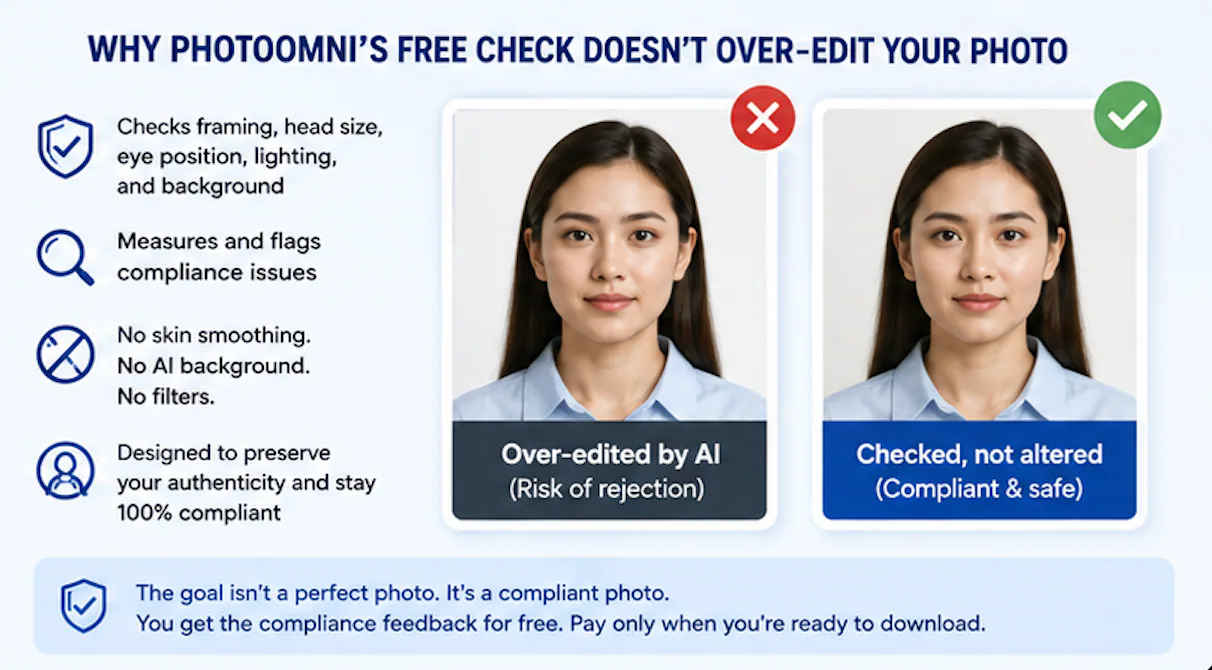
Why PhotoOmni's Free Check Doesn't Over-Edit Your Photo
It may seem counterintuitive for a tool to promote less editing, but that's precisely the point in 2026: the safest passport photo is the one that changes as little as possible about how you actually look.
PhotoOmni's free AI check evaluates your photo against the current US specification — framing, head size, eye position, lighting, and background — and tells you what to fix. What it deliberately does not do is beautify, retouch, or reconstruct your photo. No skin smoothing. No AI-generated background. No filters applied during the check or baked into the final file.
The goal isn't a flattering photo — it's a photo that is unmistakably you, submitted exactly as you appear, which is both what the 2026 rule requires and, frankly, the lower-risk choice regardless of the rule. You get the compliance feedback for free; paying only comes in when you're ready to download the final high-resolution image for your application.
When a Free Tool Is Genuinely the Right Call
To be fair to free tools: if you already know the requirements well, have good natural lighting, a plain background, and just need something to crop and resize an already-good photo, a free crop tool is a perfectly reasonable choice. The risk isn't in using a free tool — it's in assuming "free" implies "verified." Those are two different claims, and only one of them is actually being made.
A drugstore photo costs $14–16 (CVS charges about $15, Walgreens similar), while PhotoOmni's final download is $5.99 — and over 40% of applicants now use their phones. The economics already favor the DIY route; the real question is whether you're using a tool that preserves your photo's compliance or one that quietly undercuts it.
FAQ
Are free passport photo tools accurate? Many are accurate for basic cropping and sizing. Fewer offer real compliance checking (head position, background quality, lighting) — accuracy depends heavily on whether the tool actually evaluates your photo against the specification or just resizes it.
Can a free tool guarantee my passport photo will be accepted? No tool, free or paid, can guarantee acceptance — that decision belongs to the government reviewer. What differs between tools is how thoroughly they check for known rejection causes before you submit.
Do free tools use AI to edit my photo? Some do, by default, particularly for background removal or auto-enhancement. For US passport photos, any AI alteration to your face or background is non-compliant under the January 2026 rule, so check whether a free tool's processing is limited to cropping/sizing or extends to actual pixel editing.
Is PhotoOmni's passport photo check really free? Yes — the AI compliance check is free to use. You only pay if you choose to download the final high-resolution photo for your application.
Does PhotoOmni apply AI filters or beauty editing? No — PhotoOmni's check is designed to preserve your photo's authenticity rather than enhance it: it measures and flags compliance issues without altering your face or background.
About the Author
Emma Richardson Senior ICAO Photo Compliance Expert, PhotoOmni
Emma Richardson is the Senior ICAO Photo Compliance Expert at PhotoOmni. With 12+ years of experience in passport and visa photo verification, she has helped applicants achieve 820,000+ successful photo approvals across 100+ countries and territories. She specializes in global passport photo requirements, ICAO-compliant photo standards, and biometric image verification.
Related Articles
- How to Take a Passport Photo at Home (2026 Guide)
- Passport Photo Requirements: The Complete 2026 Guide
- Why Was My Passport Photo Rejected? 15 Common Reasons & Fixes
Data sources: U.S. Department of State passport processing (FY2024), NIST FRVT Part 3: Demographic Effects (March 2024), ICAO Doc 9303 photo specifications. Pricing based on publicly listed rates as of July 2026. This guide is independent and not affiliated with or endorsed by the U.S. Department of State. Always verify current requirements at travel.state.gov before submitting your application.