
New Zealand Passport & Visa Photo Requirements 2026: Size, Dimensions, Background Rules & Online Guide
Complete guide to New Zealand passport and visa photo requirements for 2026. Learn the correct 35mm × 45mm size, light-coloured background rules, digital dimensions, and how to create compliant photos online.
New Zealand Passport & Visa Photo Requirements 2026: Size, Dimensions, Background Rules & Online Guide
Quick Answer
If you prefer to prepare the file online, the New Zealand photo maker can help check the crop, background, and visa-photo format before submission.
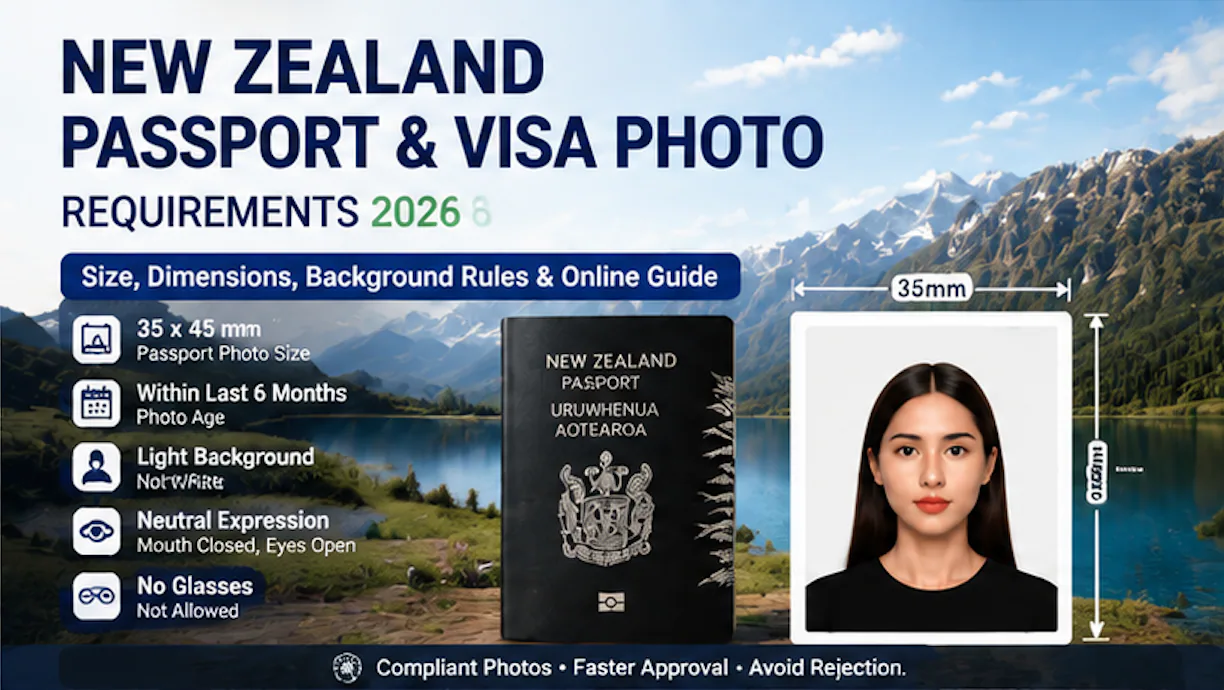
New Zealand passport and visa photos must meet strict biometric identification requirements established by New Zealand authorities. The standard printed photo size is 35 mm × 45 mm, while online visa applications require a digital image between 900 × 1200 pixels and 2250 × 3000 pixels.
The most important New Zealand passport and visa photo requirements include:
- A plain light-coloured background that is not pure white
- Photo taken within the last 6 months
- Neutral facial expression with mouth closed
- Eyes fully open and clearly visible
- Face occupying approximately 70–80% of the image height
- No glasses in passport photos
- High-quality JPG/JPEG digital image for online applications
Applicants can create New Zealand passport and visa photos through three main options:
- Professional photography studios
- Photo booths and retail photo services
- Online AI passport photo services
The average processing time is:
| Service Type | Average Processing Time |
|---|---|
| Online AI passport photo | 5–10 minutes |
| Photo booth | 5–10 minutes |
| Retail photo service | 10–20 minutes |
| Professional studio | 15–30 minutes |
New Zealand Passport & Visa Photo Requirements 2026: Complete Guide
New Zealand passport and visa photos are biometric identification images used by New Zealand authorities to verify an applicant’s identity.
The photo must accurately represent the applicant’s current appearance and meet technical requirements for facial recognition systems.
Whether you are:
- Applying for a new New Zealand passport
- Renewing a New Zealand passport
- Applying for a New Zealand visa
- Uploading a digital immigration application photo
the image must follow the official biometric photo standards.
One of the most important differences between New Zealand and many other countries is the background requirement.
New Zealand requires:
A plain, light-coloured background that is not white.
This is one of the most common reasons applicants experience passport or visa photo problems.
New Zealand Passport Photo Requirements Overview
Before submitting your photo, make sure it meets these core requirements:
| Requirement | New Zealand Standard |
|---|---|
| Photo type | Biometric identification photo |
| Printed size | 35 mm × 45 mm |
| Digital format | JPG/JPEG |
| Background | Light-coloured, not white |
| Photo age | Taken within the last 6 months |
| Expression | Neutral expression, mouth closed |
| Eyes | Fully open and visible |
| Face position | Centered and facing camera |
| Head size | Approximately 70–80% of image height |
| Glasses | Not permitted |
| Editing | No filters or artificial modifications |
A compliant passport or visa photo should clearly show:
- The complete face
- Natural skin tone
- Clear eye area
- Correct head positioning
- Even lighting
New Zealand Passport Photo Size Requirements 2026
What Is the Correct New Zealand Passport Photo Size?
The standard New Zealand passport photo size is:
A New Zealand visa photo maker can apply these dimensions and formatting checks to the uploaded photo.
35 mm × 45 mm
The photo dimensions are:
| Measurement | Requirement |
|---|---|
| Width | 35 mm |
| Height | 45 mm |
| Orientation | Portrait |
| Photo type | Biometric image |
| Photo age | Within 6 months |
The photo should have correct facial proportions.
The applicant’s head should occupy approximately:
70–80% of the photo height
This means the face should not appear:
- Too small in the frame
- Too close to the camera
- Too far away from the camera
A correctly framed passport photo should include:
- Face centered horizontally
- Space above the head
- Full facial visibility
- Natural head position
New Zealand Visa Photo Size Requirements
New Zealand visa applications may require digital photos, especially for online applications.
The digital requirements are different from printed photos.
New Zealand Visa Photo Digital Dimensions
| Digital Requirement | Specification |
|---|---|
| Minimum dimensions | 900 × 1200 pixels |
| Maximum dimensions | 2250 × 3000 pixels |
| Aspect ratio | 3:4 portrait |
| File format | JPG/JPEG |
| Recommended colour space | sRGB |
| Maximum file size | Less than 10 MB |
A suitable digital visa photo should have:
- High image resolution
- Clear facial details
- Natural colours
- No compression problems
- Correct portrait proportions
Low-quality images may cause problems during online submission.
Common digital issues include:
- Blurry images
- Incorrect aspect ratio
- Excessive compression
- Poor lighting
- Artificial filters
New Zealand Passport Photo vs Visa Photo Requirements
Many applicants search whether New Zealand passport photos and visa photos have different requirements.
The core biometric requirements are very similar.
| Requirement | Passport Photo | Visa Photo |
|---|---|---|
| Photo size | 35 × 45 mm | 35 × 45 mm |
| Background | Light colour, not white | Light colour, not white |
| Expression | Neutral | Neutral |
| Photo age | Within 6 months | Within 6 months |
| Face position | Centered | Centered |
| Digital upload | Available | Required for online applications |
A correctly prepared New Zealand passport photo can often also be used for visa applications if it meets the required digital specifications.
New Zealand Passport Photo Background Requirements
Does New Zealand Allow a White Background?
New Zealand does not require a pure white passport photo background.
The official requirement is:
A plain, light-coloured background that is not white.
Commonly used acceptable backgrounds include:
- Light grey
- Cream
- Soft neutral colours
The background should meet these conditions:
| Background Requirement | Description |
|---|---|
| Colour | Light and neutral |
| Surface | Plain and uniform |
| Objects | No visible objects |
| Pattern | No patterns or textures |
| Lighting | Even lighting |
| Shadows | No shadows on face or background |
Why Does New Zealand Require a Non-White Background?
New Zealand’s background rule is different from many countries.
For example:
| Country | Typical Passport Photo Background |
|---|---|
| New Zealand | Light-coloured, not white |
| United States | White or off-white |
| Canada | White or light-coloured |
| United Kingdom | Light grey or cream commonly used |
The purpose of the New Zealand rule is to maintain clear contrast between the applicant and the background.
A pure white background may reduce contrast in some cases, especially when:
- Hair colour is light
- Skin tone is light
- Lighting is uneven
A light grey or cream background helps maintain clearer facial separation for biometric processing.
Common New Zealand Background Mistakes
Background issues are among the most frequent reasons for passport and visa photo problems.
| Common Mistake | Why It Causes Problems |
|---|---|
| Pure white background | Does not meet New Zealand background preference |
| Shadows behind the head | Creates uneven background |
| Furniture or objects visible | Reduces biometric suitability |
| Patterned wall | Not considered plain |
| Dark background | Reduces facial contrast |
| Uneven lighting | Affects image quality |
For home photography, a plain light grey wall or a digitally adjusted compliant background is usually easier to manage.
Facial Expression and Appearance Requirements for New Zealand Passport Photos
After meeting the correct size and background requirements, facial appearance is another important factor that determines whether a New Zealand passport or visa photo will be accepted.
New Zealand requires photos to show the applicant’s natural appearance for accurate biometric identification.
New Zealand Passport Photo Facial Expression Rules
The applicant must look directly at the camera with a natural facial expression.
The main requirements include:
| Requirement | Standard |
|---|---|
| Face direction | Looking directly at camera |
| Expression | Neutral and natural |
| Mouth | Closed |
| Eyes | Fully open and visible |
| Head position | Straight and centered |
| Facial visibility | Entire face clearly visible |
Applicants should avoid:
- Smiling with visible teeth
- Frowning
- Squinting
- Tilting the head
- Looking away from the camera
- Exaggerated expressions
A natural expression helps facial recognition systems accurately analyze:
- Eye position
- Facial structure
- Face shape
- Key biometric points
Can You Smile in a New Zealand Passport Photo?
A slight natural expression may be acceptable, but a passport photo should not show an obvious smile.
The safest approach is:
- Keep your mouth closed
- Relax your face
- Keep both eyes open
- Look directly at the camera
A passport photo is not designed as a personal portrait. It is a biometric identification image, so maintaining a neutral appearance reduces the risk of rejection.
New Zealand Passport Photo Glasses Rules
Can You Wear Glasses in a New Zealand Passport Photo?
No. New Zealand passport and visa photos do not allow glasses.
This includes:
| Type of Glasses | Allowed |
|---|---|
| Prescription glasses | Not allowed |
| Sunglasses | Not allowed |
| Tinted glasses | Not allowed |
| Fashion glasses | Not allowed |
Applicants should remove glasses before taking their photo.
The reason is that glasses can affect biometric verification by causing:
- Lens reflections
- Shadows around the eyes
- Reduced eye visibility
- Facial feature obstruction
Removing glasses is the safest way to avoid photo rejection.
New Zealand Passport Photo Hair Requirements
Hair should not cover important facial features.
The applicant’s:
- Eyes
- Eyebrows
- Face outline
should remain visible.
Common hair-related problems include:
| Problem | Result |
|---|---|
| Hair covering eyes | Facial features unclear |
| Hair covering eyebrows | Reduced face visibility |
| Large accessories | Incorrect framing |
| Hair creating shadows | Poor image quality |
For applicants with long hair, moving hair away from the face before taking the photo can improve compliance.
New Zealand Head Covering Requirements
New Zealand allows head coverings in passport and visa photos in specific situations.
Accepted reasons may include:
- Religious reasons
- Medical reasons
- Cultural reasons
However, the face must remain fully visible.
The requirements are:
| Requirement | Standard |
|---|---|
| Chin visibility | Required |
| Forehead visibility | Required |
| Eyes visibility | Required |
| Facial outline | Must remain clear |
| Shadows from covering | Not allowed |
Head coverings should not:
- Cover the eyes
- Hide facial features
- Create shadows on the face
Māori Cultural Tattoo (Tā Moko) in New Zealand Passport Photos
New Zealand recognises Māori cultural traditions, including Tā moko (traditional Māori facial tattoos).
A person with Tā moko can appear in a New Zealand passport photo.
The tattoo itself does not need to be removed or hidden.
However, all other passport photo requirements still apply:
- Correct background
- Neutral expression
- Clear lighting
- Correct framing
- Face fully visible
This is an important difference between New Zealand and some other countries because cultural identity can be represented while still meeting biometric requirements.
How to Take a New Zealand Passport Photo at Home Using a Smartphone
Many applicants now choose to create passport photos at home because modern smartphones can capture high-quality images.
A compliant home setup requires:
- Correct background
- Good lighting
- Proper camera position
- Correct facial expression
- Final quality checking
Step-by-Step Guide: Taking a New Zealand Passport Photo at Home
Step 1: Prepare the Background
Choose a:
- Plain light grey wall
- Cream-coloured background
- Neutral light-coloured area
Avoid:
- White backgrounds
- Patterns
- Decorations
- Furniture in the background
Preparation time:
Approximately 2 minutes
Step 2: Set Up Your Smartphone Camera
For better results:
| Camera Setup | Recommendation |
|---|---|
| Camera height | Eye level |
| Distance | Around 1–1.5 meters |
| Camera angle | Straight ahead |
| Lens | Standard camera mode |
| Flash | Avoid harsh flash |
Avoid taking a selfie because front-facing cameras may create:
- Facial distortion
- Incorrect proportions
- Wrong camera angle
Why Selfies Are Not Recommended for New Zealand Passport Photos
Selfies often create technical problems because:
| Problem | Reason |
|---|---|
| Camera too close | Changes facial proportions |
| Wide-angle distortion | Alters face shape |
| Incorrect angle | Affects biometric measurements |
| Uneven lighting | Creates shadows |
A better method is asking another person to take the photo from approximately:
1–1.5 meters away
Step 3: Use Correct Lighting
Lighting is one of the most important factors affecting passport photo quality.
Recommended lighting:
- Natural daylight
- Soft indoor lighting
- Even illumination across the face
Avoid:
- Strong sunlight
- Shadows under the eyes
- Shadows behind the head
- Bright light behind the applicant
A good lighting setup helps maintain:
- Natural skin tones
- Clear facial details
- Better image quality
Step 4: Check Face Position and Size
Before submitting the photo, check:
| Check Item | Requirement |
|---|---|
| Face position | Centered |
| Eyes | Open and visible |
| Expression | Neutral |
| Head size | Around 70–80% of image height |
| Background | Light and plain |
Step 5: Validate the Final Photo
A final review should check:
- Correct 35 × 45 mm dimensions
- Suitable background colour
- No glasses
- Clear facial features
- Photo taken within 6 months
The complete home process usually takes:
Approximately 10 minutes
New Zealand Passport Photo Rejection Reasons
The most common reasons for rejection include:
| Issue | Explanation |
|---|---|
| White background | Does not meet New Zealand’s light background rule |
| Wearing glasses | Eyes may not be clearly visible |
| Incorrect head size | Face occupies too much or too little space |
| Shadows | Reduces biometric accuracy |
| Old photo | Appearance may no longer match |
| Filters or editing | Changes natural appearance |
| Blurry image | Poor image quality |
Online AI Validation for New Zealand Passport Photos
As passport applications become increasingly digital, AI-powered photo checking has become a practical way to reduce mistakes before submission.
An AI passport photo validator can analyze:
| AI Check | Purpose |
|---|---|
| Background detection | Identify incorrect backgrounds |
| Face detection | Check position and alignment |
| Size analysis | Verify correct cropping |
| Lighting analysis | Detect shadows |
| Image quality check | Detect blur and low resolution |
A typical AI passport photo workflow:
| Step | Average Time |
|---|---|
| Upload image | Less than 1 minute |
| AI analysis | Seconds |
| Automatic adjustment | 1–5 minutes |
| Download final file | Immediate |
Total processing time:
Around 5–10 minutes
Where to Get New Zealand Passport and Visa Photos in 2026
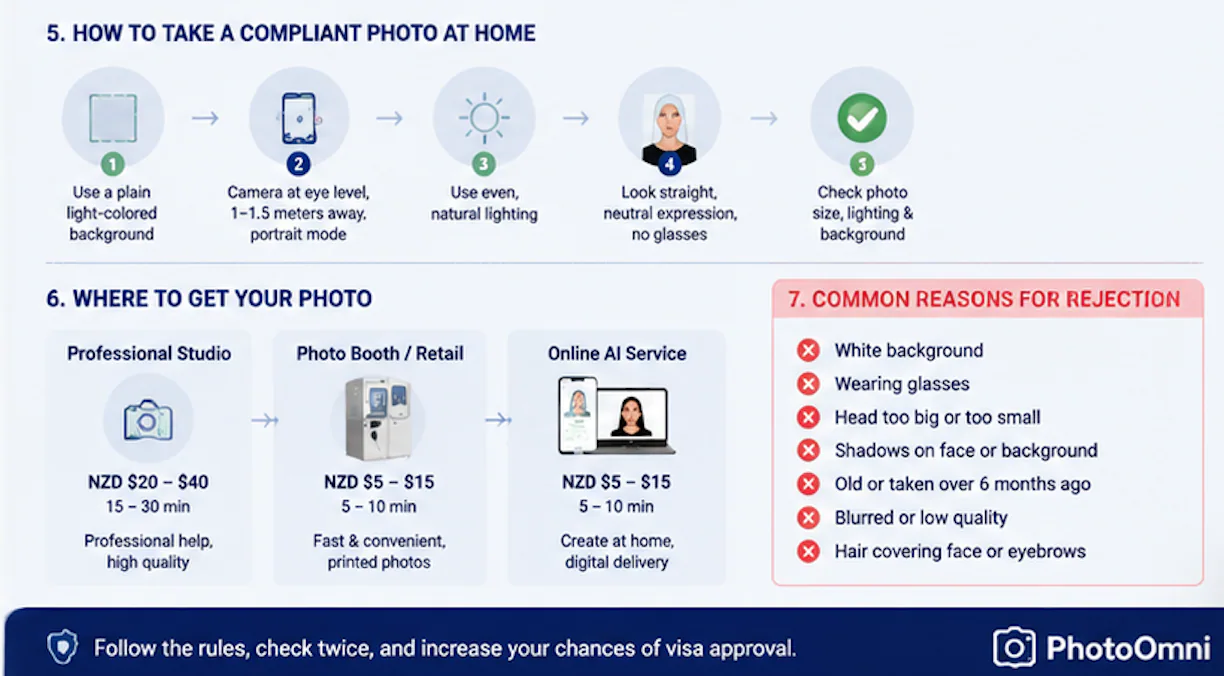
Applicants have several options for creating New Zealand passport and visa photos. The best choice depends on whether you need professional assistance, printed photos, or a fast digital solution.
The three main options are:
- Professional passport photo studios
- Photo booths and retail printing services
- Online AI passport photo services
Option 1: Professional New Zealand Passport Photo Studios
Professional studios remain a popular choice for applicants who prefer in-person assistance.
A photographer can help with:
- Camera positioning
- Lighting adjustment
- Facial positioning
- Correct framing
- Printed photo preparation
Professional studios are especially useful for:
- Baby passport photos
- Children who cannot sit still
- Applicants who need assistance with special cases
- People who prefer traditional photography services
Average Studio Cost and Processing Time
| Service | Average Cost | Processing Time |
|---|---|---|
| Passport photo studio | NZD $20–40 | 15–30 minutes |
Advantages
- Professional lighting equipment
- Photographer guidance
- Better control of difficult situations
- Immediate printed photos
Disadvantages
- Higher cost
- Requires travel
- Limited opening hours
- Appointment may be needed
Option 2: Photo Booths and Retail Passport Photo Services
Photo booths and retail photo services provide a faster alternative for applicants who only need standard passport photos.
Typical locations include:
- Photo booths
- Printing stores
- Pharmacy photo services
- Retail photography counters
Average Photo Booth Cost
| Service | Average Cost | Processing Time |
|---|---|---|
| Photo booth | NZD $5–15 | 5–10 minutes |
| Retail photo service | NZD $15–25 | 10–20 minutes |
Advantages
- Fast service
- Lower cost
- Printed photos available immediately
- Convenient locations
Disadvantages
- Limited guidance
- Lighting quality varies
- Less suitable for babies
- Staff experience differs by location
Before visiting, confirm that the service supports:
- New Zealand passport photos
- 35 × 45 mm dimensions
- Digital photo files if required
Option 3: Online AI New Zealand Passport Photo Services
Online passport photo tools have become increasingly popular because they allow applicants to create compliant photos from home.
The process usually includes:
- Taking a photo with a smartphone
- Uploading the image
- AI checking requirements
- Receiving the final digital file
Online Passport Photo Process
| Step | Average Time |
|---|---|
| Upload photo | Less than 1 minute |
| AI compliance check | Seconds |
| Background and cropping adjustment | 1–5 minutes |
| Download file | Immediate |
Total processing time:
Approximately 5–10 minutes
Studio vs Photo Booth vs Online AI Comparison
| Feature | Studio | Photo Booth | Online AI |
|---|---|---|---|
| Average cost | NZD $20–40 | NZD $5–15 | NZD $5–15 |
| Processing time | 15–30 min | 5–10 min | 5–10 min |
| Appointment | Sometimes | No | No |
| Digital delivery | Sometimes | Sometimes | Usually |
| Professional assistance | Yes | Limited | Automated |
| Available 24/7 | No | No | Yes |
| Suitable for remote users | No | Limited | Yes |
For applicants who only need a compliant digital photo, online AI solutions provide a convenient alternative to visiting a physical location.
How Much Does a New Zealand Passport Photo Cost?
The cost depends on the method you choose.
The average price range is:
NZD $5–40
Cost comparison:
| Option | Price Range | Best For |
|---|---|---|
| Photo booth | NZD $5–15 | Fast printed photos |
| Online AI service | NZD $5–15 | Digital passport photos |
| Retail photo service | NZD $15–25 | Same-day printing |
| Professional studio | NZD $20–40 | Professional assistance |
For applicants who already have access to a printer or only need a digital file, online services are often among the lowest-cost options.
Can I Print New Zealand Passport Photos at Home?
Yes, applicants can print passport photos after [creating a compliant digital file](/en/documents/new-zealand).
Printing options include:
- Home photo printer
- Local photo printing store
- Online photo printing service
A printed passport photo should use:
- High-quality photo paper
- Correct dimensions
- Clear image quality
Many applicants choose this workflow:
- Create digital passport photo online
- Download the file
- Print only when needed
This approach can reduce cost compared with purchasing multiple studio packages.
Where Can I Submit New Zealand Passport Photos?
New Zealand passport and visa applications can be completed through different channels.
Online Applications
Online applications allow eligible applicants to:
- Upload digital photos
- Submit documents electronically
- Track application progress
Digital applications require:
- Correct pixel dimensions
- JPG/JPEG format
- Suitable file size
- Compliant facial image
In-Person Applications
Applicants submitting physical applications may need:
- Printed passport photos
- Application forms
- Supporting documents
The printed photo should meet:
- 35 × 45 mm size
- High-quality print standards
- Correct background requirements
Overseas Applications
New Zealand citizens applying from overseas may submit applications through:
- New Zealand embassies
- High commissions
- Approved overseas services
Applicants outside New Zealand should check the specific requirements for their location because submission processes may vary.
Common New Zealand Passport Photo Mistakes to Avoid
The following mistakes are responsible for many photo problems:
| Mistake | Explanation |
|---|---|
| Using a white background | New Zealand requires a light-coloured background, not pure white |
| Wearing glasses | Glasses can interfere with facial visibility |
| Using selfies | Camera distance can distort facial features |
| Applying beauty filters | Changes natural appearance |
| Taking old photos | Photos must represent current appearance |
| Poor lighting | Creates shadows and unclear details |
| Wrong dimensions | Incorrect size may affect acceptance |
New Zealand Passport Photo Checklist Before Submission
Before uploading or printing your photo, check the following:
| Item | Requirement |
|---|---|
| Size | 35 × 45 mm |
| Digital dimensions | 900 × 1200 to 2250 × 3000 pixels |
| Background | Light colour, not white |
| Photo age | Within 6 months |
| Expression | Neutral |
| Glasses | Removed |
| Face size | 70–80% of image height |
| File format | JPG/JPEG |
| File size | Less than 10 MB for online applications |
Frequently Asked Questions About New Zealand Passport and Visa Photos
What is the New Zealand passport photo size?
The standard New Zealand passport photo size is:
35 mm × 45 mm
The applicant’s head should occupy approximately:
70–80% of the image height
The photo must be clear, recent, and suitable for biometric identification.
What are the pixel dimensions for a New Zealand visa photo?
For online New Zealand visa applications, the digital photo should generally be between:
- Minimum: 900 × 1200 pixels
- Maximum: 2250 × 3000 pixels
The recommended aspect ratio is:
3:4 portrait
Can I use a white background for a New Zealand passport photo?
No. New Zealand requires a plain light-coloured background.
A pure white background is not recommended because it may reduce contrast between the applicant and the background.
Common choices include:
- Light grey
- Cream
- Soft neutral colours
Can I wear glasses in a New Zealand passport photo?
No. Glasses should be removed for New Zealand passport and visa photos.
This includes:
- Prescription glasses
- Sunglasses
- Tinted lenses
Removing glasses helps ensure the eyes and facial features remain clearly visible.
How recent must a New Zealand passport photo be?
The photo must generally be taken within:
6 months
The image should accurately represent your current appearance.
If your appearance changes significantly, a new photo may be required.
Can I take a New Zealand passport photo with my phone?
Yes. A smartphone can be used if the image meets all requirements.
Recommended setup:
- Camera at eye level
- Distance around 1–1.5 meters
- Plain light-coloured background
- Even lighting
- Neutral expression
Can AI check my New Zealand passport photo?
Yes. AI passport photo tools can analyze important requirements, including:
- Background colour
- Face position
- Image quality
- Cropping
- Lighting
AI validation can help identify common problems before submitting an application.
Final Summary: The Best Way to Create a New Zealand Passport Photo in 2026
Creating a compliant New Zealand passport or visa photo requires attention to several technical details:
- Correct 35 × 45 mm size
- Light-coloured background, not white
- Neutral expression
- No glasses
- Recent photo within 6 months
- Correct digital dimensions for online applications
Applicants now have three main choices:
Professional Studio
Best for users who want:
- Photographer assistance
- Professional equipment
- Printed photos immediately
Photo Booth
Best for users who want:
- Low cost
- Fast printing
- Simple passport photos
Online AI Passport Photo Solution
Best for users who want:
- Create photos from home
- No appointment
- Digital delivery
- Automatic compliance checking
Create Your New Zealand Passport Photo Online with PhotoOmni
PhotoOmni helps applicants create New Zealand passport and visa photos directly from a smartphone.
The process is simple:
- Take a photo with your phone
- Upload the image
- AI checks photo requirements
- Adjust background and cropping
- Download the final passport photo
PhotoOmni helps check important requirements such as:
- Background compliance
- Face positioning
- Image quality
- Passport photo dimensions
Instead of searching for a nearby studio, applicants can create a passport-ready photo from home in minutes.
Create your New Zealand passport photo online with PhotoOmni and prepare your application faster.
About the Author
Emma Richardson Senior ICAO Photo Compliance Expert, PhotoOmni
Emma Richardson is the Senior ICAO Photo Compliance Expert at PhotoOmni. With 12+ years of experience in passport and visa photo verification, she has helped applicants achieve 820,000+ successful photo approvals across 100+ countries and territories. She specializes in global passport photo requirements, ICAO-compliant photo standards, and biometric image verification.
Related Articles
- How to Take a Passport Photo at Home (2026 Guide)
- Passport Photo Requirements: The Complete 2026 Guide
- Why Was My Passport Photo Rejected? 15 Common Reasons & Fixes
Data sources: US Department of State passport processing (FY2024), UK Home Office annual report (2023), NIST FRVT Part 3: Demographic Effects (March 2024), ICAO Doc 9303 photo specifications. Pricing based on publicly listed rates as of July 2026.