New Zealand visa photo guide
New Zealand Visa Photo Requirements
Prepare a recent, natural-looking photo for a New Zealand visitor, work, student, or residence visa. Most applications are submitted online through the official New Zealand visa application website, but your exact form remains the final source for upload and print requirements.
New Zealand visa photo requirements
Immigration New Zealand requires a photo that clearly identifies you. Its visa-photo guide sets the technical range for online images; use the live application form to confirm requirements for your visa route.
Official source: Read Immigration New Zealand's visa photo guidance
How to take a New Zealand visa photo at home
A phone or camera can work well when you set up the scene carefully and preserve your natural appearance.
- Ask another person to take the photo from about 1 to 1.5 metres away; do not take a close selfie.
- Stand 1 to 1.5 metres in front of a plain light-coloured background to reduce shadows.
- Keep the camera level with your eyes, use even light, and make sure the whole face is sharp.
- Look directly at the lens with eyes open, mouth closed, and a neutral expression.
- Avoid tinted lenses, lens glare, bold clothing patterns, and hair or accessories covering your face.
- Do not apply filters, beauty edits, or changes that make the photo no longer identify you clearly.
Common reasons New Zealand visa photos are rejected
An unsuitable photo can delay an application. Check these frequent issues before you upload.
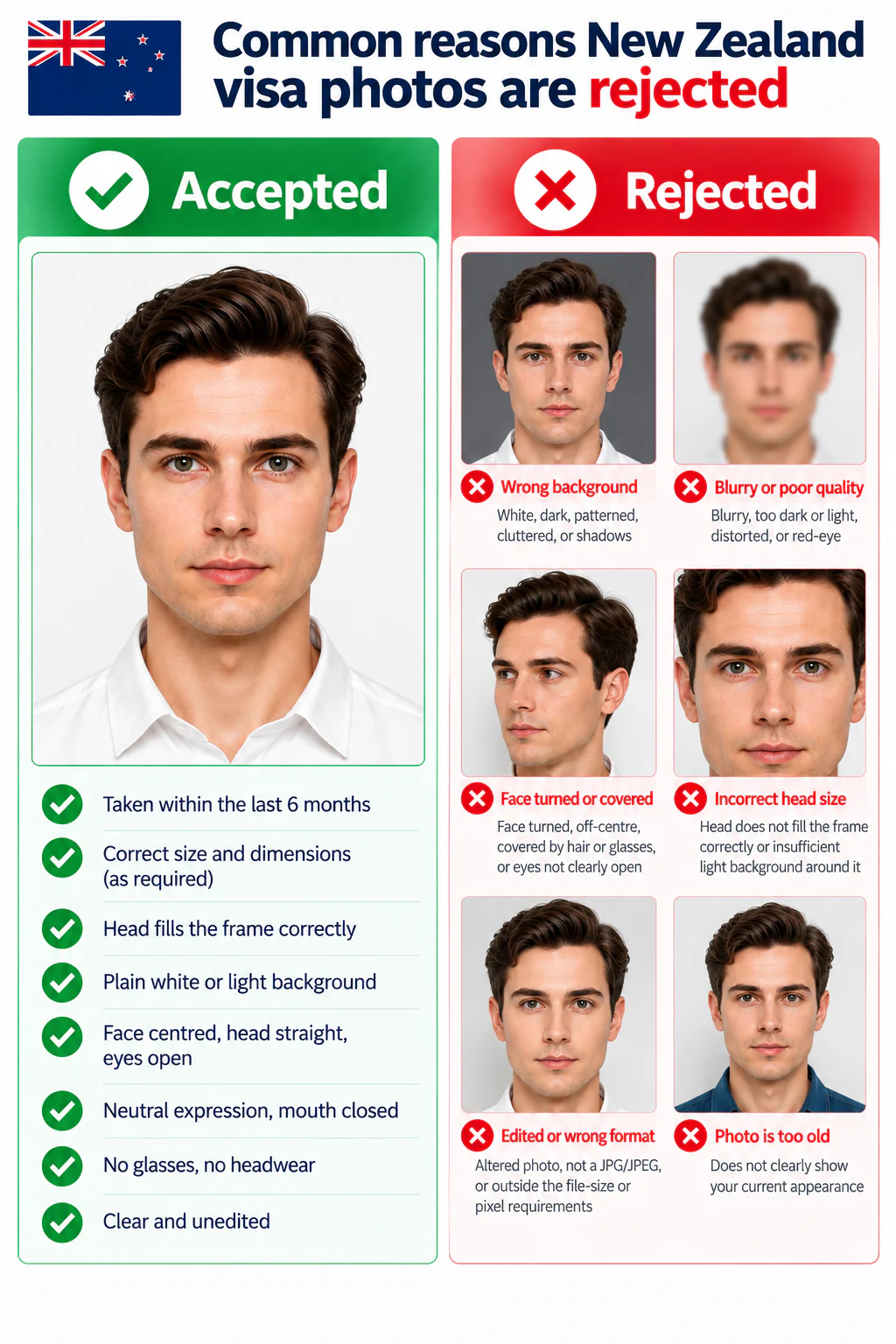
- The background is white, dark, patterned, cluttered, or has visible shadows.
- The image is blurry, too dark or light, distorted by a close selfie, or has red-eye.
- Your face is turned, off-centre, covered by hair or glasses, or your eyes are not clearly open.
- The head does not fill the frame correctly or there is insufficient light background around it.
- The photo has been altered, is not a JPG/JPEG, or is outside the file-size or pixel requirements.
- The image is old enough that it does not clearly show your current appearance.
PhotoOmni vs. online tools vs. photo studios
PhotoOmni combines at-home upload, AI pre-check, expert review, and 2 output files.
Visa-application focus
- PhotoOmni
- Built for New Zealand online visa photo preparation
- Other online tools
- Usually a generic photo tool
- Traditional photo studios
- May not know your application route
Digital-photo composition
- PhotoOmni
- 3:4 portrait with 900–2250 × 1200–3000 px guidance
- Other online tools
- May not check pixel range or framing
- Traditional photo studios
- Ask for the New Zealand visa digital format
Upload and print readiness
- PhotoOmni
- JPG/JPEG-ready digital file plus a print-ready sheet
- Other online tools
- May offer only one output type
- Traditional photo studios
- Digital copy may cost extra
Application-route guidance
- PhotoOmni
- Flags online and paper application differences
- Other online tools
- May not distinguish application routes
- Traditional photo studios
- You must confirm the checklist yourself
Photo-quality protection
- PhotoOmni
- 100% refund for eligible photo-quality rejection
- Other online tools
- Policy varies by service
- Traditional photo studios
- Policy varies by studio
Total price & inclusions
- PhotoOmni
- One-time fee of $5.99
- Other online tools
- Add-ons can cost $3–$10+
- Traditional photo studios
- Often $15+; files vary