


Australian Baby Passport Photo

Prepare two recent, unedited passport photos for your baby or child. This format follows Australian Passport Office size, print, and infant-photo guidance.

Drag & drop your photo

or

AI checkedExpert verifiedExpert refinementRefund guarantee
Australian baby passport photo preview

Photo specifications

Reference size
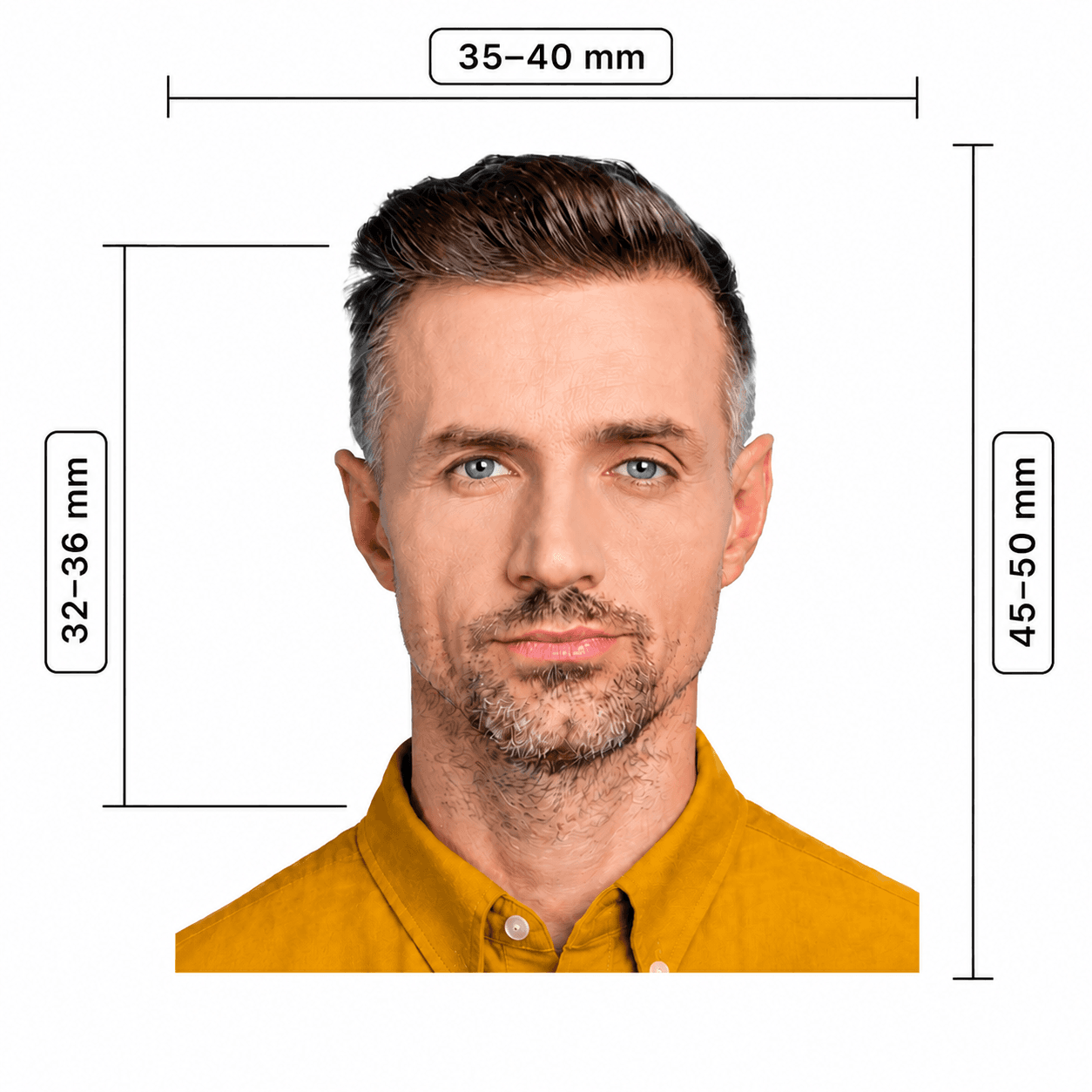
35 × 45 mm (officially accepted: 35–40 × 45–50 mm)
Head height
32–36 mm, chin to crown
Background
Plain white or light grey, shadow-free
Print
Two identical colour prints; glossy, 200 gsm minimum
Output
600 DPI JPEG reference export
Age note
Under 3s may have an open mouth

Australian baby passport photo guide

A Complete Guide to Australian Baby Passport Photos

Baby passport photos need the same careful framing and print quality as adult photos, with a small allowance for very young children. Use this guide to plan a clean, unedited source photo before you prepare your two prints.

Contents
  1. 1. Australian baby passport photo requirements
  2. 2. How to prepare your photos
  3. 3. How to take the photo at home
  4. 4. Common reasons baby photos are rejected
  5. 5. At-home preparation versus a professional photographer
  6. 6. Digital file and print guidance

Australian baby passport photo requirements

Australian Passport Office requirements apply to babies and children. The key exception is that children under 3 may have an open mouth; this does not relax the framing, lighting, or no-objects rules.

Photo size
35–40 mm wide by 45–50 mm high. This page prepares a 35 × 45 mm reference format.
Head size
32–36 mm from the bottom of the chin to the crown.
Background
Plain white or light grey, with no shadow, pattern, person, or object visible.
Expression
Face forward and keep a neutral expression where possible; children under 3 may have an open mouth.
Photo quality
Recent (within 6 months), colour, sharp, evenly lit, and free of red-eye, reflections, filters, and retouching.
Printed photos
Provide two identical colour prints on heavy-weight glossy paper (minimum 200 gsm), produced by dye sublimation rather than an inkjet printer.

How to prepare your baby's passport photos

Start from an original photo that already meets the visual rules. The Australian Passport Office does not allow retouching, so the goal is accurate framing and a clean source photo — not changing a background, removing a hand, or editing your baby's appearance.

  1. 1Take several recent, straight-on photos in a shadow-free space, keeping every hand, toy, bottle, and dummy out of the frame.
  2. 2Choose the sharpest original image with the full face clearly visible and room around the head for the final crop.
  3. 3Prepare the 35 × 45 mm reference crop with a 32–36 mm chin-to-crown height, without retouching the image.
  4. 4Print two identical colour photos through a professional dye-sublimation photo service on glossy paper of at least 200 gsm.

How to take a baby passport photo at home

A calm, well-lit setup matters more than a complicated camera. Take several photos and select the best original rather than trying to fix problems later.

  • Use soft daylight facing the baby's face; avoid flash, backlighting, and shadows on the face or background.
  • For a young baby, safely lay them on a plain white or light-grey sheet and photograph from directly above, keeping yourself out of the frame.
  • For an older baby, place the camera at eye level and keep the head straight, centered, and facing forward.
  • Keep toys or rattles outside the frame if you need to attract attention. No hands, toys, dummies, bottles, or another person can be visible.
  • Do not use portrait mode, filters, skin smoothing, red-eye correction, or background replacement.

Common reasons baby passport photos are rejected

Most rejections come from small details that are easy to miss while photographing a moving baby. Check these before ordering prints.
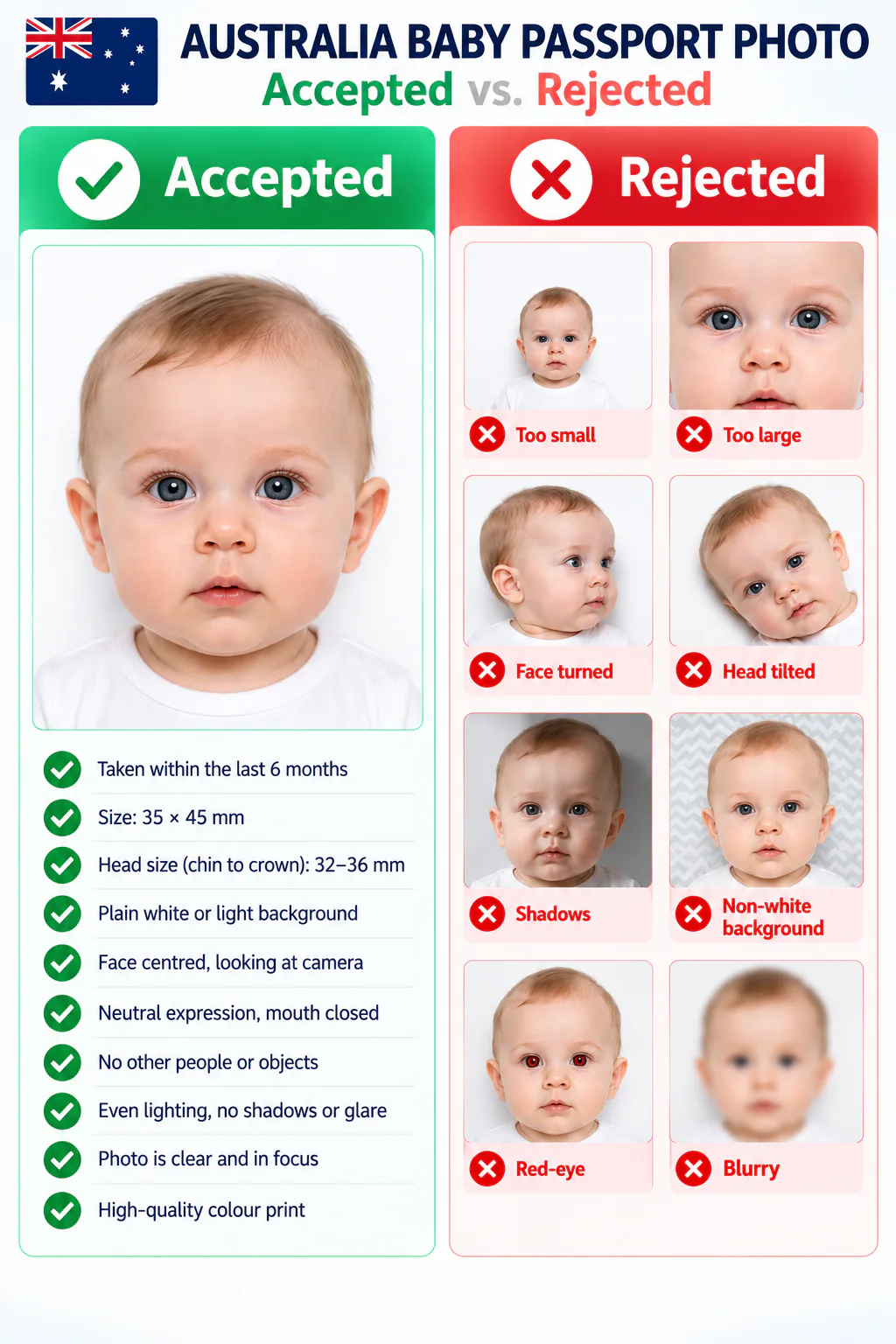
  • A parent, hand, toy, dummy, bottle, or another object appears in the photo.
  • The face is turned, tilted, obscured, too close, too far away, or outside the 32–36 mm chin-to-crown range.
  • There are shadows, glare, red-eye, an uneven background, a patterned background, or poor focus.
  • The photo has been retouched or filtered, or the print is not a high-quality colour print on suitable glossy paper.

At-home preparation vs. online tools vs. a photo studio

For Australian applications, the original photo and quality of the final print are critical. Choose the route that helps you create an accurate, unedited result.

ConsiderationPhotoOmniOther online toolsProfessional photographer
Take several photos at your baby's paceAt home, without an appointmentUsually at homeDepends on appointment availability
Australian baby rules shown before you printSize, print, infant, and no-retouching guidanceRequirements vary by providerAsk the provider to confirm current rules
Background or skin editingNot used for this Australian documentCheck that no retouching is appliedA compliant original setup avoids editing
Professional print outputUse a dye-sublimation print servicePrint quality depends on your providerOften available on site

Digital file and print guidance

Use the 600 DPI JPEG as a preparation reference, then supply two identical colour prints in the size range accepted by the Australian Passport Office. The final prints must be glossy, at least 200 gsm, and produced with dye sublimation — do not use a home inkjet printer. Check the current application instructions before lodging, as a guarantor may need to endorse one photo.

Always review the current Australian Passport Office guidance before you lodge your application. This page intentionally preserves the original image because retouching is not permitted.

Official requirements

  • Use a photo taken within the past 6 months, with the baby's face centered and facing the camera
  • Keep the face clear, in focus, evenly lit, and free of shadows, reflections, red-eye, or filters
  • Use a plain white or light grey background that contrasts with the baby's face
  • No parent, hands, toys, bottles, dummies, or other objects may be visible
  • Use a neutral expression where possible. A baby or child under 3 may have an open mouth
  • Do not retouch skin, remove marks, or alter the source image; use a professional-quality print process

How it works

1

Set up a shadow-free space

Lay your baby safely on a plain white or light-grey sheet, or seat them with no adult or object entering the frame. Use soft, even daylight.

2

Take several straight-on photos

Photograph at eye level when possible. Keep the entire face visible, look for a sharp frame, and leave room around the head for the required crop.

3

Prepare and print two identical photos

Use the 35 × 45 mm reference output, then print two matching colour photos on heavy-weight glossy paper through a dye-sublimation photo service.

Choose document
3–15 min 100% refund guarantee

Frequently asked questions

Can my baby have their mouth open?
Yes. The Australian Passport Office allows an open mouth for children under 3 years old. All other photo requirements still apply.
Can I hold my baby for the photo?
You can support your baby while taking the source photo, but no part of a parent or carer — including hands — can be visible in the submitted photo.
Can I use a toy or dummy to get my baby's attention?
Keep it outside the frame. Toys, dummies, bottles, and every other object must be absent from the final photo.
Do I need one photo or two?
An Australian passport application requires two good-quality, identical passport photos. One may need a guarantor endorsement depending on the application.
Can the background or skin be edited?
No. The Australian Passport Office does not allow retouching, including removing marks or changing facial features. Use a clean, compliant original photo instead.

← Back to home

Other Australia document photos

Browse other photo types issued by Australia and choose the one that matches your application.