Expert verified

Australia Passport Photo Online

Use PhotoOmni's Australian passport photo checker and photo tool to prepare your photo from home. As Australia has strict passport photo and print review processes, upload a clear source photo, get an AI pre-check, and receive expert-reviewed files ready to download and have professionally printed.

Start with a photo

AI checkedExpert verifiedExpert refinementRefund guarantee
Australia Passport Photo Online

Photo specifications

Print size
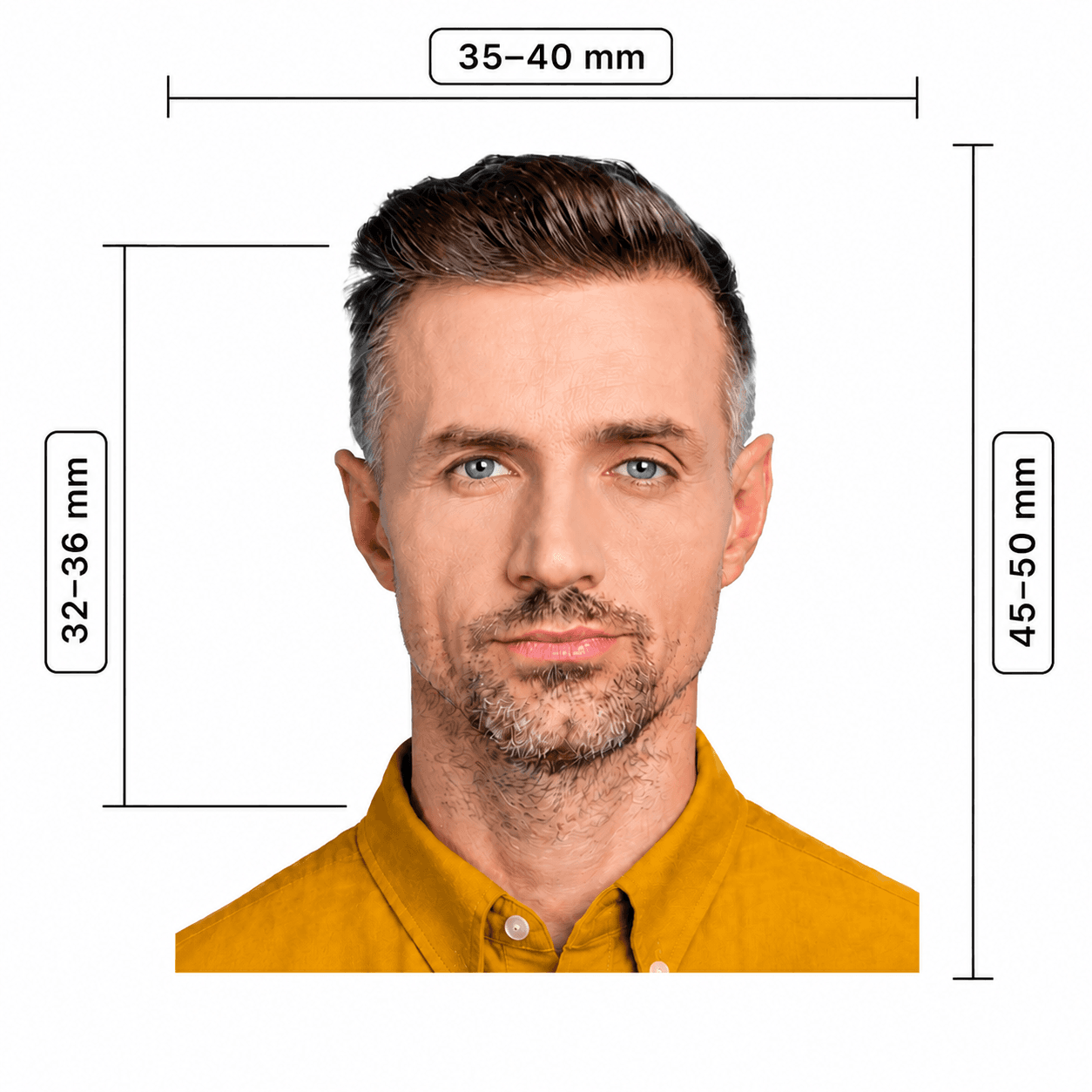
35-40 x 45-50 mm
Face height
32-36 mm
Background
Plain white or light grey
Recency
Within 6 months
Print quality
Dye-sublimation, glossy, minimum 200 gsm

Australia passport photo guide

Australian Passport Photo Specifications and Print Requirements

Australia has strict biometric and print requirements. A correctly framed digital image is not enough: you need two identical, unedited colour prints made by dye sublimation on heavy, glossy photo paper.

In this guide
  1. 1. Australian Passport Office requirements
  2. 2. How to prepare your Australian passport photo online
  3. 3. How to prepare for a professional photo
  4. 4. Common reasons photos are rejected
  5. 5. Professional providers and online services

Australian Passport Office photo requirements

These Australian passport photo specifications come from the Australian Passport Office. Follow its passport photo guidelines for Australia and use a professional passport photo provider; all photos are still assessed against the published standard.

Quantity
2 identical, good-quality colour prints; one is endorsed by the guarantor when required
Print size
35–40 mm wide x 45–50 mm high
Face size
32–36 mm from chin to crown
Photo age
Less than 6 months old
Print material
Dye-sublimation colour print on glossy, heavy-weight paper of at least 200 gsm; no inkjet prints
Background and light
Plain white or light grey that contrasts with your face; uniform light, with no shadows or reflections
Expression
Over age 3: face camera directly, eyes open, neutral expression. Under age 3: an open mouth is allowed.

How to prepare for your passport photo

These practical checks help your photographer capture a natural, compliant image the first time.

  • Wear ordinary clothing that contrasts with a white or light-grey background.
  • Face the camera straight on; keep your head level, eyes open, mouth closed, and expression neutral if you are over 3.
  • Remove glasses unless you have a medical reason you cannot remove them. Do not wear wireless earbuds.
  • Keep hair away from the edges of your face and remove accessories that could cover the eyes, nose, or mouth, or create reflections.
  • Avoid heavy makeup, filters, skin smoothing, or any retouching—moles, wrinkles, scars, and red-eye must not be edited out.
  • If you wear a religious head covering, use a plain, pattern-free covering that leaves your whole face and both face edges visible.

How to prepare your Australian passport photo online

Use PhotoOmni to prepare your photo file, then confirm the final print requirements for your passport application before lodging.

Step 1

Upload your photo

Take or upload a recent colour source photo with a full, unobstructed face.

Step 2

AI + expert compliance review

AI checks size, framing, lighting, background, and image quality; an expert reviews the result before delivery.

Step 3

Get an Australian passport photo, 35–40 × 45–50 mm

Download your Australian passport photo in the format your route requires. For standard paper requests, use the 35–40 × 45–50 mm range with a plain white or light-grey background and a 32–36 mm face height.

Common reasons Australian passport photos are rejected

The Passport Office may request new photos when any aspect of the image or print does not meet the standard. These are common causes.
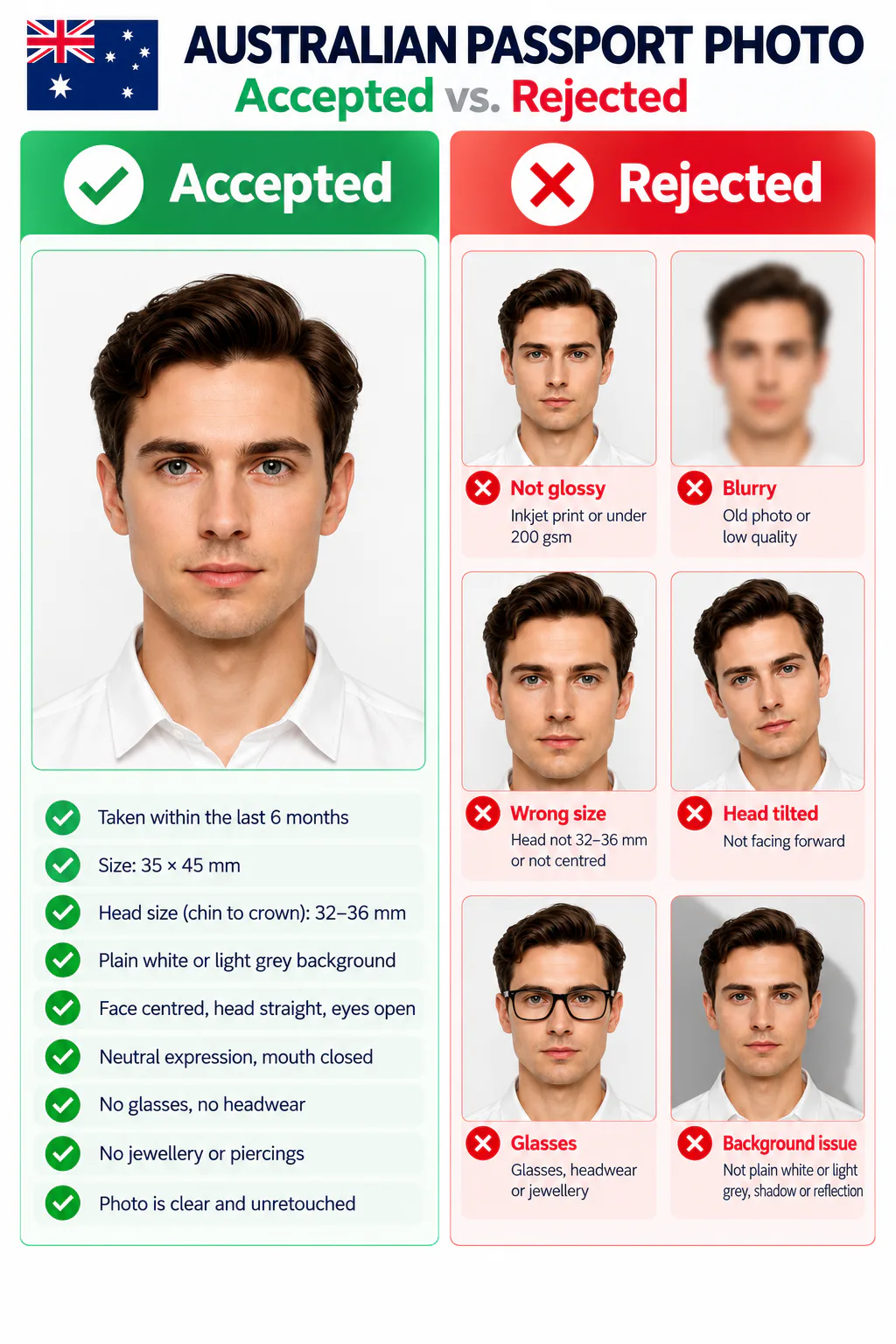
Accepted and rejected Australian passport photo examples, showing common framing, background, lighting, and accessory errors.
  • The print is an inkjet print, is not glossy, is under 200 gsm, or is not a clean dye-sublimation colour print.
  • The photo is older than six months, blurry, marked, damaged, or has red-eye.
  • The face is outside the 32–36 mm range, not centred, too close or far away, or the head is tilted.
  • The background is not plain white or light grey, does not contrast with the face, or contains shadows or reflections.
  • The image has been filtered or retouched, including skin smoothing or removal of moles, wrinkles, scars, or red-eye.
  • Glasses, hair, headwear, jewellery, piercings, or wireless earbuds obscure the face or create reflections.

Professional providers and online services

The Australian Passport Office recommends professional passport photo providers and expressly does not recommend online photo services or mobile apps because of identity-fraud risk. Use its advice when choosing how to obtain your photos.

  • Convenience

    PhotoOmni
    Upload from home in minutes
    Other online tools
    Usually online
    Traditional photo studios
    Requires a store visit
  • Application guidance

    PhotoOmni
    Digital and print route guidance
    Other online tools
    Varies by service
    Traditional photo studios
    Depends on local staff
  • Photo checks

    PhotoOmni
    AI pre-check plus expert review
    Other online tools
    May be basic or extra
    Traditional photo studios
    Usually retake-based
  • Final format

    PhotoOmni
    Digital and print-ready output
    Other online tools
    May be limited or extra
    Traditional photo studios
    Digital copy may not be included
  • Total price & inclusions

    PhotoOmni
    One-time fee of $5.99
    Other online tools
    Add-ons can cost $3–$10+
    Traditional photo studios
    Often $15+; files vary

Official requirements

  • Provide 2 identical colour prints; one must be endorsed by your guarantor where required
  • Face the camera straight on with eyes open and a neutral expression
  • Use a clear, unedited image with uniform lighting and no shadows, reflections, or red-eye

Frequently asked questions

How many passport photos do I need for an Australian passport application?
You need 2 identical, good-quality colour prints that meet the Australian Passport Office guidelines. For applications that require a guarantor, one photo must be endorsed by the guarantor.
Can I print my Australian passport photo at home?
No. The Australian Passport Office requires colour prints produced using dye sublimation, not an inkjet printer, on heavy-weight glossy paper of at least 200 gsm.
What are the Australian passport photo dimensions?
The Australian passport photo size can range from 35–40 mm wide by 45–50 mm high, with a 32–36 mm face height. Australian passport size photo dimensions must also meet the Office's print, background, and composition requirements.
Where can I get Australian passport photos near me?
Use PhotoOmni to prepare and check your Australian passport photo from home, then download the finished file and take it to a professional print shop for dye-sublimation printing on heavy glossy photo paper.
Can I wear glasses, jewellery, or a hearing aid?
Glasses are only allowed when you cannot remove them for medical reasons; vision impairment alone is not enough. Frames must not obscure the eyes, lenses must not reflect, and medical evidence may be required. Jewellery and piercings cannot obscure the face or reflect. A regularly worn hearing aid is allowed; wireless earbuds are not.
Can I wear a religious head covering?
Yes, if you normally wear it for religious reasons. It must be plain and pattern-free, show your whole face from chin to forehead, and leave both edges of your face visible.
Does the Australian Passport Office recommend online passport photo services?
No. It recommends a professional passport photo provider and says it does not recommend online passport photo services or mobile apps because of identity-fraud risk. Follow its current guidance for your application.

← Back to home

Real feedback from some PhotoOmni customers

I took the photo at home with my phone. Much easier than going to a photo shop.
Olivia Bennett
I wasn’t sure if my photo met the Australian requirements. The checks made everything much clearer.
James Anderson
I needed a visa photo quickly before submitting my application. The whole process was fast and straightforward.
Mia Thompson