Malaysia visa photo guide
Malaysia Visa Photo Requirements, Made Clear
Prepare a recent 35 x 50 mm photo for your Malaysia eVISA application. This guide covers the visible photo requirements, how PhotoOmni prepares the file, and the final checks to make before upload.
Malaysia eVISA photo requirements
Check the live eVISA portal for your application route before uploading, as requirements can vary by visa type and change over time.
Photo size
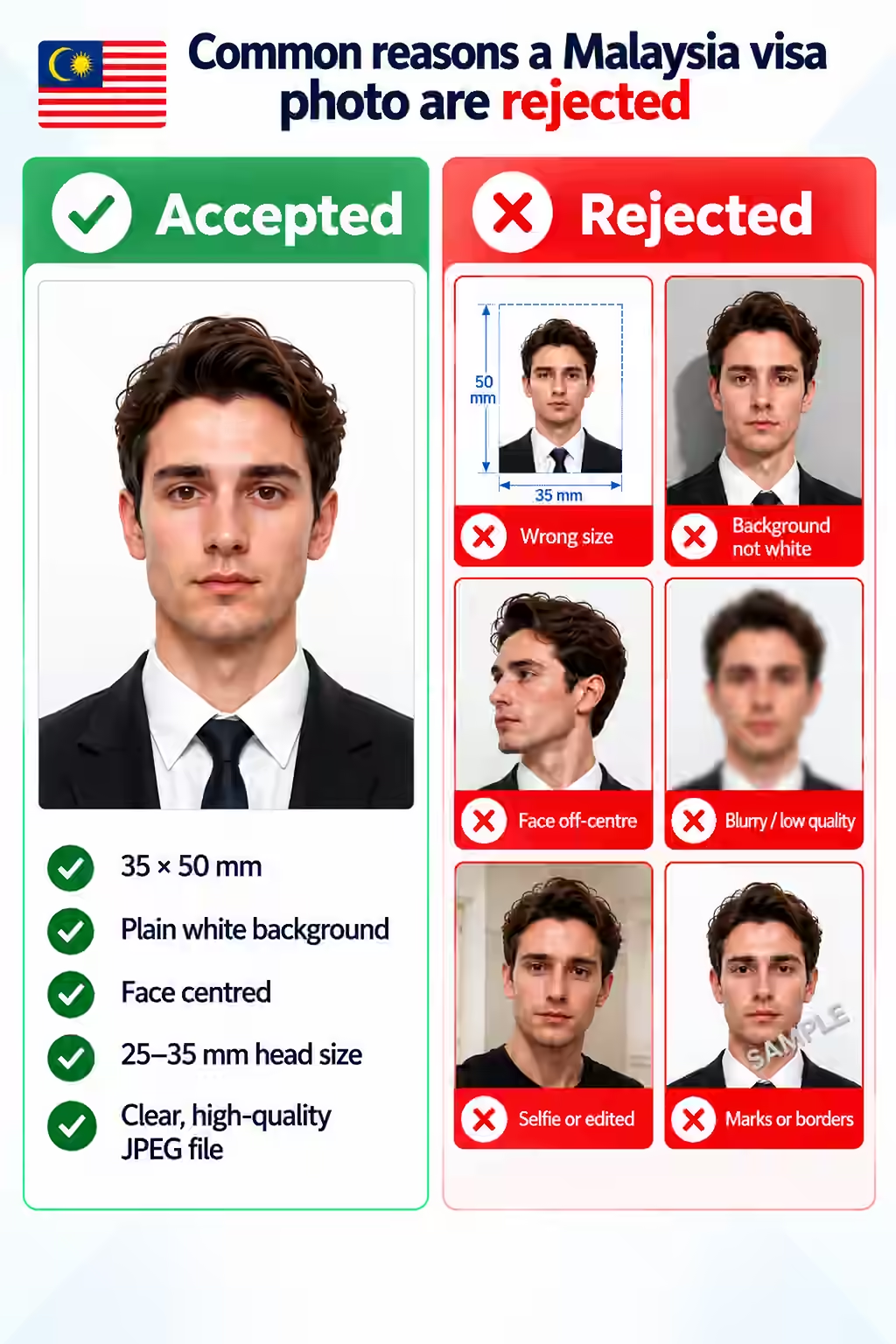
35 x 50 mm
Background
Plain white, clean, and free of shadows
Recency
Taken within the last 6 months
Pose
Full face, centred, and facing the camera
Image quality
Clear and evenly exposed, without borders, frames, or visible shadows
Do not use
Selfies, scans, heavily edited images, filters, or beauty effects
How to take a suitable photo at home
A clean source image gives the final crop the best chance of meeting your eVISA portal's requirements.
- Ask someone else to take the photo at eye level; avoid close-up selfies and wide-angle distortion.
- Face forward, keep both eyes open, and maintain a natural expression with your mouth closed.
- Use even light from the front and avoid shadows on your face, background, or under your chin.
- Use a plain light background and wear clothing that contrasts clearly with it.
- Remove sunglasses, headphones, and accessories that obscure your face.
- Do not use filters, portrait blur, beauty effects, or heavy retouching.
Common reasons a Malaysia visa photo may be rejected
These visible issues can prevent a photo from meeting the portal's upload rules or the expected studio-photo style.
- The photo is not 35 x 50 mm or has an unsuitable crop.
- The background is coloured, textured, or has a visible shadow.
- The face is not centred, is turned away from the camera, or is partly obscured.
- The image is old, blurry, poorly lit, overexposed, or low resolution.
- The photo is a selfie, scan, or visibly edited image.
- Borders, frames, watermarks, or other marks are visible in the image.
PhotoOmni vs. other ways to get a photo
Choose the route that fits your application, then confirm the final file against the live requirements for your visa type.
Convenience
- PhotoOmni
- Upload from home in minutes
- Other online tools
- Usually online
- Traditional photo studios
- Requires a store visit
Peace of mind
- PhotoOmni
- AI pre-check plus expert approval
- Other online tools
- May lack expert review or charge extra for it
- Traditional photo studios
- Depends on local staff
Expert adjustments
- PhotoOmni
- Included when needed
- Other online tools
- Varies by service
- Traditional photo studios
- Usually retake-based
Ready-to-use files
- PhotoOmni
- Digital photo plus print-ready sheet
- Other online tools
- May be limited or extra
- Traditional photo studios
- Digital copy may not be included
Rejection protection
- PhotoOmni
- 100% refund for photo-caused rejection
- Other online tools
- Policy varies
- Traditional photo studios
- Policy varies by shop
Total price & inclusions
- PhotoOmni
- One-time fee of $5.99
- Other online tools
- Add-ons can cost $3–$10+
- Traditional photo studios
- Often $15+; files vary