Singapore visa photo guide
Singapore Visa Photo Requirements: 35x45 mm and Online Upload
This Singapore visa photo guide explains how to make a compliant Singapore visa picture from home. Use it to check your Singapore visa photo size, crop, background, and online JPEG before you submit your application.
Singapore visa photo requirements
ICA requires a recent passport-sized colour photo for entry-visa applications. Check the live instructions from your authorised visa agent or overseas mission: local application routes can have additional document rules.
Official source: ICA: Singapore entry visa requirements
How to take a Singapore visa photo from home
A phone camera is enough when you start with a straight-on, sharp image. These practical steps help your Singapore visa photo editor produce a natural result.
- Ask someone else to take the picture at eye level instead of relying on a close-up selfie.
- Face the camera directly, keep your head straight, eyes open, and mouth closed.
- Use soft, even light and a plain white background; avoid shadows on the face or wall.
- Keep the photo sharp and in colour, with your full face and both edges of your face visible.
- Do not wear sunglasses or use filters, portrait enhancement, beauty effects, or facial retouching.
- Keep space above the head so the Singapore visa photo crop can be positioned correctly.
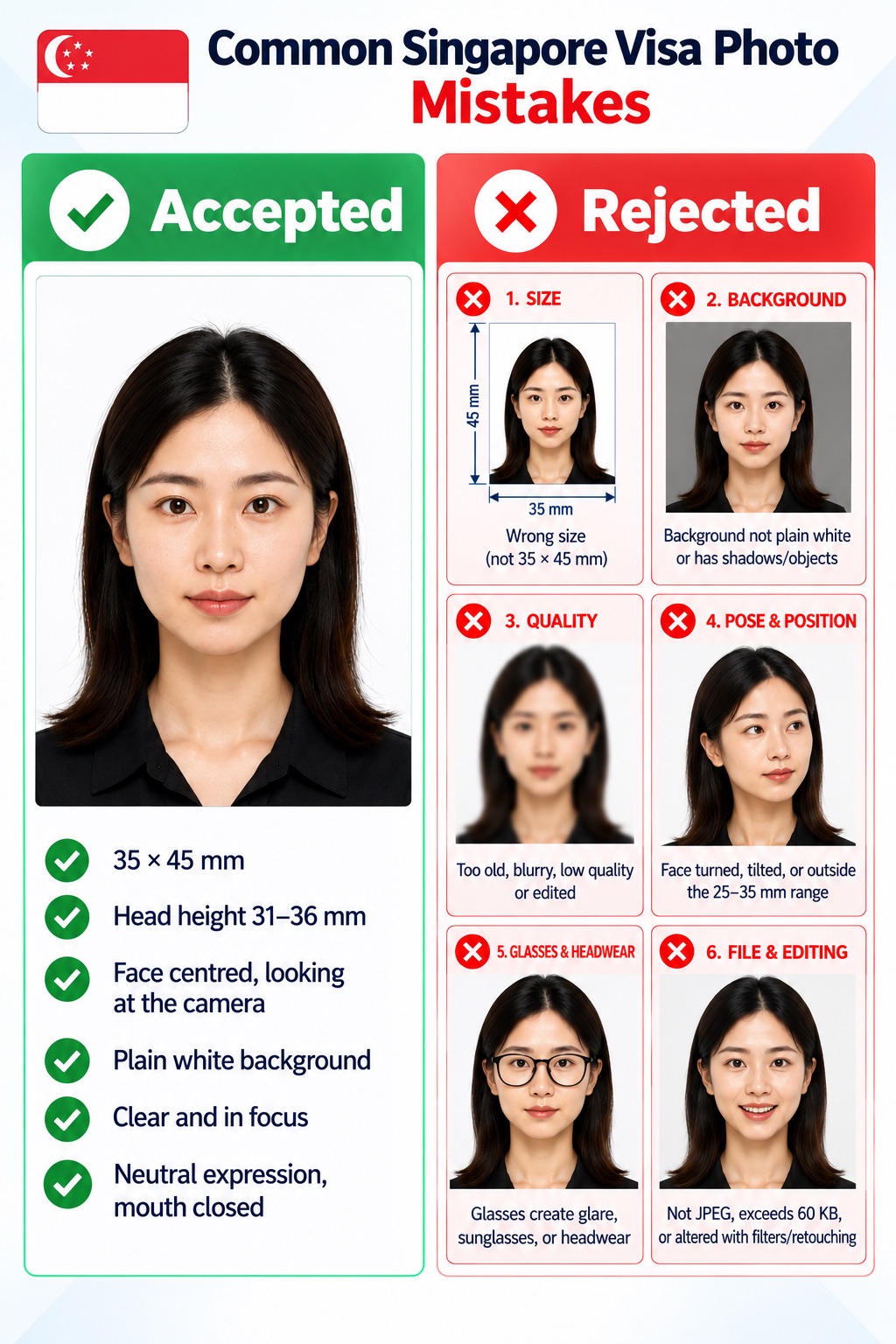
Common Singapore visa photo mistakes
Use this Singapore visa photo checker list before your online application. A photo that does not meet the visible requirements can delay processing.
- The Singapore visa photo dimensions are not 35 x 45 mm, or the online file is not 400 x 514 pixels.
- The background is not plain white, or visible shadows, patterns, borders, or objects appear in the frame.
- The photo is older than three months, blurred, poorly exposed, scanned, or low quality.
- The face is turned, tilted, partly covered, or outside the 25–35 mm chin-to-crown range.
- Glasses create glare, sunglasses obscure the eyes, or headwear hides facial features.
- The file is not JPEG, exceeds 60 KB, or has been altered with filters or retouching.
PhotoOmni vs. other ways to make a Singapore visa photo
An online Singapore visa photo app makes the preparation process simpler. Always compare the final file with the current instructions for your individual application route.
Convenience
- PhotoOmni
- Make your Singapore visa photo from home
- Other online tools
- Usually online
- Traditional photo studio
- Requires a visit
Singapore visa photo size
- PhotoOmni
- 35 x 45 mm plus 400 x 514 px online resize
- Other online tools
- May offer generic crops
- Traditional photo studio
- Depends on local experience
Compliance checking
- PhotoOmni
- AI pre-check plus expert review
- Other online tools
- May lack expert review
- Traditional photo studio
- Usually retake-based
Visa-ready digital file
- PhotoOmni
- JPEG prepared for online application
- Other online tools
- Formats may be limited
- Traditional photo studio
- Digital file may cost extra
Rejection protection
- PhotoOmni
- 100% refund
- Other online tools
- Policy varies
- Traditional photo studio
- Policy varies by studio
Total price & inclusions
- PhotoOmni
- One-time fee of $5.99
- Other online tools
- Add-ons can cost $3–$10+
- Traditional photo studio
- Often $15+; files vary