
Passport Photo Requirements Guide 2026
Complete guide to official passport photo requirements. Covers image quality, lighting, background, face position, sizes by country, and common rejection reasons.
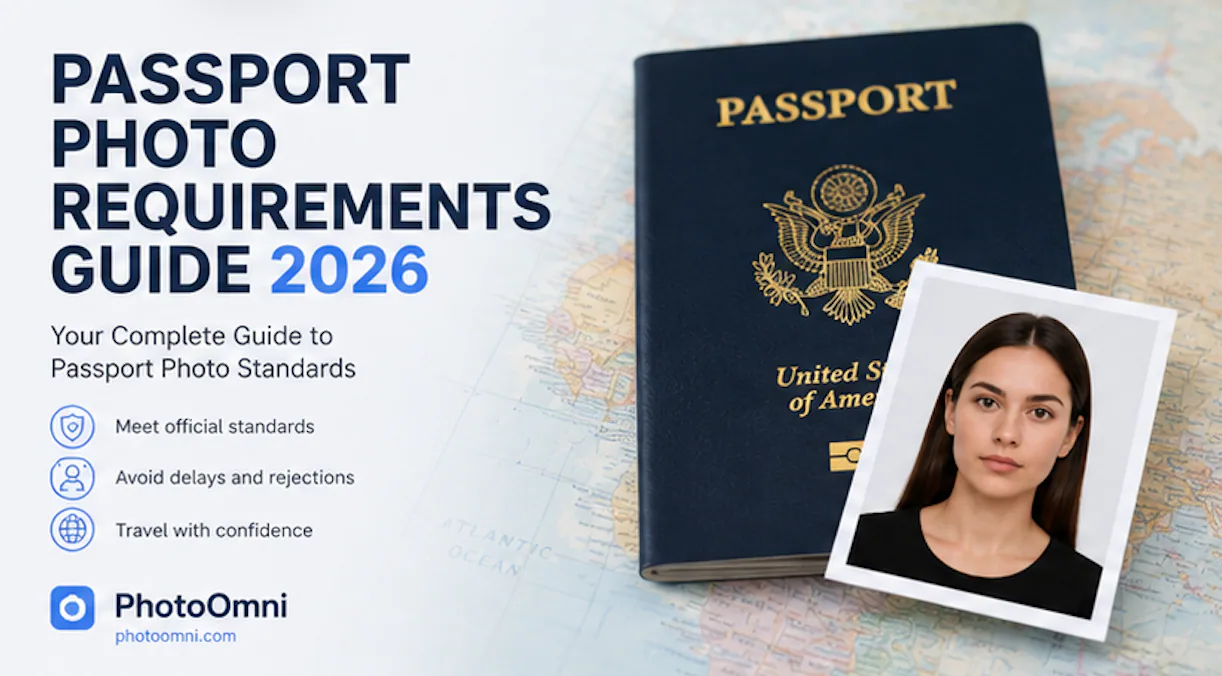
Last verified against current government guidance: September 28, 2026
Applying for a passport may seem straightforward, but one small mistake can delay the entire application process. Surprisingly, one of the most common reasons passport applications are delayed or rejected isn't missing paperwork—it's submitting a photo that doesn't meet the official requirements.
Today, more than 150 countries issue biometric passports based on standards developed by the International Civil Aviation Organization (ICAO). Although each country publishes its own passport photo specifications, most governments follow the same biometric principles to ensure photos work reliably with facial recognition systems.
If you prefer to prepare the file online, the US passport photo maker can help check the crop, background, and passport-photo format before submission.
Your passport photo must accurately represent your current appearance, meet strict technical standards, and provide enough facial detail for automated identity verification. Even something as simple as uneven lighting, an incorrect background, or a slightly tilted head can cause your application to be rejected.
The good news is that passport photo requirements are much easier to understand than many people expect. Once you know what passport authorities evaluate, it's relatively simple to produce a compliant passport photo, whether you take it at home or visit a professional studio.
This guide explains official passport photo requirements in plain language. You'll learn why these rules exist, what makes a passport photo acceptable, the most common common rejection reasons reasons, and how to check your photo before submitting your application.
Whether you're applying for your first passport, renewing an existing one, or preparing documents for international travel, understanding these requirements can save you time, money, and unnecessary delays.
Quick Answer: What Are Passport Photo Requirements?
Although exact specifications vary by country, most passport authorities require a photo that:
- Clearly shows your full face
- Uses a plain white or off-white background
- Has even lighting with no harsh shadows
- Shows a neutral facial expression
- Keeps the head centered within the frame
- Is sharp, high resolution, and correctly exposed
- Has not been digitally altered
- Matches the official dimensions required by the issuing country
- Was taken within the last 6 months in most countries
Find the Rule You Need
This page is the overview. Use the focused guides for detailed answers:
- Why passport photos are rejected
- Glasses rules for passport photos
- Hair, ears and face-visibility rules
- Accepted vs rejected passport photo examples
- Baby and infant U.S. passport photo rules
- Printing size, DPI, paper and 4×6 layout
Passport Photo Standards at a Glance
| Requirement | Typical Standard |
|---|---|
| Countries following ICAO standards | 150+ |
| Maximum photo age | 6 months |
| Recommended print quality | 300 DPI |
| Minimum digital size | 600 × 600 pixels |
| Background | White or off-white |
| File format | JPEG (digital applications) |
Although each country publishes its own technical specifications, these core requirements are shared by most governments worldwide.
Why Passport Photo Requirements Matter
A passport photo isn't simply an identification picture—it's part of one of the world's most secure identity documents.
Modern ePassports use biometric facial recognition technology to compare the photo stored inside the passport chip with the person presenting the document at border control. According to ICAO, facial recognition is the primary biometric identifier used in international travel because it offers reliable identity verification across different countries.
Unlike social media profiles or driver's license photos, passport photographs must be highly standardized. Every applicant is photographed using nearly identical rules so that biometric systems can accurately measure facial features regardless of where the passport was issued.
If your passport photo doesn't meet these standards, your application may be rejected before processing even begins. That can lead to travel delays, additional photo expenses, and the need to resubmit your application.
Spending just a few extra minutes understanding the requirements is far easier than correcting mistakes later.
What Makes a Passport Photo Acceptable?
Many people assume a high-quality selfie or professionally edited portrait will automatically satisfy passport requirements. In reality, passport authorities care far more about accuracy than appearance.
An acceptable passport photo should:
- Represent your current appearance
- Show your entire face without obstructions
- Display natural skin tones
- Use even lighting across the face
- Keep the background clean and distraction-free
- Provide sufficient detail for biometric verification
Passport photos are designed for identification—not artistic expression.
Beauty filters, AI face enhancement, skin smoothing, portrait mode, and facial reshaping may improve a photograph aesthetically, but they can also modify facial features that biometric systems rely on for identification.
The objective isn't to create your best-looking portrait. It's to produce the most accurate representation of how you look today.
Official Passport Photo Requirements Explained
Although every passport authority publishes its own specifications, nearly all evaluate the same technical categories.
These include:
- Image quality
- Lighting
- Background
- Facial positioning
- Head size
- Eye position
- Digital file quality
- Print dimensions
Understanding these categories makes it much easier to satisfy any country's passport photo requirements.
Image Quality Requirements
Image quality is one of the first aspects evaluated during passport photo review.
A compliant passport photo should be:
- Sharp
- Well focused
- High resolution
- Properly exposed
- Free from visible compression artifacts
For digital applications, many governments recommend images of at least 600 × 600 pixels, while 1200 × 1200 pixels generally provides better detail.
Printed passport photos are usually expected to be produced at approximately 300 DPI, ensuring facial features remain sharp after printing.
Avoid using:
- Screenshots
- Cropped social media photos
- Messaging app images
- Heavily compressed files
Even if these images appear acceptable on a smartphone, compression often removes the fine facial detail required for biometric verification.
A simple test is to zoom in to 200% on your face. If your eyelashes, eyebrows, or skin edges appear blurry, it's usually worth retaking the photo.
Passport Photo Lighting Requirements
Lighting is one of the most overlooked aspects of passport photography, yet it has a significant impact on biometric accuracy.
Studies by the U.S. National Institute of Standards and Technology (NIST) have shown that lighting quality directly affects facial recognition performance. Poor lighting can hide facial contours, introduce shadows, and reduce the reliability of automated identity verification.
The goal is simple:
Your face should be evenly illuminated from forehead to chin with natural skin tones and no distracting shadows.
Use Soft, Even Lighting
Natural daylight remains the easiest way to achieve compliant lighting.
The best results are usually obtained:
- between 9:00–11:00 AM
- or 2:00–4:00 PM
when sunlight is softer and less likely to produce harsh shadows.
Stand facing a large window rather than direct sunlight.
If natural light isn't available, use two identical light sources positioned at approximately 45° on either side of the camera.
This arrangement creates balanced illumination while minimizing shadows beneath the eyes, nose, and chin.
Avoid relying on a single ceiling light, which frequently produces uneven lighting and dark facial shadows.
Common Lighting Mistakes
Many passport photos fail inspection because of simple lighting problems.
Avoid:
- Strong facial shadows
- Shadows behind the head
- Overexposed highlights
- Flash reflections
- Mixed color temperatures
- Images that are too dark
A compliant passport photo should accurately represent your natural appearance without dramatic lighting effects.
Passport Photo Background Requirements
A plain background isn't simply an aesthetic preference—it plays an important role in biometric identification.
Facial recognition systems work more accurately when they can clearly distinguish your face from its surroundings. Busy backgrounds introduce unnecessary visual information that may interfere with automated facial detection.
Most passport authorities require:
- Plain white background
- Plain off-white background
- Even brightness
- No visible texture
- No furniture
- No decorations
- No other people
Standing approximately 0.5–1 meter (20–40 inches) away from the wall helps reduce shadows while keeping the background evenly illuminated.
Background Comparison
| Acceptable | Not Acceptable |
|---|---|
| Plain white wall | Wallpaper |
| Off-white backdrop | Bookshelves |
| Even lighting | Outdoor scenery |
| No shadows | Patterned walls |
| Clean surface | Furniture |
Even when AI background removal tools are available, beginning with a naturally clean background usually produces the most accurate and reliable results.
Passport Photo Face Position Requirements
Passport authorities use facial recognition technology to compare your passport photo with your appearance during identity verification. Because of this, the position of your face must follow strict biometric standards.
Your face should:
- Be centered within the frame
- Face directly toward the camera
- Remain upright without tilting
- Keep both eyes fully visible
- Show a neutral facial expression
- Keep your mouth closed
Avoid turning your head, lowering your chin, or looking slightly away from the camera. Even subtle changes in head position can affect biometric measurements.
Many countries also specify how large your head should appear in the final image.
| Country | Head Height |
|---|---|
| United States | 25–35 mm |
| Canada | 31–36 mm |
| Australia | Approximately 32–36 mm |
| New Zealand | Approximately 32–36 mm |
The image should also leave enough space above your head and around your shoulders so that the final crop meets official requirements.
Passport Photo Size Requirements
One of the most misunderstood aspects of passport photography is photo size.
Many applicants confuse the printed photo size with the digital image dimensions. Although they're related, they're different requirements.
Governments typically specify:
- Physical print size
- Digital image dimensions
- Head height
- Eye position
- Resolution
- File format
Common Passport Photo Sizes
| Country | Photo Size |
|---|---|
| United States | 2 × 2 in (51 × 51 mm) |
| Canada | 50 × 70 mm |
| United Kingdom | Digital upload or printed photo |
| Australia | 35 × 45 mm |
| New Zealand | 35 × 45 mm |
| India | 2 × 2 in (51 × 51 mm) |
| Most Schengen Visa Countries | 35 × 45 mm |
Rather than manually cropping your image, using a passport photo tool that automatically applies your country's official dimensions is usually the safest option.
Passport Photo Clothing Requirements
Many applicants ask:
"What should I wear for a passport photo?"
Fortunately, passport authorities focus on facial visibility rather than fashion.
Recommended Clothing
Choose:
- Solid-colored tops
- Dark colors that contrast with a white background
- Everyday clothing that reflects your normal appearance
Avoid:
- White shirts that blend into the background
- Camouflage patterns
- Military or police-style uniforms
- Clothing with large collars covering the neck
- Fashion scarves covering the jawline
Simple clothing helps keep the attention on your face, which is exactly what biometric systems are designed to analyze.
Passport Photo Glasses Requirements
Glasses remain one of the most common reasons passport photos are rejected.
Since 2016, the U.S. Department of State has generally required applicants to remove glasses for passport photos unless medically necessary. Many other countries have adopted similar guidance.
If glasses are permitted, they must not:
- Create glare
- Hide your eyes
- Cover your eyebrows
- Use tinted lenses
- Distort your facial features
Sunglasses are almost never accepted.
Removing your glasses before taking your passport photo is usually the safest choice.
Passport Photo Hair Requirements
Your hairstyle does not need to change for your passport photo, but your hair must not hide important facial features.
Officials should clearly see:
- Both eyes
- Eyebrows
- Nose
- Mouth
- Jawline
Long hair, beards, and mustaches are generally acceptable provided they reflect your normal appearance.
Hats, headphones, fashion accessories, and decorative headwear should be removed unless worn daily for religious or documented medical reasons.
Passport Photo Requirements for Babies and Children
Photographing infants is often more difficult than photographing adults, but most governments provide slightly more flexibility for young children.
Baby Passport Photos
The photo should:
- Show the baby's entire face
- Keep both eyes open whenever possible
- Use a plain white background
- Exclude parents, hands, toys, and blankets
Many parents place a white sheet over a mattress or car seat to create a suitable background.
Because babies move frequently, photographers often take 5–10 photos before selecting the best one.
Children's Passport Photos
Older children are generally expected to meet the same standards as adults.
They should:
- Look directly at the camera
- Maintain a neutral expression
- Keep both eyes open
- Keep their head centered
- Remain clearly visible against the background
Taking multiple photos greatly increases the likelihood of capturing one that meets official requirements.
Digital Passport Photo Requirements
Online passport renewal systems continue to expand around the world, making digital passport photos increasingly important.
Many governments require:
- JPEG format
- Color image
- Correct aspect ratio
- Minimum 600 × 600 pixels
- Appropriate file size
- Recent photograph
Depending on the country, file size limits commonly range from approximately 50 KB to 10 MB.
Submitting the wrong format or exceeding the maximum file size may result in an automatic upload error before your application is even reviewed.
Passport Photo Quality Requirements
Regardless of where your photo is taken, image quality must remain high.
A compliant passport photo should be:
- Sharp
- Properly focused
- Correctly exposed
- High resolution
- Natural in color
- Free from digital editing artifacts
Avoid:
- Screenshots
- Social media downloads
- Messaging app images
- AI beauty filters
- Portrait mode blur
When reviewing your image, zoom to 200%. If facial details appear soft or blurry, retake the photo before submitting your application.
Why Passport Photos Get Rejected
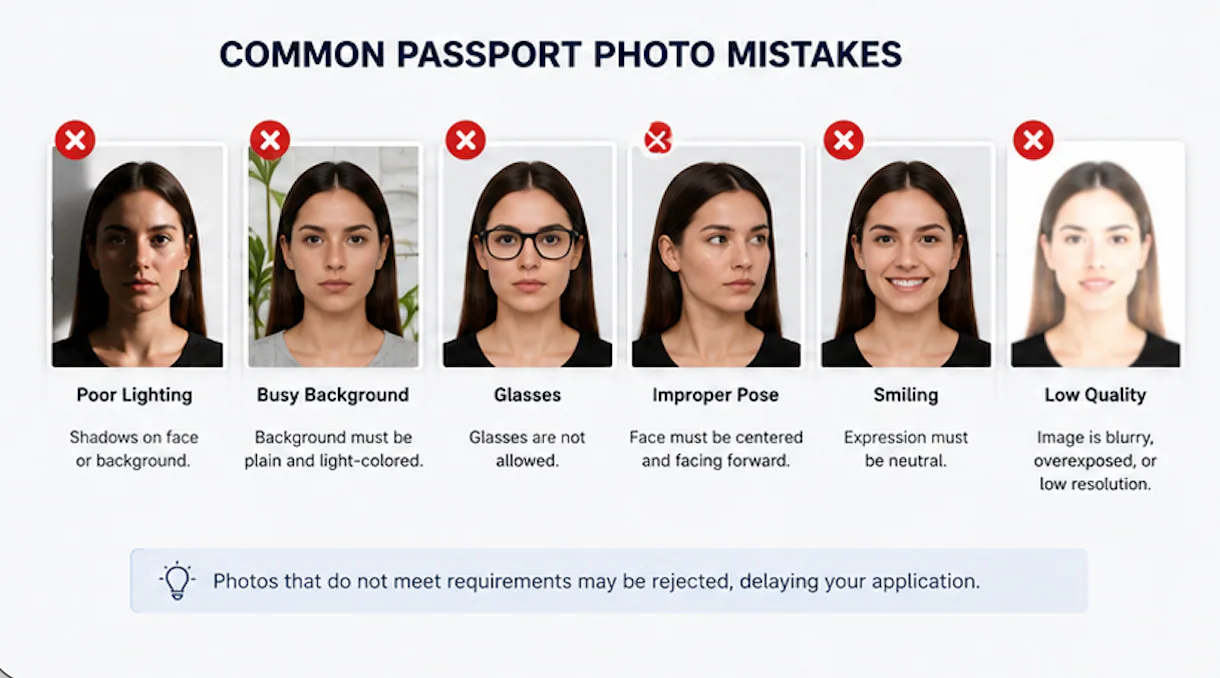
Even when applicants carefully follow the instructions, passport photos are rejected every day.
In most cases, the problem is not the camera—it is a small technical detail that doesn't meet official requirements.
Most Common Rejection Reasons
| Problem | Why It Fails |
|---|---|
| Incorrect background | Patterned wall or shadows |
| Poor lighting | Face not evenly illuminated |
| Blurry image | Motion blur or poor focus |
| Wrong size | Incorrect crop or dimensions |
| Incorrect head position | Head too large, too small, or tilted |
| Digital editing | Beauty filters or AI enhancement |
| Glasses glare | Eyes partially obscured |
| Hats or accessories | Facial features hidden |
Reviewing these issues before submission can save both time and application fees.
Passport Photo Requirements Checklist
Before uploading or printing your passport photo, complete this final review.
| Category | Checklist |
|---|---|
| Image Quality | ✔ Sharp ✔ High Resolution ✔ Natural Colors |
| Background | ✔ White ✔ No Patterns ✔ No Shadows |
| Lighting | ✔ Even Lighting ✔ No Flash ✔ No Harsh Shadows |
| Face | ✔ Looking Forward ✔ Eyes Open ✔ Mouth Closed |
| Position | ✔ Head Centered ✔ Correct Size ✔ Proper Crop |
Completing this checklist takes less than one minute, but it can significantly reduce the risk of passport photo rejection.
Country-Specific Passport Photo Requirements
Although passport photo requirements are similar worldwide, every government publishes its own technical specifications.
Quick Comparison
| Country | Size | Background | Photo Age |
|---|---|---|---|
| United States | 2 × 2 in | White | Within 6 months |
| Canada | 50 × 70 mm | White | Within 6 months |
| United Kingdom | Digital or Print | Light | Recent |
| Australia | 35 × 45 mm | White | Within 6 months |
| New Zealand | 35 × 45 mm | White | Within 6 months |
| India | 2 × 2 in | White | Recent |
Always check the latest official guidance before submitting your application.
Frequently Asked Questions
What are the official passport photo requirements?
Most governments require a recent color photo with a plain white or off-white background, proper lighting, correct head positioning, and official dimensions.
A US passport photo maker can apply these dimensions and formatting checks to the uploaded photo.
Can I take my own passport photo?
Yes. Many countries allow applicants to take passport photos at home as long as they meet all official requirements.
Does my passport photo have to be professionally taken?
No. A professional photographer is not required if your photo complies with government specifications.
Can I smile?
Most countries recommend a neutral expression with your mouth closed.
Can I wear glasses?
Usually no. Removing glasses is the safest option unless medically required.
Does my passport photo need a white background?
Yes. Most passport authorities require a plain white or off-white background.
Can I wear makeup?
Yes, provided it does not significantly change your natural appearance.
Can I wear jewelry?
Small jewelry is generally acceptable if it does not hide facial features or create reflections.
How recent should my passport photo be?
Most countries require a photo taken within the last 6 months.
What file format is accepted?
JPEG is the most commonly accepted digital passport photo format.
Can AI check my passport photo?
Yes. Modern passport photo tools can automatically analyze dimensions, background, lighting, facial positioning, and other common compliance issues. However, you should always compare the final image with your country's official requirements before submitting your application.
Final Thoughts
Passport photo requirements are designed to ensure every passport photo is clear, accurate, and suitable for biometric identity verification. To improve your chances of approval, focus on proper lighting, a plain background, correct facial positioning, image quality, and the required photo dimensions rather than camera quality alone.
Since passport photo requirements vary by country, always follow the latest guidance from your passport authority before submitting your passport application. Spending a few extra minutes reviewing your photo can help you avoid delays, extra costs, and the need to retake your passport photo.
About the Author
Emma Richardson Senior ICAO Photo Compliance Expert, PhotoOmni
Emma Richardson is the Senior ICAO Photo Compliance Expert at PhotoOmni. With 12+ years of experience, she has helped applicants achieve 820,000+ successful passport and visa photo approvals across 100+ countries and territories. She specializes in global passport photo requirements and ICAO-compliant photo verification.