Australian visa photo guide
Australian Visa Photo Requirements for ImmiAccount and Paper Applications
Australian visa photo requirements can differ by visa subclass and application channel. Use this guide to prepare a genuine photo, then verify the exact instruction in ImmiAccount or on your form before submission.
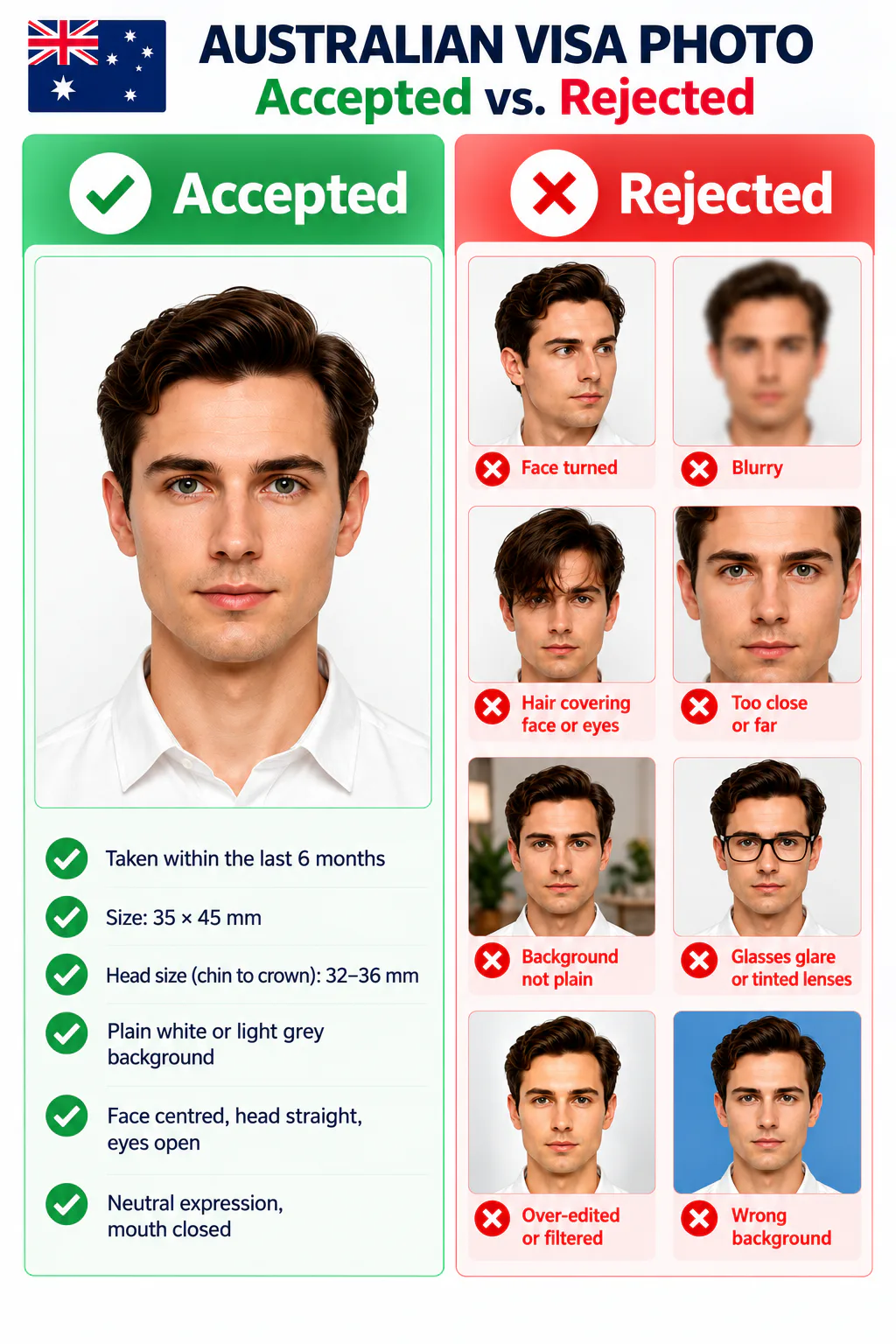
Australian visa photo: quick requirements check
There is no single photo file setting for every Australian visa. The Department's standard photo guidance is useful when your visa form or ImmiAccount request uses it; your exact application instruction takes priority.
Official source: Australian Department of Home Affairs: photo requirements
How to take a suitable Australian visa photo at home
An iPhone or other phone can provide a suitable source photo when you follow the same visible requirements as a professional photograph.
- Ask another person to take the photo at eye level; avoid close selfies and wide-angle distortion.
- Use bright, even front light and remove shadows from your face and background.
- Stand against a smooth neutral or light-grey wall with no objects, patterns, or other people visible.
- Face the camera directly with your eyes open and mouth closed; keep hair away from the sides of your face.
- Remove glasses if practical and remove accessories that obscure your face or create reflections.
- Do not use filters, portrait blur, beauty effects, face reshaping, or AI-generated edits.
Why an Australian visa photo may be rejected or need a retake
These are common visible risks. A final decision remains with the Department and the requirements attached to your visa application.
- The image is a scan, screenshot, photo of a print, or an old image that no longer shows your current appearance.
- The face is turned, poorly framed, shadowed, blurred, obscured by hair, or not clearly visible.
- The background is patterned, dark, coloured, glossy, or contains objects or another person.
- The photo uses a filter, retouching, AI face generation, or an edit that changes the applicant's appearance.
- The JPEG, file size, pixels, print dimensions, or photo count does not match the instruction for the visa route.
- A printed photo is used where a digital original is requested, or vice versa.
PhotoOmni vs. other ways to prepare an Australian visa photo
For every route, use an authentic source photo and follow the exact instruction shown for your visa subclass or ImmiAccount request.
Convenience
- PhotoOmni
- Upload from home in minutes
- Other online tools
- Usually online
- Traditional photo studios
- Requires a store visit
Application guidance
- PhotoOmni
- Digital and print route guidance
- Other online tools
- Varies by service
- Traditional photo studios
- Depends on local staff
Photo checks
- PhotoOmni
- AI pre-check plus expert review
- Other online tools
- May be basic or extra
- Traditional photo studios
- Usually retake-based
Final format
- PhotoOmni
- Digital and print-ready output
- Other online tools
- May be limited or extra
- Traditional photo studios
- Digital copy may not be included
Total price & inclusions
- PhotoOmni
- One-time fee of $5.99
- Other online tools
- Add-ons can cost $3–$10+
- Traditional photo studios
- Often $15+; files vary