Expert verified

Japan Visa Photo Online

Make a Japan visa photo online for tourist, business, student, or eVisa applications. PhotoOmni prepares a 35 × 45 mm print layout from one clear source photo.

Start with a photo

AI checkedExpert verifiedExpert refinementRefund guarantee
Japan Visa Photo Online

Photo specifications

Photo size
35 × 45 mm
Head size
32–36 mm
Background
Plain, light, and shadow-free
Photo age
Within 6 months

Japan visa photo guide

Japan Visa Photo Requirements and Size

Use this Japan visa photo tool to prepare a compliant 35 × 45 mm visa picture online. Always confirm the current Japan visa application guidance from the Japanese Ministry of Foreign Affairs.

In this guide
  1. 1. Japan visa photo requirements
  2. 2. How PhotoOmni works
  3. 3. How to take a suitable source photo
  4. 4. Common Japan visa photo mistakes
  5. 5. Japan visa photo maker comparison

Japan visa photo requirements

The requirements below cover common Japan visa photo expectations. Your issuing office may set different or additional rules, so use its current checklist as the final authority.

Number of photos
Check the current checklist for your visa type and application location
Recency
Taken within the last 6 months
Photo size
35 × 45 mm (3.5 × 4.5 cm)
Head size
32–36 mm from crown to chin
Colour and background
Recent colour photo; plain, light, shadow-free background
Lighting and positioning
Even lighting; full face centred and facing forward
Expression and clothing
Neutral expression; ordinary clothing with clear contrast from the background
Head covering and glasses
Keep the face and eyes visible; avoid glare and anything that obscures facial features
Print and digital quality
Sharp, unedited, borderless photo; use at least 300 DPI for print output
File format
JPEG or PNG when a digital upload is requested; follow the portal's file-size limit

How PhotoOmni works

Upload a photo, complete an AI and expert compliance review, then download your Japan visa photo files.

Step 1

Photo Upload

Upload one selfie or take a new photo with your phone.

Step 2

AI + expert compliance review

AI pre-checks size, framing, lighting, background, and image quality; an expert reviews the result before delivery.

Step 3

Get your Japan visa photo

Download a 35 × 45 mm Japan visa photo with a 32–36 mm head height and print-ready layout.

How to make a Japan visa photo online

Start with a clear, recent photo so the Japan visa photo editor can make an accurate crop.

  • Ask someone to take the photo at eye level rather than using a close-up selfie.
  • Use even front lighting and a plain light wall with no visible shadow.
  • Face forward with your head straight, eyes open, and a neutral expression.
  • Wear everyday clothing that contrasts with the background.
  • Remove sunglasses and avoid glasses glare, beauty filters, or portrait effects.

Common Japan visa photo mistakes

Check these common problems before you upload or print your Japan tourist visa photo.

  • The photo is older than six months or not the requested physical size.
  • The head is too small, too large, off-centre, turned, or partly obscured.
  • The background is dark, patterned, uneven, or contains shadows.
  • The image is blurry, overexposed, filtered, heavily retouched, or low quality.
  • Glasses glare, headwear, hair, or accessories obscure the eyes or face.
  • Borders, marks, watermarks, or an unsuitable file format are visible.
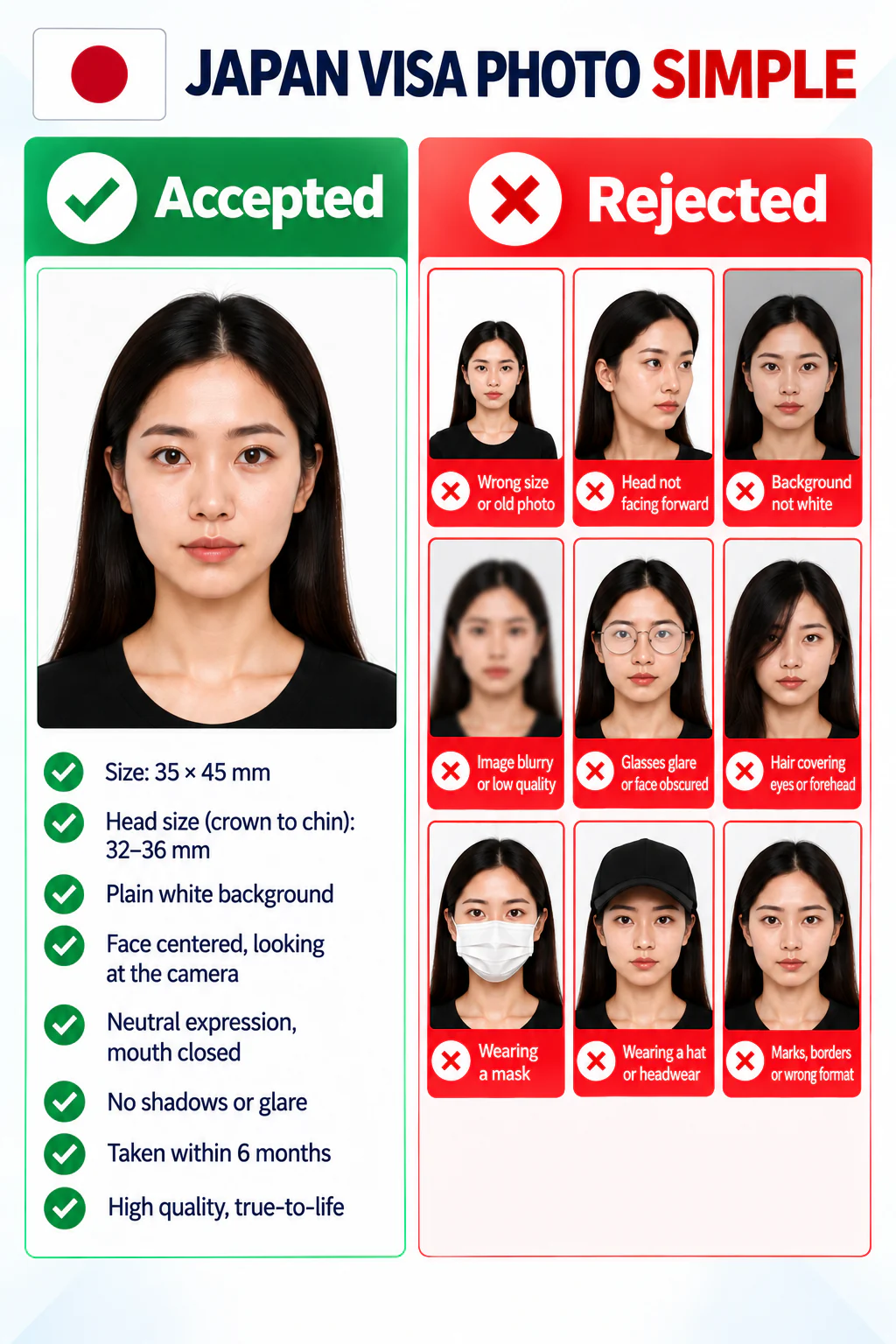
Japan visa photo guide showing acceptable composition and common photo mistakes.

PhotoOmni vs. other Japan visa photo tools

Compare an online Japan visa photo maker with generic online tools and a traditional photo studio.

  • Visa-application focus

    PhotoOmni
    Built for Japan tourist, business, student, and eVisa photo preparation
    Other online tools
    Usually a generic photo tool
    Traditional photo studios
    May not know your visa route
  • Visa-photo composition

    PhotoOmni
    35 × 45 mm layout with 32–36 mm head-height guidance
    Other online tools
    May not check head size or framing
    Traditional photo studios
    Ask for the visa-specific crop
  • Upload and print readiness

    PhotoOmni
    JPEG/PNG-ready digital file plus a 300 DPI print-ready sheet
    Other online tools
    May offer only one output type
    Traditional photo studios
    Digital copy may cost extra
  • Application-route guidance

    PhotoOmni
    Flags that embassy, consulate, and eVisa rules can differ
    Other online tools
    May not distinguish visa routes
    Traditional photo studios
    You must confirm the checklist yourself
  • Photo-quality protection

    PhotoOmni
    100% refund for eligible photo-quality rejection
    Other online tools
    Policy varies by service
    Traditional photo studios
    Policy varies by studio

Official requirements

  • Use one recent colour photo with a plain, light background and even lighting
  • Keep your full face centred, facing forward, with a neutral expression and eyes visible
  • Use a clear, unedited image without borders, filters, glare, or visible shadows

Frequently asked questions

Can I use the same photo for my Japan passport and visa?
Only if your visa application accepts the same current size, recency, background, and composition rules. Check the instructions from the Japanese embassy, consulate, or visa centre handling your application.
Does Japan eVisa accept smartphone photos?
A smartphone can provide the source image when it is sharp, evenly lit, and meets the applicable eVisa upload rules. Confirm the live instructions for your location before upload.
Can I wear makeup in a Japan visa photo?
Natural makeup is generally the safer choice. Avoid effects or editing that change your facial appearance, skin tone, or visible features.
What happens if my Japan visa photo is rejected?
Use the rejection reason to prepare a new photo that matches the required size, background, quality, and composition. PhotoOmni refunds eligible photo-quality rejections within its review scope.
Can PhotoOmni resize my Japan visa photo automatically?
Yes. PhotoOmni prepares the 35 × 45 mm print layout and guides the crop using the Japan visa photo composition requirements.
How many photos do I need for a Japan visa application?
The number can vary by visa type and application location. Check the current checklist from the embassy, consulate, or authorised visa centre.
Can I print my Japan visa photo at home?
Use the print-ready sheet only when home printing is accepted for your route. Print at the required physical size on suitable photo paper without borders.
Can I use a photo older than six months?
No. Use a recent photo taken within the previous six months so it accurately reflects your current appearance.
What's the difference between a Japan passport photo and a Japan visa photo?
They can share a 35 × 45 mm format, but the final authority is different. Visa requirements are set by the Japanese mission and may vary by application route, while passport rules are set by Japan's passport authority.

← Back to home

Real feedback from some PhotoOmni customers

I was a bit nervous because Japan's photo rules are pretty strict. Everything worked out perfectly, and my visa was approved without any photo issues.
Emily Carter
My first photo got rejected because of the background. I tried PhotoOmni, uploaded a new selfie, and it passed the first time.
Michael Turner
So easy to use! The photo requirements were super clear.
Olivia Chen

Other Japan document photos

Browse other photo types issued by Japan and choose the one that matches your application.