Expert verified

Japanese Passport Photo Online

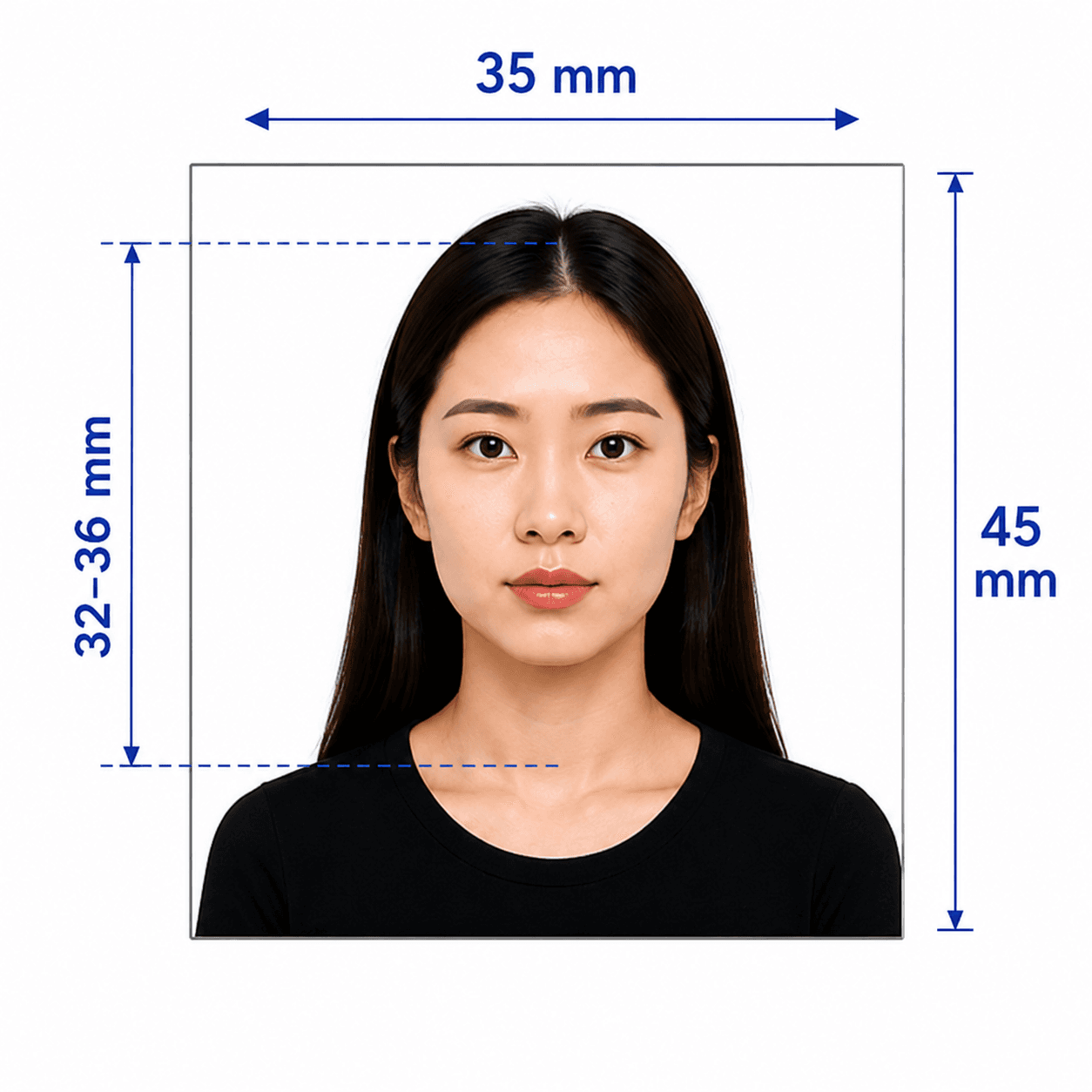
Prepare a Japanese passport photo at the official Japan passport photo size of 35 x 45 mm, with a 34 ± 2 mm face height and shadow-free plain background.

Start with a photo

AI checkedExpert verifiedExpert refinementRefund guarantee
Japanese Passport Photo Online

Photo specifications

Size
35 x 45 mm
Face height
34 ± 2 mm (32–36 mm)
Top clearance
4 ± 2 mm above the crown
Background
Plain and shadow-free; white recommended
Recency
Within 6 months

Japan passport photo guide

Japanese Passport Photo Requirements

Japan's passport photo layout is exact: the 35 x 45 mm print, face size, top clearance, background, and eye area all matter. This guide turns the Ministry of Foreign Affairs standards into a clear pre-submission checklist. See our Japan visa photo requirements guide for visa-specific guidance.

In this guide
  1. 1. Official photo requirements
  2. 2. How PhotoOmni works
  3. 3. How to take the photo at home
  4. 4. Common reasons photos are rejected
  5. 5. PhotoOmni compared with other options

Official Japan passport photo requirements

These points reflect the Japanese Ministry of Foreign Affairs passport-photo standards. Use the current official guidance and the instructions from your prefectural passport office or overseas mission as the final check.

Photo size
35 mm wide x 45 mm high, without a border
Photo age
Taken within 6 months before the application date
Face height
34 ± 2 mm from crown to chin
Top clearance
4 ± 2 mm from the top of the photo to the crown
Background
Plain and shadow-free; white is recommended. Gradients are not accepted.
Pose
Only the applicant, facing forward, without a hat, with the face outline exposed
Eye area
No hair, mask, glasses, false eyelashes, eyelash extensions, or their shadows in the area around the eyes

How PhotoOmni works

Upload a photo, complete an AI and expert compliance review, then download your Japan passport photo files.

Step 1

Upload your photo

Upload one selfie or take a new photo with your phone.

Step 2

AI + expert compliance review

AI pre-checks size, framing, lighting, background, and image quality; an expert reviews the result before delivery.

Step 3

Get a Japan passport photo, 35 × 45 mm

Download a 35 × 45 mm Japan passport photo with a 34 ± 2 mm face height, 4 ± 2 mm top clearance, and a print-ready layout.

How to take a suitable photo at home

The official layout starts with a clean source photo. Take a moment to remove the common causes of an unusable eye area or background.

  • Ask someone to take the photo at eye level; face the camera directly and keep your head straight.
  • Use even light from the front to keep the background and face free of shadows.
  • Use a plain white background where possible. Do not use a gradient or patterned wall.
  • Remove hats and keep your full face outline visible. Do not let hair cross the eye area.
  • Avoid masks, glasses, false eyelashes, and eyelash extensions if they could appear in or cast a shadow around the eyes.
  • Wear ordinary clothing and avoid photo filters, beauty effects, or editing that changes your appearance.

Common reasons Japan passport photos are rejected

The Ministry of Foreign Affairs warns that an unsuitable photo must be retaken. These are frequent problems to catch before you submit.
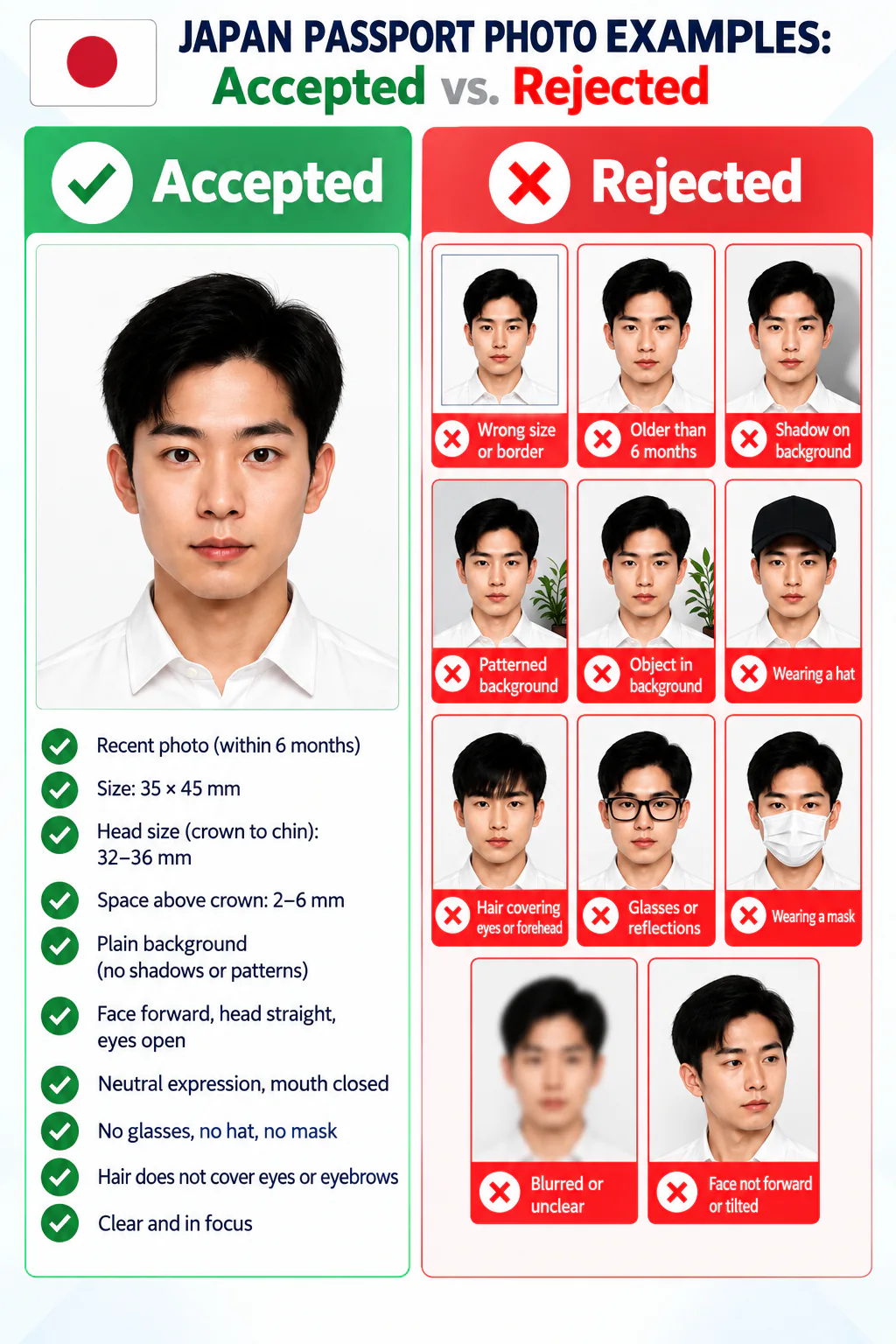
Accepted and rejected Japan passport photo examples, showing common sizing, framing, background, and accessory errors.
  • The photo is not 35 x 45 mm, has a border, or was taken more than six months before the application.
  • The crown-to-chin height is outside 32–36 mm, or the space above the crown is outside 2–6 mm.
  • The background has a shadow, a gradient, a pattern, or another visible object.
  • Someone else appears in the image, the head is turned, a hat is worn, or the face outline is obscured.
  • Hair, glasses, a mask, false eyelashes, eyelash extensions, or their shadows obstruct the area around the eyes.
  • The image is blurred, overly retouched, printed with marks showing on the front, or otherwise does not resemble the applicant's current appearance.

PhotoOmni vs. other ways to prepare a Japan passport photo

Compare the convenience, Japan-specific checks, and delivery options before choosing a photo service.

  • Convenience

    PhotoOmni
    Prepare from home
    Other online tools
    Usually online
    Photo studio
    Requires a visit
  • Japan specification coverage

    PhotoOmni
    35 x 45 mm format, framing, and background requirements
    Other online tools
    May only provide a general crop
    Photo studio
    Depends on studio experience
  • Compliance guidance

    PhotoOmni
    Checks size, background, lighting, and expression with expert review
    Other online tools
    May lack expert review or charge extra
    Photo studio
    Usually requires an in-person retake
  • Output file

    PhotoOmni
    Japan passport photo specification
    Other online tools
    File options may be limited
    Photo studio
    Digital files may cost extra
  • Rejection guarantee

    PhotoOmni
    100% refund
    Other online tools
    Policy varies by service
    Photo studio
    Policy varies by studio
  • Total price & inclusions

    PhotoOmni
    One-time fee of $5.99
    Other online tools
    Add-ons can cost $3–$10+
    Photo studio
    Often $15+; files vary

Official requirements

  • Only the applicant, facing forward without a hat, may appear in the photo
  • Use a borderless photo with a plain, shadow-free background
  • Keep the face from crown to chin within the official 34 ± 2 mm range and keep the eye area unobstructed

Frequently asked questions

Can I wear glasses in a Japanese passport photo?
The eye area must be fully visible. Hair, a mask, glasses, false eyelashes, eyelash extensions, or their shadows must not enter the area around the eyes. Choose no glasses if there is any risk of obstruction or reflection.
Can I wear a religious or medical head covering?
The standard is a photo without a hat. Japan's Ministry of Foreign Affairs may allow a head covering for religious or medical reasons when the outline of the face remains identifiable and the applicant requests the accommodation. Confirm your case with the passport office before applying.
What background should I use?
Use a plain background with no shadow. White is recommended; the Ministry of Foreign Affairs also accepts some conventional light-blue backgrounds, but does not accept gradients.
What is the Japanese passport photo size?
The standard Japan passport photo size is 35 x 45 mm, the passport photo size Japan uses for standard applications. A Japan passport size photo must also keep the face height within 34 ± 2 mm and leave 4 ± 2 mm above the crown. The same framing applies to any Japan passport picture submitted with an application.
Can I use a digital file for an online Japanese passport application?
Yes, where online application is available. For applications made in Japan, the Ministry of Foreign Affairs lists JPG files up to 600 KB. For applications made from overseas, it lists JPG, JPEG, BMP, or PNG files from 20 KB to 2 MB. Confirm the live rule for your route before uploading.
Should I write anything on the back of a printed photo?
Yes. The Ministry of Foreign Affairs asks applicants to write their name on the back, taking care that ink or pressure does not show through on the front.
What if my photo is rejected?
An unsuitable photo will need to be retaken. If a PhotoOmni result is rejected for a photo-quality issue within our checking scope, we refund 100% of your order.

← Back to home

Real feedback from some PhotoOmni customers

I used PhotoOmni for my Japanese passport renewal. The AI and expert review gave me confidence, and my application was accepted without any photo issues.
Haruto Sato
I took my passport photo at home instead of visiting a studio. PhotoOmni handled everything, and I received a compliant photo in just a few minutes.
Maria Santos
My family applied for Japanese passports together, and PhotoOmni made the process simple.
Arjun Patel

Other Japan document photos

Browse other photo types issued by Japan and choose the one that matches your application.