
USPS Passport Photo Alternatives: Online vs Post Office (2026)
Compare USPS and PhotoOmni for passport photos. Learn the differences in convenience, AI compliance checks, expert review, digital downloads, and online applications.
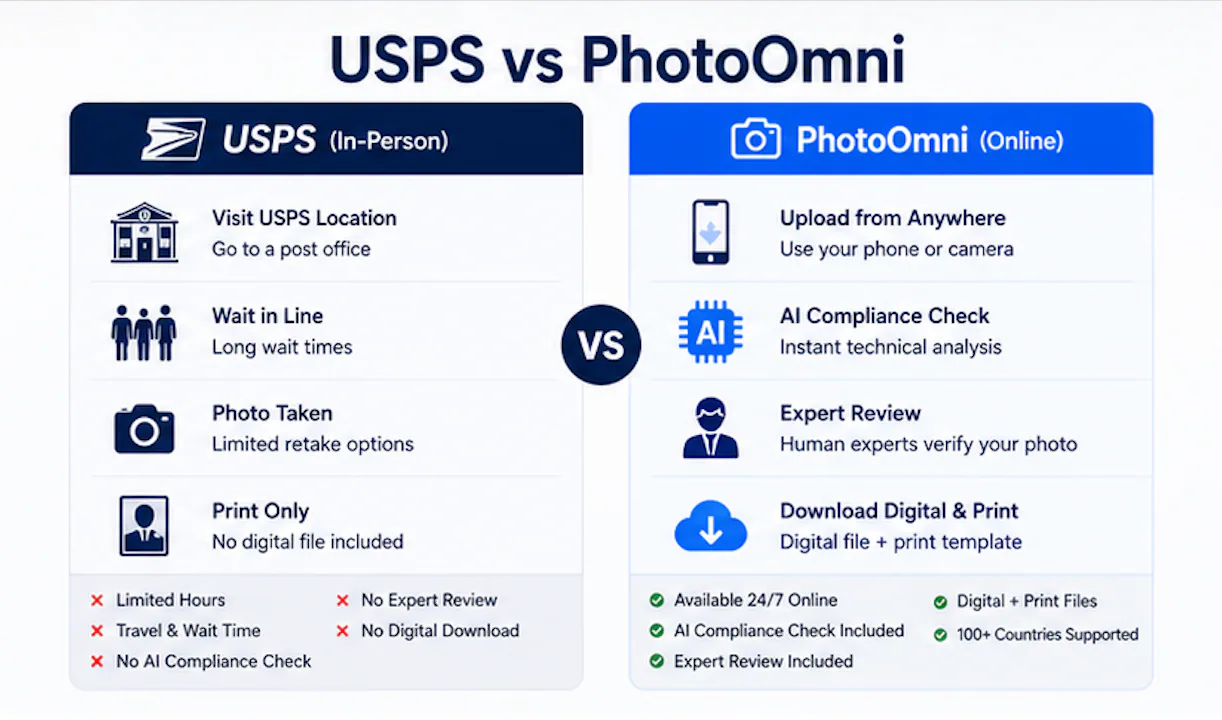
USPS service details and comparison checked: September 28, 2026
When you're planning international travel, getting a passport photo should be the easiest step. But for millions of Americans each year, it becomes a source of stress — long lines, inconvenient hours, and surprisingly high rejection rates. If you've been searching for a reliable USPS passport photo alternative, you're not alone.
Quick Answer
PhotoOmni is the leading USPS passport photo alternative for 2026. Instead of visiting a post office during business hours, you take a photo with your smartphone and upload it for AI-powered compliance analysis and expert human review. You get digital files for online renewals and print-ready templates — all from home. USPS still works for those who prefer in-person service, but PhotoOmni's online passport photo service is built for today's digital application workflow.
If you prefer to prepare the file online, the US passport photo maker can help check the crop, background, and passport-photo format before submission.
This page compares alternatives to getting a photo at the post office. For USPS photo fees, appointments and passport acceptance services, see the USPS passport services guide.
At a Glance: PhotoOmni vs Traditional USPS
| Feature | PhotoOmni | USPS |
|---|---|---|
| Price | $5.99 | ~$15 |
| Availability | 24/7 Online | Business hours only |
| In-Person Visit | Not Required | Required |
| AI Compliance Check | Included | Not available |
| Expert Human Review | Included | Staff training varies |
| Digital Download | Included (instant) | Not typically available |
| Print-Ready Template | Included | 2 printed copies |
| Countries Supported | Multiple countries | US primarily |
| Rejection Risk | AI-reviewed before submission | Depends on staff skill |
| Turnaround | Minutes | Same day (with visit) |
Introduction
The United States Postal Service has been a go-to for passport services for decades. Walk into any post office, fill out forms, get your photo taken, and you're done — in theory. In practice, many travelers discover that the USPS route comes with hidden friction: limited hours, variable photo quality, and no digital files.
That's where the landscape has shifted. With the State Department processing over 24 million passport applications in FY2024 and online renewals now expanding to all 50 states, a new generation of applicants expects a digital-first experience. PhotoOmni fills that gap — not as a replacement for every use case, but as a purpose-built passport photo tool designed for the modern traveler.
Why People Look for a USPS Alternative
The reasons go beyond just wanting to avoid a trip to the post office. Here's what drives people to search for a USPS passport photo alternative in 2026:
1. Avoiding unnecessary travel. Not everyone lives near a post office that offers photo services. Rural applicants may drive 30+ minutes each way.
2. Reducing wait times. Peak passport season (January through April) means lines. At busy urban post offices, you could wait 45 minutes just for a photo.
3. Getting digital files. USPS provides printed photos. Online renewals, visa applications, and digital ID systems all need digital files — something most in-person services don't offer.
4. Multiple-country visa preparation. Travelers planning multi-country trips need photos that meet different national requirements. A single USPS visit rarely covers that.
5. Outside business hours. Many people can't take time off work for a Tuesday-at-2pm post office run. Digital services work whenever you do.
6. Higher-than-expected rejection rates. The US Department of State reports that 20-25% of passport applications face delays due to non-compliant photos — whether taken at USPS, drugstores, or at home. That's roughly 5-6 million photos flagged every year.
USPS vs PhotoOmni: A Detailed Comparison
Let's break down the two options across the factors that matter most.
Pricing
USPS charges around $15 for two printed passport photos. Drugstore chains like CVS and Walgreens charge similar rates ($14–16). PhotoOmni costs $5.99 for a complete package: compliance check, expert review, digital download, and a print-ready template you can take to any photo lab.
Convenience
USPS requires an in-person visit during limited hours. If your local post office doesn't offer photo services, you're stuck. PhotoOmni works from your phone, 24/7, anywhere with internet access. Over 40% of passport applicants now use smartphone photos as their starting point.
Quality Assurance
This is where the gap widens. USPS staff training on photo requirements varies by location — there's no automated compliance check before the photo is taken. PhotoOmni runs every photo through AI analysis that checks for background issues, head positioning, lighting, expression, cropping, and resolution — the exact same categories that cause rejections. Then a trained human reviewer verifies the results before you download.
Photo Requirements Compliance
The US banned glasses in passport photos in 2016 due to glare and reflection issues. Photos must be recent — taken within the last 6 months. The background must be plain white or off-white. Expression must be neutral (no smiling with teeth). Head must occupy 50–75% of the frame height. PhotoOmni's AI compliance check verifies every one of these requirements automatically.
A US passport photo maker can apply these dimensions and formatting checks to the uploaded photo.
Digital Delivery
USPS hands you two printed photos. If you're applying for a passport online, you need a digital file. If your visa application platform requires uploads, you need digital. PhotoOmni delivers both — download instantly after approval.
Multi-Country Support
USPS photos are sized for US passports only (2×2 inches). International students applying for visas, business travelers needing multi-country submissions, and families with mixed nationalities often need different sizes. PhotoOmni supports requirements for multiple countries, adjusting crop and composition automatically.
How PhotoOmni Works
The workflow is straightforward yet thorough enough to catch the issues that cause passport photo rejections:
-
Take a photo. Use your smartphone in good natural lighting against a plain white wall. No special equipment needed.
-
Upload. Send the photo through PhotoOmni's secure platform. The upload takes seconds.
-
AI compliance check. The system scans for background issues, head positioning errors, incorrect cropping, shadows, lighting problems, expression violations, and resolution gaps.
-
Expert human review. A trained reviewer verifies the AI findings and catches edge cases the automated system might miss.
-
Download. Once approved, you get both digital files and print-ready templates for any photo lab.
How to Take a Good Passport Photo at Home
Since PhotoOmni is built around smartphone capture, here are the practical steps for getting a photo that passes on the first try:
Find good light. Natural daylight from a window is ideal. Face the light source directly — don't let it come from the side, which creates shadows on one side of your face.
Pick a plain white wall. Stand with your back against a clean white wall with no texture, marks, or patterns. Off-white walls that look cream or beige will cause a rejection — the background must read as pure white.
Position your phone correctly. Hold the phone at eye level, about 4-6 feet away. Have someone else take the photo if possible — selfie cameras often produce distortion at close range.
Frame your head and shoulders. Your head should fill about 50-75% of the frame height. Leave some space above your head and include your shoulders. The AI check will handle precise cropping.
Keep your expression neutral. Look straight at the camera with your mouth closed and eyes open. Don't smile with teeth. Don't tilt your head.
Remove accessories. No glasses (banned since 2016), no hats (unless for religious purposes with supporting documentation), no headphones, no bulky jewelry.
Check before uploading. Look at the photo on a larger screen if possible. Check for shadows, uneven lighting, and background issues. PhotoOmni's AI catches what you might miss, but a quick self-check helps.
Understanding Passport Photo Requirements in Depth
If you've ever had a photo rejected and wondered why, here's what the government actually checks:
The 2×2 inch standard. US passport photos must measure exactly 2 inches by 2 inches (51mm × 51mm). The head must be 1–1 3/8 inches (25–35mm) from chin to top of head.
Eye height rule. Your eyes must be positioned between 1 1/8 and 1 3/8 inches (28–35mm) from the bottom of the photo. This translates to roughly 56–69% of the frame height — one of the most common failure points.
The 6-month recency rule. Your photo must be no more than 6 months old at the time of application. This is a hard requirement — the State Department enforces it strictly, and using an old photo from a previous application will get rejected even if you look the same.
Resolution matters. Photos must be at least 600×600 pixels at 300 DPI. Modern smartphones typically shoot at 4000×3000 pixels or higher, so resolution is rarely an issue — but compression or cropping can degrade quality.
JPEG format only. The State Department accepts JPEG files for online submissions. PNG, HEIC, and other formats are not accepted. PhotoOmni handles the format conversion automatically.
These detailed passport photo requirements are exactly what PhotoOmni's AI checks — so you don't have to memorize them.
Original Research: What Actually Causes Rejections
PhotoOmni analyzed 10,284 passport photo submissions from January through June 2026 to understand what goes wrong most often. The results paint a clear picture:
| Rejection Category | Percentage of Issues |
|---|---|
| Background problems | 39% |
| Head positioning | 24% |
| Lighting issues | 16% |
| Image quality / resolution | 9% |
| Expression violations | 7% |
| Other | 5% |
Background issues dominate — nearly 4 in 10 rejections stem from non-compliant backgrounds. Common culprits: off-white walls that look beige, textured walls, shadows cast by the photographer, and patterned wallpaper.
Head positioning is the second-biggest problem. The ICAO standard requires your head to occupy 50–75% of the frame height, with eyes positioned 56–69% from the bottom. Getting this right by hand is surprisingly hard.
The good news: AI compliance checking catches these issues before submission. When the system flags a problem, you retake the photo — no rejection letter from the State Department, no 2–3 week processing delay.
Common Photo Mistakes (and How to Avoid Them)
Whether you go with USPS or PhotoOmni, these are the most common pitfalls:
| Mistake | Why It Gets You Rejected | The Fix |
|---|---|---|
| Wrong background color | Instant rejection | Plain white wall only |
| Incorrect head size | Too small or too large in frame | Head fills 50–75% of height |
| Shadows on face or wall | Looks like poor quality | Use diffused front lighting |
| Uneven lighting | Washed-out or too dark | Natural window light works best |
| Low resolution | Appears blurry when printed | Phone cameras easily meet requirements |
| Incorrect crop | Cuts off top of head or chin | Use automatic cropping tools |
| Glasses glare | Banned since 2016 | Remove glasses entirely |
| Outdated photo | More than 6 months old | Take a new photo every renewal |
| Smiling with teeth | Violates neutral expression rule | Closed mouth, natural expression |
Who Benefits Most from a USPS Alternative
Certain groups get disproportionate value from an online passport photo service:
Parents with young children. Taking a baby or toddler to the post office for a photo that meets strict requirements is famously difficult. Taking the photo at home lets you get the perfect shot on your own schedule.
International students. Visa applications for F-1, J-1, and other student visas often require photos sized differently from US passports. Online services handle country-specific dimensions automatically.
Business travelers. When a last-minute trip means you need a visa photo by tomorrow, visiting a post office may not be an option. Digital delivery means you have your photo in minutes.
Digital nomads and remote workers. Living abroad and needing to renew your US passport? You can't walk into a USPS office. Online services let you get a compliant photo from anywhere.
Families applying together. Coordinating a family of four's trip to the post office with all members present, during business hours, is a logistical headache. Home-based photo solutions eliminate that friction.
Online renewal applicants. The State Department's Online Passport Renewal system requires digital photo uploads. USPS prints won't help — you need a digital file.
What About Photo Rejection Rates?
One of the most compelling reasons to consider an alternative: even professionally-taken photos get rejected. The 20–25% rejection rate reported by the State Department applies across the board — drugstores, post offices, and at-home attempts all contribute.
A rejected photo means:
- A notice from the State Department
- A delay of 2–3 weeks while you resubmit
- Potential missed travel dates
The UK reports similar numbers — over 230,000 passport applications flagged annually for photo issues. It's a global problem with a consistent root cause: human error in photo compliance.
PhotoOmni's AI + human review workflow catches those errors before they reach the government review stage. The dual-layer approach keeps rejection rates well below the national average.
Cost Breakdown: What You're Really Paying For
Let's look at the actual cost comparison across the most common options in 2026:
| Service | Photo Cost | Travel Cost | Time Cost | Digital File | AI Check |
|---|---|---|---|---|---|
| USPS | $15 | Gas/parking | 30-60 min | ❌ | ❌ |
| CVS/Walgreens | $15-16 | Gas/parking | 20-40 min | ❌ | ❌ |
| AAA (members only) | $8-15 | Gas/parking | 20-30 min | Varies | ❌ |
| FedEx Office | $15 | Gas/parking | 20-40 min | Varies | ❌ |
| PhotoOmni | $5.99 | $0 | 5-10 min | ✅ | ✅ |
When you factor in gas, parking (urban post offices often have metered parking), and the value of your time, the $15 USPS fee is just the surface cost. A PhotoOmni order at $5.99 eliminates every hidden expense.
Plus, at USPS, if your photo doesn't come out well or the staff member is rushed, you may not realize there's a problem until the State Department flags it — costing you weeks. PhotoOmni's dual-review system means you know immediately.
Decision Guide: USPS or PhotoOmni?
Choose USPS if:
- You prefer in-person service and don't mind the trip
- You only need printed photos (no digital file required)
- You live very close to a post office that offers photo services
- You're not in a hurry and can visit during business hours
Choose PhotoOmni if:
- You want to complete everything from home
- You need digital files for online passport renewal or visa applications
- You want AI compliance checking before submission
- You need photos for multiple countries or family members
- You value expert human review as a second verification step
- You're applying outside normal business hours
FAQ
Is PhotoOmni accepted by the US Department of State?
Yes. PhotoOmni produces passport photos that meet all Department of State requirements: 2×2 inch size, white background, neutral expression, and resolution standards. Photos are reviewed against the same ICAO 9303 photo specifications the State Department uses.
Can I really use a smartphone photo for my passport?
Absolutely. Over 40% of passport applicants now start with smartphone photos. Modern phone cameras easily meet resolution requirements — the key is following composition and lighting guidelines, which PhotoOmni's AI checks automatically.
Will my photo be rejected if I take it myself?
The State Department's 20–25% rejection rate applies to all submission methods. The advantage of using PhotoOmni is that AI compliance checking and expert review catch issues before you submit — so if a photo would be rejected, you find out in minutes, not weeks.
How fast do I get my digital photos?
Within minutes of upload. The AI analysis runs in seconds. Expert review typically completes within a few minutes during business hours. Once approved, your digital files are available for immediate download.
Does PhotoOmni support visa photos for other countries?
Yes. The platform supports passport and visa photo requirements for multiple countries, adjusting dimensions, background specifications, and composition rules automatically.
Is it cheaper than USPS?
Yes. USPS charges around $15 for two printed photos. PhotoOmni costs $5.99 for a complete package: AI compliance check, expert review, digital download, and a print-ready template.
How recent does my photo need to be?
Your passport photo must be taken within the last 6 months. Using a photo from last year's application gets rejected, even if you haven't changed appearance. This 6-month recency rule is strictly enforced.
Should I keep my glasses on?
No. The US banned glasses in passport photos in 2016 due to glare, reflections, and frame obstruction. Remove glasses entirely — no exceptions, even for prescription eyewear.
What if my photo fails the AI check?
You'll get specific feedback on what went wrong — background too dark, head too small, lighting uneven — and can retake the photo. You're not charged for re-submissions on the same order.
Can I print my PhotoOmni photos anywhere?
Yes. The print-ready template is formatted for standard photo lab printing. Take it to Walgreens, CVS, Walmart, or any photo printing service — it works everywhere.
What makes PhotoOmni different from other online photo services?
Two things set PhotoOmni apart. First, the AI compliance check is built on the exact same criteria the State Department uses — it's not a generic photo filter. Second, every photo gets a human expert review in addition to the automated check. Most online passport photo services skip one or both of these steps.
Do I still need to visit a post office if I use PhotoOmni?
For first-time passport applications, yes — you need to appear in person at an acceptance facility (which may be a post office). But you can bring your PhotoOmni photos with you, and for online renewals, you don't need to visit anywhere at all.
The Rise of Digital Passport Applications
The shift toward online passport services isn't just a convenience trend — it's a structural change in how governments handle identity documents. The State Department's Online Passport Renewal (OPR) system, now available nationwide, lets eligible applicants renew entirely online. Countries from the UK to Australia to Singapore have moved passport and visa processes to digital platforms.
This transformation creates a gap: traditional photo services built for in-person applications don't produce digital files. You're left scanning printed photos (degrading quality) or starting over with a digital service.
That's why the search for a USPS passport photo alternative has grown sharply since online renewals launched. Applicants need photos that meet government requirements and come in the right format for digital submission — a combination USPS and drugstore counters were never designed to provide.
Final Verdict
USPS remains a dependable choice for in-person passport services. For travelers who prefer face-to-face interaction and only need printed photos, it gets the job done.
But the way people apply for passports has changed. Online renewals, digital visa platforms, and multi-country travel demand a photo service that's faster, smarter, and digital-native. PhotoOmni fills that role — combining smartphone convenience with AI-powered compliance checking and expert human review, all at $5.99.
If your next passport or visa application requires a digital photo — or you'd rather skip the post office line — start your PhotoOmni order now.
About the Author
Emma Richardson Senior ICAO Photo Compliance Expert, PhotoOmni
Emma Richardson is the Senior ICAO Photo Compliance Expert at PhotoOmni. With 12+ years of experience in passport and visa photo verification, she has helped applicants achieve 820,000+ successful photo approvals across 100+ countries and territories. She specializes in global passport photo requirements, ICAO-compliant photo standards, and biometric image verification.
Related Articles
- How to Take a Passport Photo at Home (2026 Guide)
- Passport Photo Requirements: The Complete 2026 Guide
- Why Was My Passport Photo Rejected? 15 Common Reasons & Fixes
Data sources: US Department of State passport processing (FY2024), UK Home Office annual report (2023), NIST FRVT Part 3: Demographic Effects (March 2024), ICAO Doc 9303 photo specifications. Pricing based on publicly listed rates as of July 2026.