
Japanese Passport Photo Requirements 2026: 35 x 45 mm Size, 32–36 mm Head Height & MOFA Background Rules
Complete Japanese passport photo requirements for 2026: 35×45mm size, 32–36mm head height, MOFA background rules, glasses policy, and online application specs.
Quick Answer
If you prefer to prepare the file online, the Japanese passport photo maker can help check the crop, background, and passport-photo format before submission.
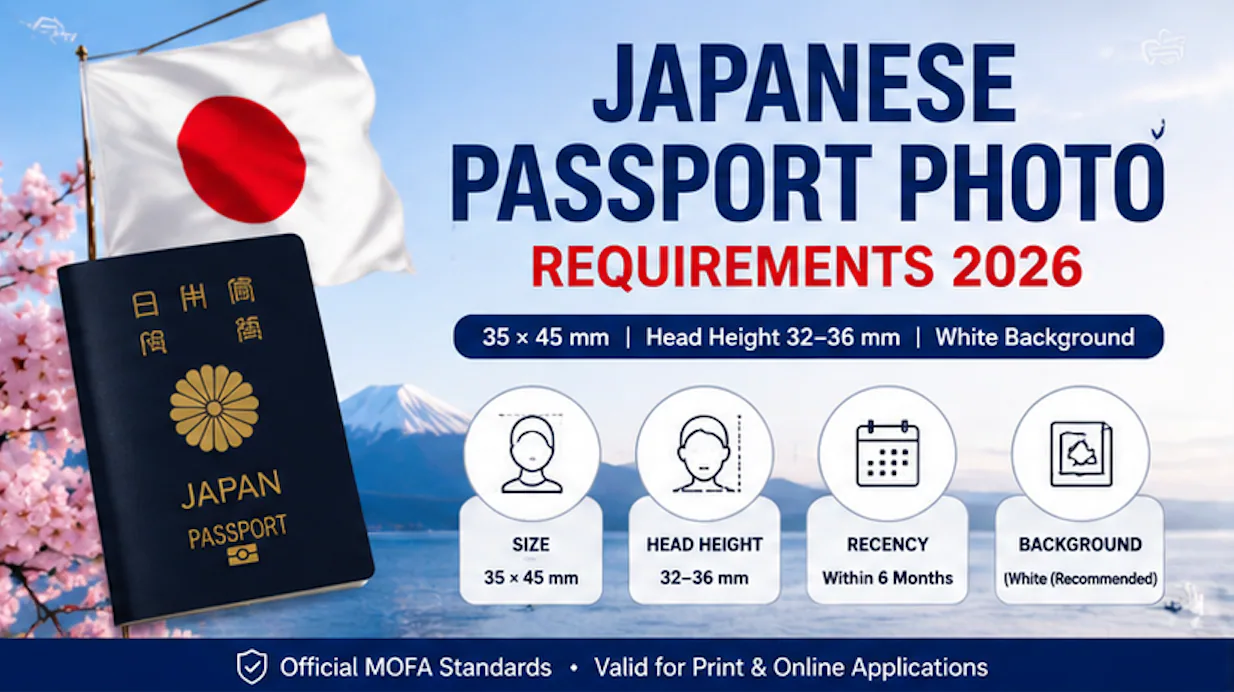
Size: 35 mm × 45 mm. Head height: 32–36 mm (chin to crown). Background: plain, light-colored, white recommended. Validity: taken within the last 6 months. These four numbers cover roughly 90% of what fails a Japanese passport photo.
| Question | Short answer |
|---|---|
| Japan passport photo size | 35 mm wide × 45 mm tall, borderless |
| Head height | 34 mm ± 2 mm → 32–36 mm range |
| Background color | Plain, light-colored; white recommended |
| How recent must it be | Taken within 6 months of application |
| Same as visa photo? | Same print size, but different head-height ratio (~27–32 mm for visa) |
| Glasses allowed? | Removal recommended since 2024; if worn, no glare and frames must not cover eyes |
| Can I upload it online? | Yes — JPG up to 600 KB (domestic) or JPG/JPEG/BMP/PNG 20 KB–2 MB (overseas) |
Everything below is sourced to the Ministry of Foreign Affairs (MOFA) specification sheet and cross-checked against Japanese embassy PDF guidance.
1. Official Specification Table
| Parameter | Requirement |
|---|---|
| Print size | 35 mm wide × 45 mm tall (縦45mm×横35mm) |
| Head height (crown to chin) | 34 mm ± 2 mm → 32–36 mm range |
| Top margin (photo edge to top of hair) | 2–6 mm |
| Border | None (borderless print) |
| Background | Plain, light-colored, no shadow/pattern/gradient/objects; white recommended |
| Color | Color only (black-and-white generally not accepted for passport route) |
| Recency | Taken within 6 months of application |
| Expression | Neutral, mouth closed, both eyes open |
| Eyewear | Removal recommended since 2024 update; if worn, no glare, frames must not cover eyes/eyebrows |
| Head coverings | Not permitted except for daily religious wear |
| Online domestic upload (in Japan) | JPG, up to 600 KB |
| Online overseas upload (outside Japan) | JPG / JPEG / BMP / PNG, 20 KB – 2 MB |
| Digital pixel spec (MynaPortal-linked applications) | ~600 × 730 px (different aspect ratio from the 35×45 print) |
Source hierarchy for these numbers: MOFA's passport photo standards page, MOFA's application-document guidance, and Japanese embassy-published photo-spec PDFs, which state the figures in both Japanese and English (e.g., "頭頂からあごまでが34±2mm" / "From the top of your head to your jaw must be 34±2mm").
A Japanese passport photo maker can apply these dimensions and formatting checks to the uploaded photo.
2. Passport vs. Visa vs. My Number Card: Don't Reuse the Crop
This is the most common mix-up in this topic — three different Japanese official-document photos, three different specs.
| Passport | Visa | My Number Card (マイナンバーカード) | |
|---|---|---|---|
| Print dimensions | 35 × 45 mm | 35 × 45 mm (some consulates list 45×35, same physical size, different notation order) | Submitted larger, then reduced to 2.75 cm × 2.20 cm on the card itself |
| Head height | 32–36 mm | ~27–32 mm (roughly 60–70% of frame) | Different official spec, governed by a separate agency (digital agency's My Number Card portal, not MOFA) |
| Background | White recommended | White recommended; some consulates accept blue | Plain background, no MOFA involvement |
| Reused across routes? | Not automatically | Not automatically | Not automatically — different issuing authority, different spec sheet entirely |
Takeaway: the passport and visa share the same 35×45 mm outer print size but different head-height ratios, so a crop made for one will typically fail the other's face-ratio check. The My Number Card photo is governed by an entirely separate spec (published by Japan's Digital Agency, not MOFA) and is reduced to a different final size on the card — treat it as an unrelated document, not a substitute.
3. Where to Get a Japanese Passport Photo Taken
In Japan:
- Self-service ID photo booths (証明写真機) at train stations, convenience stores, and shopping centers — select the passport (パスポート) setting, not a generic ID setting, since head-ratio presets differ by document type.
- Photo studios (写真館) and camera shops offer staff-assisted passport photos and will typically guarantee compliance.
- Some convenience store photo-printing kiosks support printing a digitally-corrected image at the correct 35×45 mm scale if you already have a compliant digital file.
Near me (outside Japan):
- Japanese Embassies and Consulates General generally do not take the photo themselves — you bring a completed photo to the application counter.
- Local passport-photo services, pharmacies, and photo studios in your country can produce a 35×45 mm print if you specify "Japanese passport photo spec," not the generic local passport size (many countries default to a different size or head ratio).
- A phone photo plus a compliant online cropping/print tool is an accepted path for the print copy, provided the final measurements match Section 1's table exactly.
DIY printing cost: consumer photo-ID printing services in Japan that output to convenience-store multi-copy printers price a passport-size print at roughly ¥30 per sheet (typically 4 photos per sheet) once the digital crop is prepared.
4. How to Take a Compliant Photo at Home
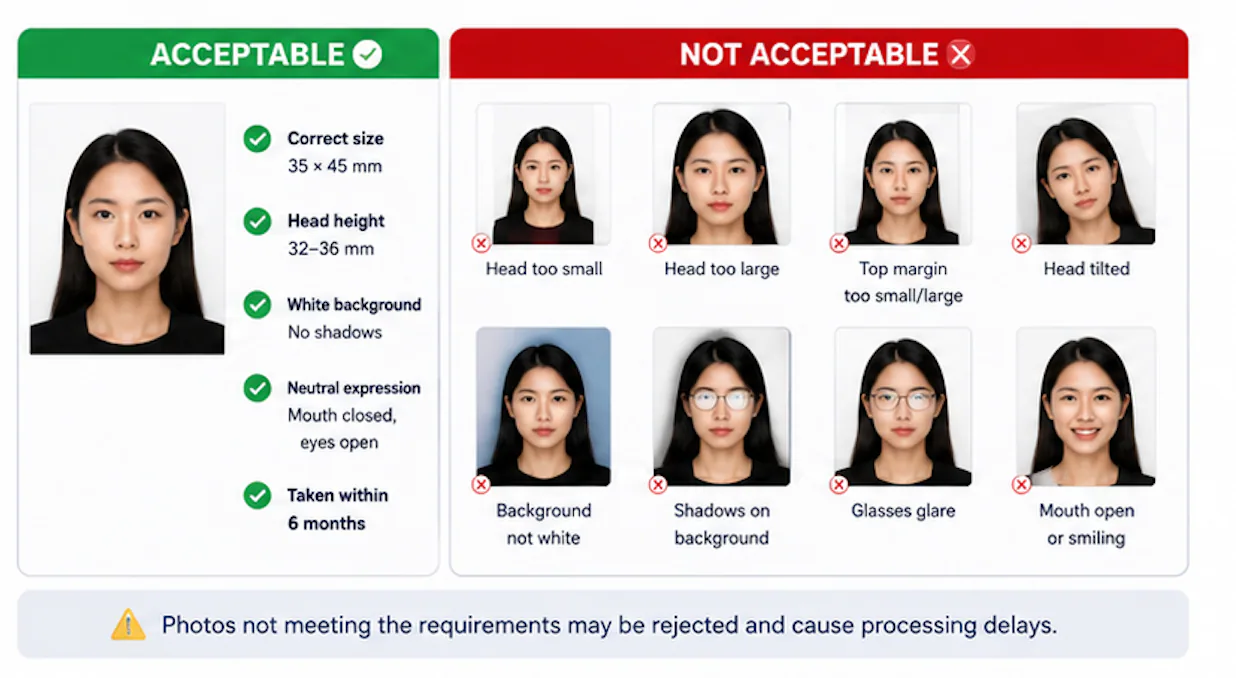
| Step | Spec to hit |
|---|---|
| Camera distance | Front camera: 40–50 cm from face. Rear camera: 1–2 m. |
| Orientation | Straight-on, portrait mode off, no head tilt |
| Lighting | Even, daylight or diffused indoor light; no shadows on face or background |
| Background | Plain, light, shadow-free wall or backdrop |
| Framing check | Head height must fall inside 32–36 mm once printed at true 35×45 mm scale |
| Output | Export/print at 100% scale; verify with a physical ruler before submission — scaling errors during home printing are a common, avoidable rejection cause |
| Print paper | Glossy or matte photo paper is acceptable for the print itself; MOFA's stated requirement is a clear, undamaged, high-resolution print rather than a specific paper finish |
| Home printer setting | Print at the source resolution/100% scale setting rather than "fit to page" — "fit to page" is the most common cause of a 35×45 mm crop coming out oversized or undersized on paper |
A tripod or a second person to hold the phone level is recommended; selfies at arm's length distort proportions and commonly push the top-margin measurement (2–6 mm) out of range.
5. Special Cases: Infants, Elderly, and Applicants Needing Assistance
These are documented on Japanese prefectural passport-office pages (Kanagawa, Shizuoka, Gunma, Saitama) as extensions of the standard MOFA spec — not a separate rulebook, but specific accommodations within it.
Infants and round-faced young children — the 32 mm floor can flex:
- If fitting the standard 32 mm minimum head height would cut the ears or sides of the face out of the frame (common with round infant faces), the head height is allowed to fall below 32 mm, as long as the entire face including both ears fits within the frame width. Width takes priority over the height minimum in this specific case.
- Both eyes must be open — a closed-eyes photo is rejected regardless of age.
- Only the applicant may appear in the photo. Accepted workarounds: lay the infant on a plain, light-colored sheet or futon and shoot straight down from directly above; or have a person hold the infant, provided no part of the assistant's body — hands included — appears in frame or on the child's face.
Elderly applicants or those unable to sit/stand unassisted:
- Same rule as above on assistants: no part of an assistant's body may be visible in the frame.
- Eyes must not be closed; motion blur from head movement is a listed rejection cause, same as for any applicant.
- If the applicant cannot hold a seated position, prefectural guidance explicitly allows photographing the person lying on a plain, pale/white sheet, shot from directly overhead — this is an accepted alternative to a standard seated portrait, not a workaround you have to request permission for.
- If a wheelchair, medical tubing, or similar equipment would otherwise be visible in frame, it must be cropped or positioned out of shot — visible equipment is listed as a specific unsuitable-photo condition.
Naturalized citizens / first-time adult applicants: the photo specification itself does not differ by applicant category in the published MOFA standard; the differences for naturalized citizens are in supporting documents (family register, certificate of naturalization), not the photo.
6. Why the 2024 Glasses Rule Exists
MOFA's spec update did not ban glasses outright — it moved from "allowed" to "removal recommended," and lens glare, colored lenses, and frames covering the eyes are separately listed as explicit unsuitable-photo conditions across MOFA and prefectural guidance.
The reasoning cited by photography-industry sources tracks two things that changed independently of the photo rule itself:
- Automated facial-recognition immigration gates. Japan, like most countries, has expanded automated e-gate border control that matches the live camera image to the passport photo algorithmically rather than relying solely on a human officer. Glasses are technically compatible with this matching, but lens glare or reflection is a real failure mode for the match.
- The underlying biometric standard predates this and is bigger than Japan. Japan's IC passport photo requirement itself traces back to ICAO's 2003 decision to standardize facial image as the mandatory biometric data point on machine-readable passports, adopted globally in the wake of post-2001 security tightening — glasses-related image-quality issues are a downstream compliance detail of that older standard, not a new 2024 policy goal.
Practical takeaway: glasses are not prohibited, but a glare-free glasses photo is genuinely harder to produce reliably at home than a no-glasses photo, which is the actual reason removal is now the recommended default.
7. File-Format Pitfalls for Online Applications
| Issue | Fix |
|---|---|
| iPhone default format is HEIC | MOFA's accepted formats are JPG (domestic) or JPG/JPEG/BMP/PNG (overseas) — convert HEIC to JPG before upload |
| File exceeds domestic 600 KB cap | Re-export at slightly lower JPEG quality; do not resize below the required pixel dimensions to hit the cap |
| Wrong aspect ratio submitted | The ~600×730 px digital spec has a different aspect ratio from the 35×45 mm print — don't reuse the print crop file as-is for online upload without re-checking proportions |
| Photo older than 6 months reused from a previous application | Not accepted — recency is checked against the application date, not the previous issuance date |
8. If Your Photo Is Rejected — What Happens Next
- At a counter/window application: staff check the photo at submission. If it doesn't meet spec, or if your appearance has changed significantly from your last passport photo, you're typically asked to bring a corrected photo before the application can proceed — some offices allow this at a nearby booth the same visit, but this isn't guaranteed everywhere.
- On an online application: an unsuitable photo triggers an on-screen error at upload rather than a delayed rejection — you fix the specific issue flagged and re-upload immediately. There's no separate "resubmission period"; it's corrected within the same session.
- If online upload keeps failing (repeated errors, not a one-time fix): switching to an in-person counter application is the standard fallback, particularly if you're on a deadline — MOFA support and prefectural offices both point people toward the physical route when the online path stalls.
- Processing time impact: a rejected photo at the counter simply delays the submission, not the standard processing window once a valid application is accepted — domestic processing is generally about 2 weeks from a complete, accepted application, not from your first attempt.
9. Common Rejection Reasons
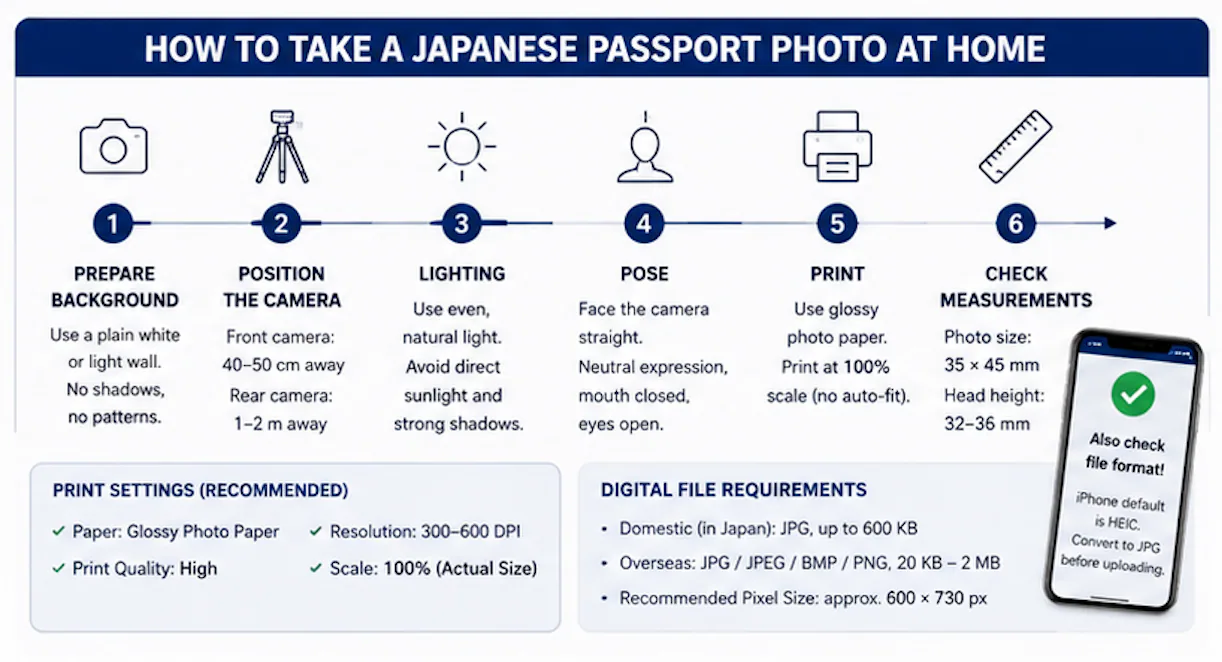
- Head tilt (even slight) — face must be perfectly straight
- Head height outside the 32–36 mm window
- Shadows on the background, especially behind the head or near the shoulders
- Hair covering eyes or eyebrows
- Glare on eyeglass lenses, or colored/tinted lenses
- Mouth not fully closed, or eyes not fully open
- Home-printed photo scaled incorrectly (not true 35×45 mm) — most often from a "fit to page" print setting
- Wrong file spec used for the wrong submission route (domestic vs. overseas online rules differ)
- HEIC file uploaded directly from iPhone without converting to JPG first
- Assistant's hand, arm, or body visible in frame (infant and assisted-applicant photos)
10. How Japan Compares to Other Countries (35×45 mm Is Common, Not Universal)
| Country/Region | Passport photo size | Head height | Background |
|---|---|---|---|
| Japan | 35 × 45 mm | 32–36 mm | White recommended |
| United Kingdom | 35 × 45 mm | ~29–34 mm | Light grey/cream (not white) |
| Schengen/EU | 35 × 45 mm | ~32–36 mm (varies by state) | Light grey or white, varies by country |
| South Korea | 35 × 45 mm | Similar range to Japan | White |
| United States | 2 × 2 in (51 × 51 mm) | Head 50–69% of frame | White or off-white |
| Canada | 50 × 70 mm | 31–36 mm | White or light grey |
| China | 33 × 48 mm | — | White |
Key point: 35×45 mm is the most widely used passport photo footprint globally, shared by Japan, the UK, the Schengen area, Australia, and South Korea — but the exact head-height ratio and background color still vary by country. A photo cropped for one 35×45 mm country does not automatically pass in another. Never reuse a US-format (2×2 in / 51×51 mm) photo for a Japanese application — the aspect ratio itself is wrong (square vs. portrait).
11. What Happens to Your Photo — IC Chip and Biometric Data
Since Japan's 2025-format passport rollout, the photo page itself is plastic with an embedded contactless IC chip, and the chip stores the passport's core data plus a facial image extracted from your submitted photo.
Two verifiable facts, kept separate from speculation:
- What's stored: Japan's IC passport records facial image only as biometric data — Japan did not additionally adopt fingerprint or iris data, which ICAO's 2003 standard left optional per country.
- Why a chip at all: the chip and biometric photo requirement exists specifically to make the passport harder to forge or use under a false identity, a standard that accelerated internationally after 2001.
FAQ
What is the exact size for a Japanese passport photo? 35 mm wide × 45 mm tall, borderless, with the head measuring 32–36 mm from chin to crown.
Where can I get a Japanese passport photo taken in Japan? Self-service ID photo booths at train stations and convenience stores (select the passport-specific setting), or a photo studio/camera shop for staff-assisted shooting.
Where can I get Japanese passport photos taken near me? Outside Japan, most passport-photo services, pharmacies, and photo studios can produce a compliant print if you specify the Japanese passport spec (35×45 mm, 32–36 mm head height) rather than your country's default passport size.
What is the required background color for Japanese passport photos? Plain and light-colored, with white officially recommended by MOFA. The background must be free of shadows, patterns, gradients, or objects.
How do I take a Japanese passport photo at home with the correct dimensions? Position the camera 40–50 cm away (front camera) or 1–2 m away (rear camera), shoot against a plain light background with even lighting, then crop and print at true 35×45 mm scale — verify the final print with a ruler, since head height outside 32–36 mm is one of the most common rejection reasons.
Make a Compliant Photo Online
Matching all of the specs above by hand — 35×45 mm print size, 32–36 mm head height, correct background, correct file size for domestic or overseas upload — is where most rejections happen. PhotoOmni lets you create a Japanese passport photo online(/en/documents/japan/passport-photo): upload or take a photo, and it crops, resizes, and adjusts the background to the MOFA spec automatically, with export options for both the printed 35×45 mm copy and the online-application file.
Sources
- Ministry of Foreign Affairs of Japan — passport photo standards and application-document guidance (updated March 2025)
- Japanese embassy-published photo specification PDF (bilingual JP/EN spec sheet)
- MOFA online-application photo upload notes (domestic vs. overseas file rules)
- Prefectural passport office guidance (Kanagawa, Shizuoka, Gunma, Saitama) on infant, elderly, and assisted-applicant photo accommodations
- Japanese consular guidance on IC passport biometric data (facial-image-only standard, ICAO 2003)
- Japan Digital Agency / My Number Card portal photo specification (for the passport-vs-My-Number-Card comparison)
About the Author
Emma Richardson Senior ICAO Photo Compliance Expert, PhotoOmni
Emma Richardson is the Senior ICAO Photo Compliance Expert at PhotoOmni. With 12+ years of experience in passport and visa photo verification, she has helped applicants achieve 820,000+ successful photo approvals across 100+ countries and territories. She specializes in global passport photo requirements, ICAO-compliant photo standards, and biometric image verification.
Related Articles
- How to Take a Passport Photo at Home (2026 Guide)
- Passport Photo Requirements: The Complete 2026 Guide
- Why Was My Passport Photo Rejected? 15 Common Reasons & Fixes
Data sources: US Department of State passport processing (FY2024), UK Home Office annual report (2023), NIST FRVT Part 3: Demographic Effects (March 2024), ICAO Doc 9303 photo specifications. Pricing based on publicly listed rates as of July 2026.