Make a 35x45 Photo Online

Make a 35x45 photo online from a clear portrait. PhotoOmni crops and resizes your photo to 35 × 45 mm (3.5 × 4.5 cm), prepares a white background, and combines AI checks with expert review. Get a digital JPEG and a print-ready sheet for passport, visa or ID uses that accept this preset.

Start with a photo

AI checkedExpert verifiedExpert refinementRefund guarantee
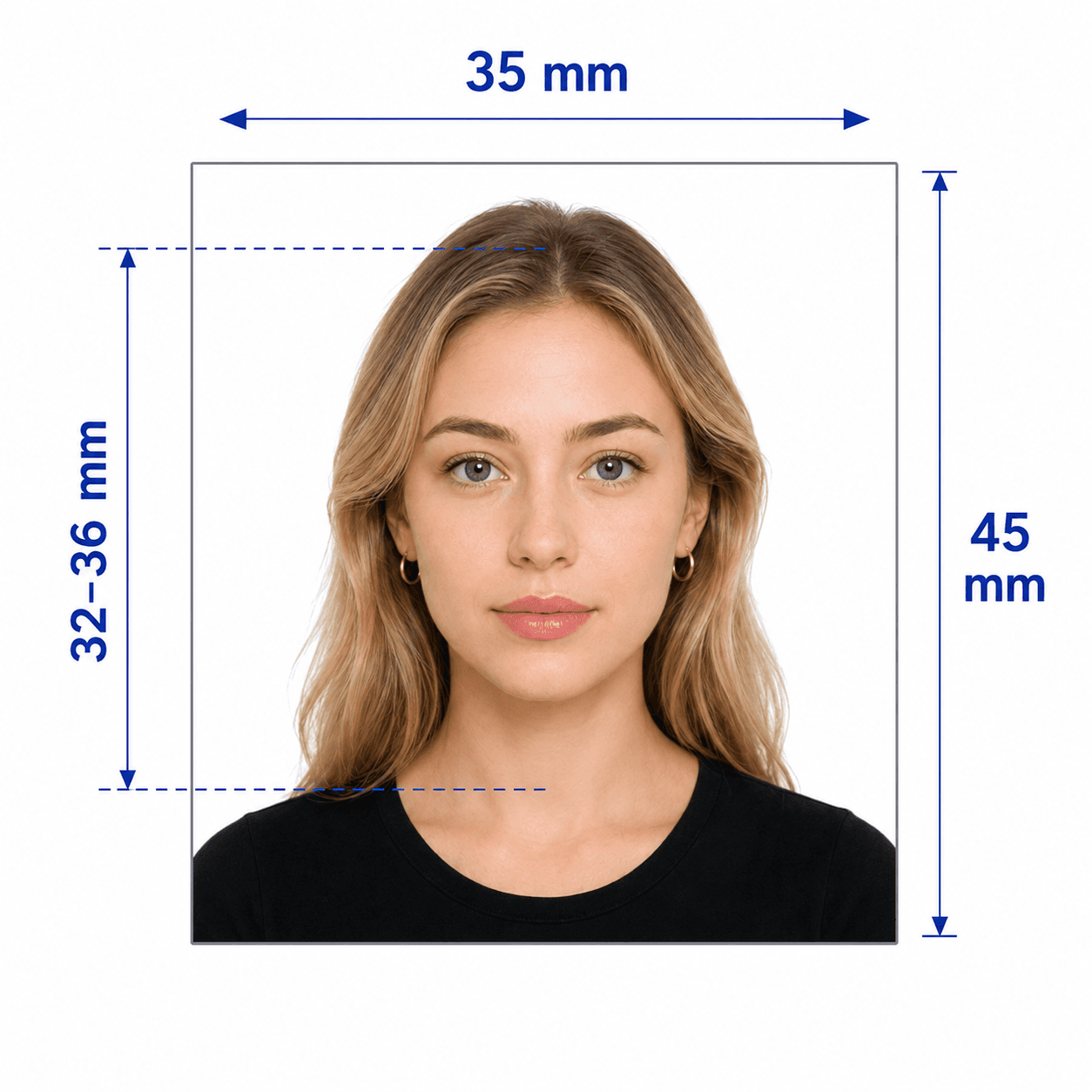
35x45 mm photo size example

Photo specifications

Photo size
35 mm wide × 45 mm high
Centimeters
3.5 × 4.5 cm
Inches
Approx. 1.38 × 1.77 in
Aspect ratio
7:9 portrait
Output
413 × 531 px JPEG at 300 DPI
Generic preset
White background; head height 32–36 mm

How PhotoOmni Works

Get your document photo in just three simple steps.

  1. Upload a portrait

    Use your phone or computer; no app installation needed.

  2. Crop, check and review

    Prepare the 7:9 crop, white background and head placement, with AI checks and expert review.

  3. Download and print

    Get a 413 × 531 px JPEG and print-ready sheet; print at actual size.

35x45 photo guide

35x45 Photo Size, Requirements & Printing

Use this 35x45 photo editor for a generic white-background print preset. A size match alone does not guarantee acceptance for a particular passport, visa or ID card.

35x45 photo size in mm, cm, inches and pixels

Pixel conversions are rounded. The 600 DPI row is a reference conversion, not a second download option.

Photo size
35 mm wide × 45 mm high
Centimeters
3.5 × 4.5 cm
Inches
Approx. 1.38 × 1.77 in
Aspect ratio
7:9 portrait
Output
413 × 531 px JPEG at 300 DPI
Generic preset
White background; head height 32–36 mm
600 DPI
≈ 827 × 1063 px

How to take a 35x45 photo at home

Start with a sharp original portrait.

  • Face the camera with eyes open and mouth closed.
  • Use a sharp color photo with even lighting and no filters.
  • Leave space around your full head and shoulders.
  • Check the issuing authority’s background, head size and recency rules.
  • Choose the specific document page if its requirements differ from this generic preset.

Common reasons a 35x45 photo is rejected

Check more than the outside dimensions.
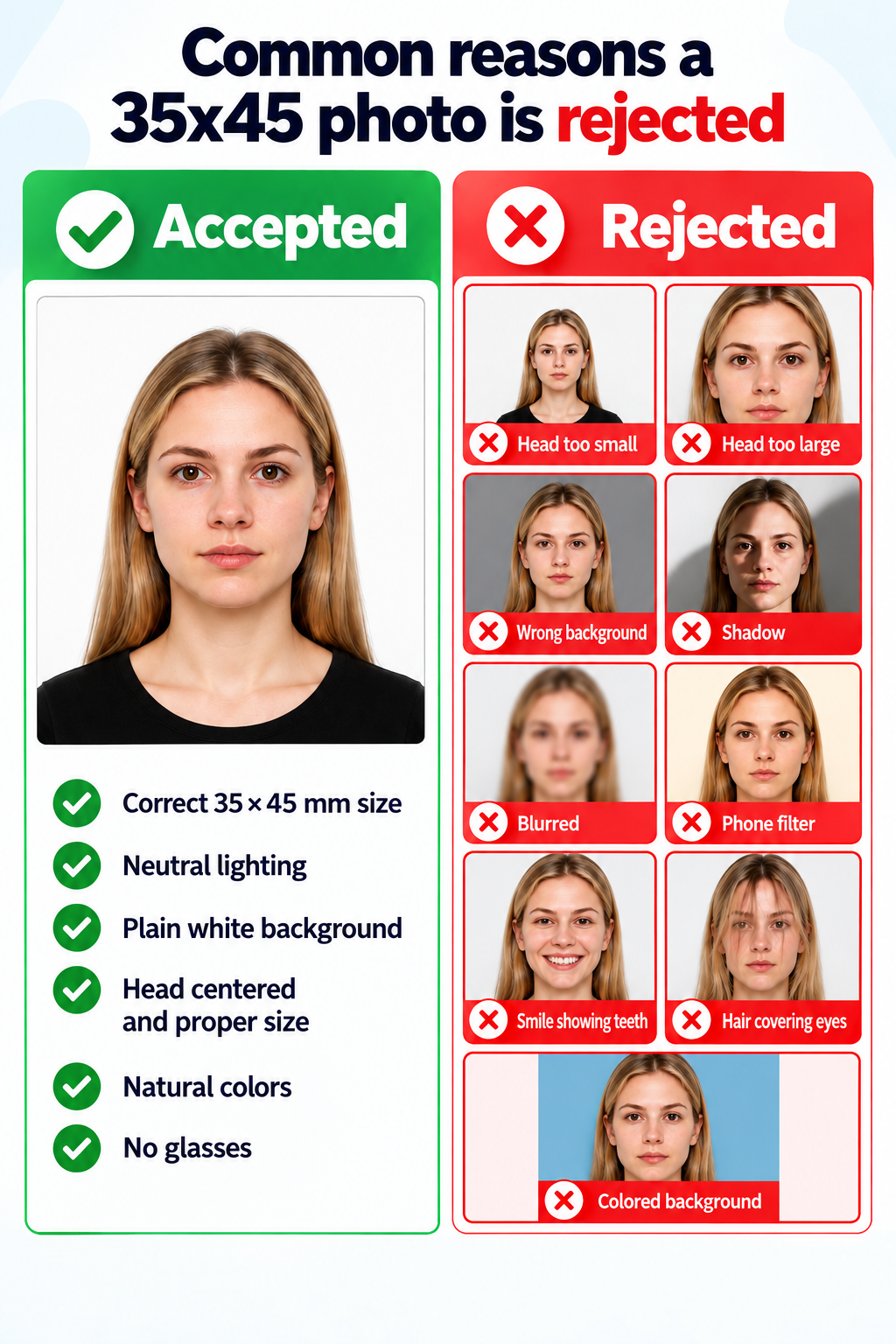
Accepted and rejected 35x45 photo examples: head size, background, shadows and image quality
View full-size image
  • Wrong head size or background for the chosen document.
  • Blur, shadows, filters or an outdated photo.
  • Printing with scaling that changes the physical dimensions.

PhotoOmni, crop tools and studios

Compare the available preparation and review options.

  • Convenience

    PhotoOmni
    Upload from home in minutes
    Other online tools
    Usually online
    Traditional photo studios
    Requires a store visit
  • Peace of mind

    PhotoOmni
    AI pre-check plus expert approval
    Other online tools
    May lack expert review or charge extra for it
    Traditional photo studios
    Depends on local staff
  • Expert adjustments

    PhotoOmni
    Included when needed
    Other online tools
    Varies by service
    Traditional photo studios
    Usually retake-based
  • Ready-to-use files

    PhotoOmni
    Digital photo plus print-ready sheet
    Other online tools
    May be limited or extra
    Traditional photo studios
    Digital copy may not be included
  • Rejection protection

    PhotoOmni
    100% refund for photo-caused rejection
    Other online tools
    Policy varies
    Traditional photo studios
    Policy varies by shop
  • Total price & inclusions

    PhotoOmni
    One-time fee of $5.99
    Other online tools
    Add-ons can cost $3–$10+
    Traditional photo studios
    Often $15+; files vary

Frequently asked questions

What is the exact size of a 35x45 photo?
It is 35 mm wide and 45 mm high: 3.5 × 4.5 cm, or approximately 1.38 × 1.77 inches. The portrait aspect ratio is 7:9.
How do I convert a photo to 35x45 mm?
Upload a clear portrait. PhotoOmni crops it to 7:9, resizes the output and prepares the background. Avoid stretching a photo to fit; preserve natural facial proportions.
What is the 35x45 photo size in pixels?
At 300 DPI, 35 × 45 mm is approximately 413 × 531 pixels; at 600 DPI it is approximately 827 × 1063 pixels. This tool delivers the 300 DPI preset. Pixel dimensions for online applications depend on the portal. For the conversion table, aspect ratio and printing tips, see our 35×45 mm photo size guide.
How do I crop a photo to 35x45?
Use a 7:9 portrait crop with the full head centered and shoulders visible. This preset targets a 32–36 mm head height. Check your document’s rules before submitting.
Can I make a 35x45 photo on my phone without an app?
Yes. Open PhotoOmni in your iPhone or Android browser and upload a well-lit portrait. Ask someone to take the photo at eye level, or use a timer.
Can I make a 35x45 photo online free?
Check PhotoOmni’s current pricing before ordering. Expert-reviewed files and print services are paid products; this page does not promise a free final download.
How do I make a 35x45 photo with a white background?
Upload an evenly lit portrait and use this white-background preset. If your application requires cream, light grey or an unedited background, choose the document-specific workflow and follow the authority’s rules.
Is a 35x45 passport photo automatically biometric?
No. The right dimensions alone do not establish biometric compliance. Head proportions, expression, lighting, background and permitted edits also depend on the issuing authority.
Can I use the same 35x45 photo for a passport and visa?
Only when both applications accept the same composition, background, photo age and file specifications. Use the linked UK passport or Schengen visa page to check the relevant workflow.
Where can I print 35x45 visa photos?
Use the print-ready sheet at home or a local photo lab. Select 100% / actual size, disable Fit to page, and measure each photo after printing: 35 mm wide by 45 mm high.
Can I upload the 413x531 px file to any passport portal?
No. Print resolution is not a universal digital upload requirement. Online portals may require different pixel dimensions, file sizes or an original unedited photo. Select the specific document first.
What should I do if my photo is rejected?
If your photo is rejected, PhotoOmni provides a 100% refund.

Real feedback from some PhotoOmni customer

“I uploaded my photo straight from my phone without downloading an app. Getting my 35×45 mm passport photo was quick and easy!”
Emily Carter
“I wasn't sure how to make my passport photo exactly 35×45 mm. PhotoOmni made the process really simple. The instructions were clear, and the final photo was ready to print. Definitely worth it!”
Daniel Wilson
“I took my passport photo at home using my phone. The online tool helped me get the correct 35×45 mm dimensions without any complicated editing. Quick, easy, and much cheaper than going to a studio!”
Sophie Mitchell

Ready to create your photo?

Upload a photo and get a document-ready result in minutes.

3–15 min100% refund guarantee

Choose your document

These documents have their own requirements. Follow the specific product page rather than assuming every 35x45 photo is interchangeable.

Other Europe document photos

Browse other photo types issued by Europe and choose the one that matches your application.