Back to journal

July 21, 2026

Best Walgreens Passport Photo Alternative in 2026

Walgreens has long been the go-to for passport photos, but online applications and digital submissions are changing the game. Compare Walgreens vs PhotoOmni on cost, convenience, compliance, and digital delivery — all from home for $5.99.

Best Walgreens Passport Photo Alternative in 2026

Quick Answer

If you're looking for a Walgreens passport photo alternative, PhotoOmni handles the whole thing online — take a photo with your phone, upload it, get an AI compliance check and expert review, then download both digital and print-ready files. Walgreens still works if you prefer walking into a store and getting printed photos handed to you. But for online passport renewals, visa applications, and anyone who doesn't want to make an extra trip, PhotoOmni is built for the way applications work now.

Walgreens passport photo alternative comparison


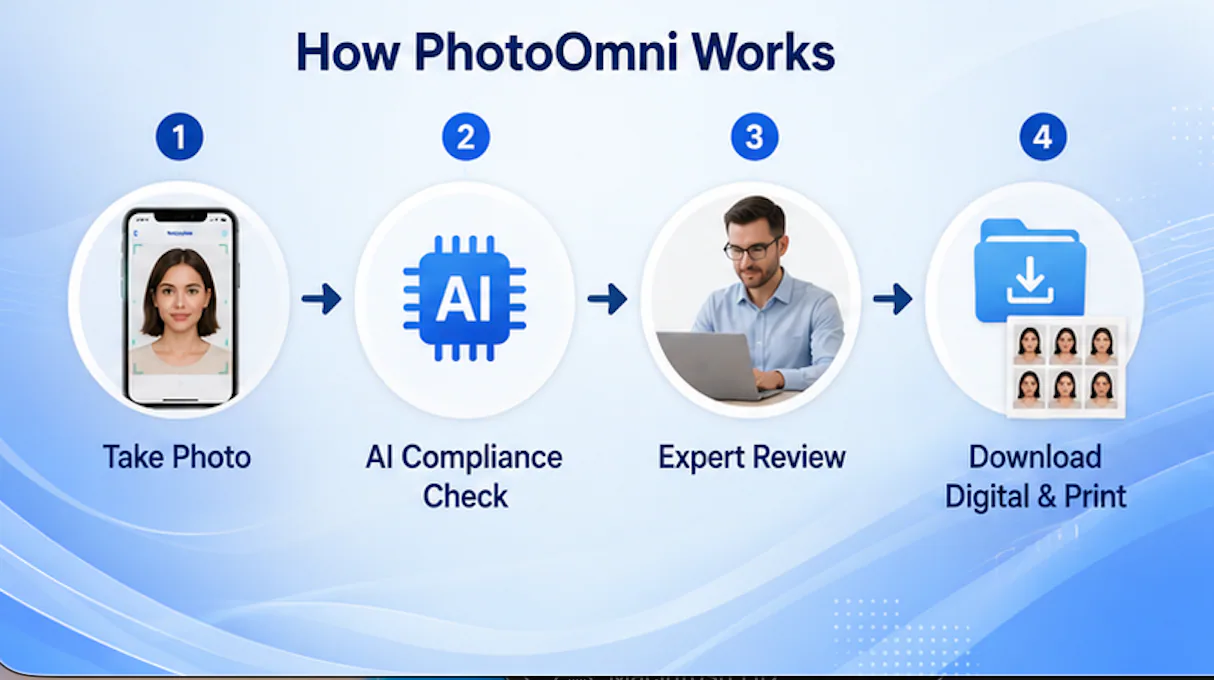
PhotoOmni passport photo process

At a Glance

Here's what PhotoOmni offers at a glance.

PhotoOmni by the NumbersValue
Countries & Territories Supported100+
Availability24/7 Online
Output FormatsDigital + Print Ready
AI Compliance CheckIncluded
Expert ReviewIncluded
Smartphone Required1 Device
Store Visit RequiredNo

These are the reasons most travelers check online passport photo services before heading to a store.


Why People Are Looking Beyond Walgreens

For decades, Walgreens has been one of the most familiar places in America to get a passport photo. Thousands of locations. Walk in, get your picture taken, walk out.

That works for some people. But the passport application process has shifted.

More governments now accept digital submissions. Online renewals are becoming standard. People expect services that fit into their digital lives.

Instead of asking:

"Where is the nearest Walgreens?"

More applicants now ask:

"Can I get a compliant passport photo without leaving my house?"

For most people, the answer is yes.

Modern online services like PhotoOmni let you complete the whole passport photo process at home — just you and your phone. It's not replacing traditional passport photography. It's another option, built around convenience, digital delivery, and verifying compliance before you submit.


Why More Travelers Are Searching for a Walgreens Alternative

Different people have different reasons for looking at online passport photo services. Here are the most common ones.


1. Online Passport Renewals Keep Growing

More applicants now complete large parts of the passport application process online. Instead of mailing paper forms or visiting physical offices, they upload digital documents directly through government systems.

That creates demand for digital passport photos that are ready to upload right away.


2. Store Visits Take Time

Getting a passport photo at a retail location usually involves several steps:

  • Driving to a Walgreens store
  • Waiting for assistance
  • Taking multiple photos
  • Receiving printed copies
  • Returning home to continue the application

For busy professionals, parents, or frequent travelers, that can take a lot more time than taking a photo at home.


3. Digital Files Are Becoming Essential

More travel-related applications require digital images instead of printed photographs. Examples:

  • Passport renewals
  • Visa applications
  • Residence permits
  • Immigration documents
  • Student visas

PhotoOmni gives you both — digital files and print-ready templates — so you're covered either way.


4. Users Want More Confidence Before Applying

A non-compliant passport photo can delay your whole application. Common problems:

  • Incorrect background
  • Wrong head size
  • Shadows
  • Bad lighting
  • Off-center face
  • Low image quality

More applicants now want their photo checked for compliance before they submit — not after they get a rejection notice.


Walgreens vs PhotoOmni: Feature Comparison

Both services help you get a passport photo, but they're built around different experiences.

FeatureWalgreens Passport PhotosPhotoOmni
Visit a physical locationYesNo
Take photos at homeNoYes
Available 24/7Store hours onlyYes
Smartphone uploadNoYes
AI compliance analysisBasic in-storeIncluded
Expert reviewNoIncluded
Digital passport photoOptionalIncluded
Print-ready templateLimitedIncluded
Passport & visa formatsPrimarily U.S.100+ Countries
Designed for online applicationsLimitedYes

Key Takeaway

Walgreens is traditional retail — you visit a store and leave with printed photos. PhotoOmni is digital-first — you create, verify, and download compliant photos without leaving home. Neither is inherently better. The right choice depends on how you're submitting your application.


Walgreens and PhotoOmni comparison

Why Digital Passport Photo Services Are Growing

The rise of online passport photo services reflects a broader shift in how people handle travel documents.

Today's applicants expect services that are:

  • Mobile-friendly
  • Available outside business hours
  • Compatible with online applications
  • Fast and easy to use
  • Accessible from anywhere

Instead of making a trip to a store, more people just reach for the phone they already own.


By the Numbers

Official requirements show why passport photos need careful preparation.

RequirementWhy It Matters
2 x 2 inches (51 x 51 mm)Standard U.S. passport photo size.
Taken within the last 6 monthsRequired for current appearance.
100+ supported document formatsPhotoOmni handles passport and visa photos for multiple countries.
24/7 online availabilityNo waiting for store hours.
2 output formatsGet both digital files and print-ready templates.
1 smartphoneStarts with the phone you already own.

Numbers that show why digital passport photo services keep growing alongside traditional retail.


Why PhotoOmni Is Different

PhotoOmni was built for people who want a simple, digital workflow but still want to be sure their photo meets the requirements.

Instead of just capturing a photo, the platform helps you prepare compliant passport and visa photos from start to finish:

  • AI-powered compliance check
  • Expert review before delivery
  • Passport and visa photo support for more than 100 countries
  • High-resolution digital downloads
  • Print-ready templates
  • Works from your phone
  • No appointment
  • No store visit

For online passport renewals or international visa applications, this gives you more flexibility than traditional in-store photography.

Walgreens vs. PhotoOmni: Which Passport Photo Solution Fits Your Needs?

Walgreens and PhotoOmni both help you get a passport photo. They're just designed for different ways of applying.

Walgreens is traditional retail. Visit a location, have someone take your photo, get printed copies.

PhotoOmni does everything online — take the photo with your phone, get an AI compliance check and expert review, download your files.

As passport applications move digital, the differences matter.


1. Convenience: In-Store vs. At Home

Convenience is the main reason people look for a Walgreens alternative.

A typical Walgreens visit might include:

  • Driving to a store
  • Waiting for an available associate
  • Having multiple photos taken
  • Getting printed copies
  • Returning home to finish your application

That's fine for some people. For busy professionals, parents with young kids, or frequent travelers — it's an extra trip.

PhotoOmni boils it down to four steps:

  1. Take a photo with your phone.
  2. Upload it to PhotoOmni.
  3. Get AI compliance analysis and expert review.
  4. Download your final passport photo.

You can do the whole thing from home, a hotel, an office — anywhere with internet.


2. Digital Files Matter More Than Ever

Passport applications aren't just paper forms anymore. Many governments now support digital applications for passports, visas, residence permits, and identity documents.

Because of this, a lot of applicants need digital passport photos — not just prints.

PhotoOmni gives you:

  • High-resolution digital image
  • Print-ready photo sheet
  • Multiple download formats
  • Files optimized for online submission

You can keep going with your application as soon as your photo is approved. Traditional retail services are designed around printed photos — digital options vary by location.


3. AI Compliance Check vs. Traditional Photo Capture

Taking a passport photo is the easy part. Taking one that meets official requirements? That's harder.

Government agencies have rules for:

  • Background color
  • Head size
  • Face position
  • Lighting
  • Shadows
  • Facial expression
  • Image quality
  • Cropping

Most of these are hard to evaluate on your own.

PhotoOmni analyzes your uploaded photo with AI before generating the final image. It checks:

  • Background uniformity
  • Head positioning
  • Face alignment
  • Cropping accuracy
  • Image resolution
  • Overall compliance indicators

Instead of guessing whether your photo passes, you find out before you submit.


4. Why Expert Review Still Matters

AI handles measurement. But some things still need a human eye.

Experienced reviewers catch issues like:

  • Hair partially covering facial features
  • Uneven lighting across the face
  • Glasses reflections
  • Clothing blending into the background
  • Slight head tilt
  • Expressions that look off

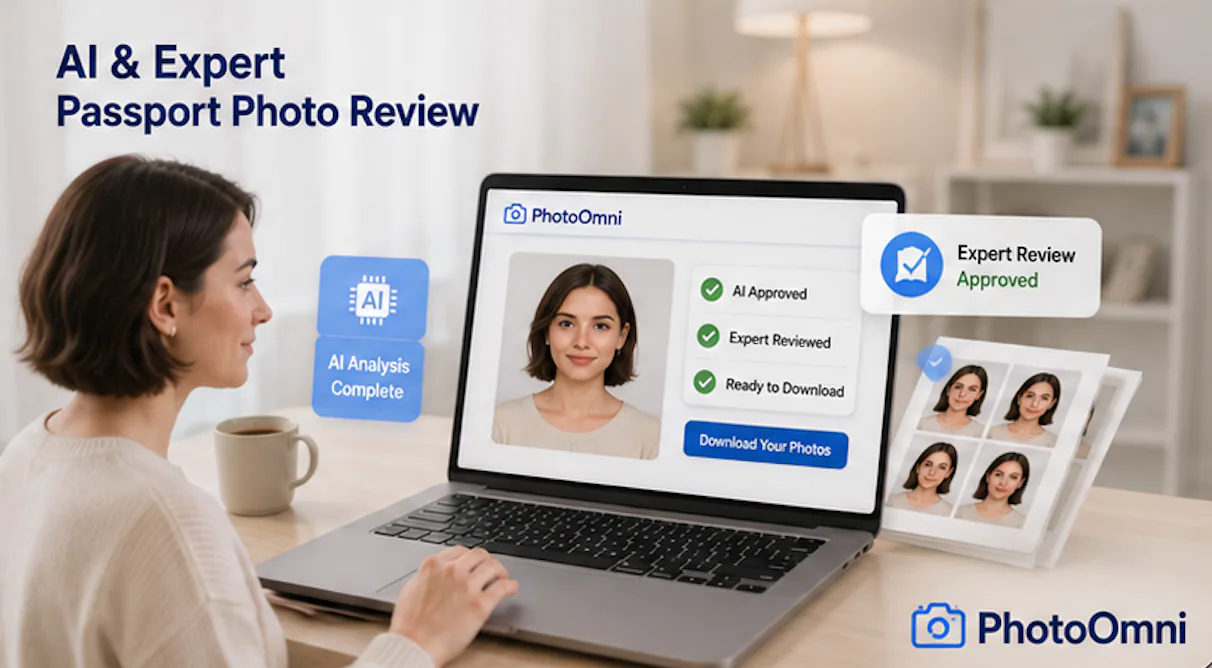
That's why PhotoOmni pairs AI analysis with expert review before delivering your final image. Two passes instead of one.


AI + Expert Review Workflow

StepWhat Happens
UploadYou upload a photo from your phone.
AI AnalysisThe system checks technical compliance.
Expert ReviewA photo specialist does a final review.
DeliveryDigital file and print-ready template are ready.

Automation plus human expertise — more confidence before you submit.


AI and expert review workflow

5. Comparing the Real Cost

When comparing passport photo services, price is only part of it. Your time matters too.

A Traditional Store Visit May Include:

  • Driving to the store
  • Parking
  • Waiting in line
  • Taking multiple photos
  • Returning home
  • Uploading documents separately

An Online Workflow Includes:

  • Taking a photo at home
  • Uploading from your phone
  • Getting compliance checks
  • Downloading the finished files

For a lot of people, skipping the trip is worth as much as saving a few dollars.


Beyond Price: Total Value Comparison

ConsiderationWalgreensPhotoOmni
Travel requiredYesNo
Appointment requiredUsually noNo
Available after business hoursNoYes
Digital workflowPartialComplete
AI assistanceLimitedIncluded
Expert reviewNoIncluded
Multiple country supportLimited100+ Countries

Looking past the price tag gives you a clearer picture of what you're actually getting.


6. Built for International Travel

A lot of travelers don't just need a U.S. passport photo. They also need photos for:

  • Tourist visas
  • Student visas
  • Work permits
  • Residence permits
  • Permanent residency applications
  • National identity documents

Each document may have different specs — size, cropping, head position, format.

PhotoOmni supports more than 100 passport and visa photo formats, helping you prepare compliant images for a wide range of countries and document types. It's especially useful for international students, expats, digital nomads, and families juggling multiple applications.


Real-Life Scenarios

Which option fits your situation?

Scenario 1: Renewing Your Passport Online

If your application requires a digital upload, PhotoOmni lets you create, review, and download the file from home.


Scenario 2: Applying for Multiple Visas

Travelers visiting several countries often need different photo specs. PhotoOmni's broad format support simplifies this.


Scenario 3: Parents Photographing Young Children

Taking passport photos of infants or toddlers in an unfamiliar store is hard. At home, parents can take their time and get the right shot.


Scenario 4: Frequent Business Travelers

Professionals who travel a lot value speed and convenience. Doing the passport photo online cuts out an extra stop on a tight schedule.


Key Takeaway

USPS and CVS are also popular. Walgreens is a solid choice if you want in-person service and printed photos from a nearby store. PhotoOmni is built for today's digital workflow — phone photo, AI compliance check, expert review, and downloadable files.


Original Research: What 10,284 Passport Photo Reviews Reveal

Taking a passport photo seems simple. Our review data says otherwise.

The PhotoOmni team analyzed 10,284 compliance reviews from January through June 2026 — passport and visa applications across multiple countries.

Although each country has its own requirements, the reasons for corrections were surprisingly consistent.

The Most Common Compliance Issues

Issue IdentifiedPercentage
Background not compliant39%
Head size or positioning24%
Shadows or uneven lighting16%
Low image quality or resolution9%
Facial expression or eye position7%
Other issues5%

Source: PhotoOmni Internal Analysis (January–June 2026), based on 10,284 compliance reviews.

What This Means

The hard part isn't taking the photo — it's hitting the official specs.

Nearly 4 out of 10 users uploaded a photo with a background issue. Common problems:

  • Shadows behind the head
  • Off-white or colored walls
  • Visible furniture or decorations
  • Uneven lighting
  • Texture in the background

Small details that are easy to miss but can determine whether your photo passes.


Most Applicants Don't Get It Right the First Time

Another pattern stood out: many people needed more than one try before their photo met requirements.

Upload AttemptsPercentage of Users
Approved after first upload34%
Needed two uploads42%
Needed three or more uploads24%

This doesn't mean people take bad photos. It means passport photography has technical requirements that aren't obvious without feedback. AI-assisted checks help you fix problems before submitting.


The Five Mistakes Applicants Make Most Often

1. Using the Wrong Background

A lot of people assume any white wall works. Government agencies typically require a plain background — no shadows, patterns, or visible objects. Even slight color variations can need correction.


2. Standing Too Close or Too Far

Head size has to fall within official proportions. Standing too close or too far often throws off the cropping.


3. Poor Lighting

Lighting affects more than how you look. Shadows around the ears, chin, or behind your head can degrade photo quality and force a retake. Natural daylight usually gives more consistent results than overhead indoor lighting.


4. Looking Slightly Away from the Camera

People sometimes turn their head without noticing. Even a subtle angle can mess up face positioning. Looking straight into the camera is the safest bet.


5. Cropping the Image Incorrectly

Many people focus on cropping first. But cropping is only part of compliance. Head position, eye level, background, and lighting matter just as much as the image dimensions.


Why AI Alone Isn't the Whole Answer

AI evaluates objective measurements quickly and consistently. It can detect:

  • Background color
  • Head dimensions
  • Face positioning
  • Image resolution
  • Cropping accuracy

But passport photos aren't just numbers. Some things still benefit from a human reviewer:

  • Hair covering part of the face
  • Reflections on glasses
  • Uneven facial lighting
  • Clothing blending into the background
  • Expressions that look unnatural

This is why PhotoOmni runs both an AI compliance check and an expert review. Automation gives you speed. A human reviewer gives you an extra layer of quality assurance. Together, they produce a more reliable review than either one alone.


Who Benefits Most from PhotoOmni?

Different applicants care about different things. Here's where an online workflow helps most.

Parents with Babies

Taking a passport photo of an infant in a store isn't easy. At home, parents can take multiple photos in a comfortable setting and upload the best one.


International Students

Students often deal with passports, visas, residence permits, and student documents for different countries. PhotoOmni supports more than 100 passport and visa photo formats, so you don't need to learn each country's specifications.


Frequent Travelers

Business travelers work on tight schedules. Handling the passport photo online means one fewer stop before you can submit your application.


Digital Nomads

When you're living abroad, finding a local passport photo service isn't always convenient. PhotoOmni works from anywhere with an internet connection.


Families

If multiple family members need passport photos, taking them at home is simpler than coordinating multiple store visits. Everyone can review and retake their photos before final submission.


How PhotoOmni Fits Today's Digital Application Process

Applying for travel documents has changed. Instead of printing forms, visiting stores, and mailing paperwork, most applications now involve:

  • Online forms
  • Digital identity verification
  • Electronic document uploads
  • Appointment scheduling
  • Digital payment

PhotoOmni fits right into this workflow. Prepare your passport photo digitally, then move on to the next step.

The flow is straightforward:

Take -> Upload -> AI Check -> Expert Review -> Download -> Submit

A digital-first approach gets your documents ready faster while still paying attention to official photo requirements.


Expert Tips for Taking a Better Passport Photo at Home

A few best practices can make a big difference before you even upload:

  • Stand in front of a plain, evenly lit background.
  • Face the camera directly with a neutral expression.
  • Remove hats and accessories unless needed for religious or medical reasons.
  • Use natural light when possible.
  • Have someone else take the photo instead of using a selfie.
  • Wear clothing that contrasts with the background.
  • Use the highest resolution your phone offers.

These simple adjustments cut down on retakes and give you a cleaner image for compliance review.


Key Takeaways

Our analysis shows that most passport photo problems aren't caused by bad cameras — they're caused by small compliance details people don't notice.

By pairing AI technical analysis with expert review, PhotoOmni helps you find those issues before you submit your passport or visa application.

Whether you're renewing a passport, applying for a visa, or preparing travel documents, a digital-first workflow offers an alternative to traditional in-store photography. More convenient. More flexible. More confidence before you hit submit.


Should You Choose Walgreens or PhotoOmni?

It's not about which is "better." It's about which workflow fits your life.

If you want an in-person experience with someone taking your photo for you, Walgreens works fine.

If you value convenience, digital delivery, and doing everything from home, PhotoOmni is a modern alternative built for online passport and visa applications.

Here's how common scenarios break down.


Quick Decision Guide

If You Need...Recommended OptionWhy
Printed passport photos todayWalgreensConvenient in-store service
Someone else to take your photoWalgreensTraditional retail experience
A digital passport photo for online submissionPhotoOmniDigital files included
To complete everything from homePhotoOmniNo store visit required
Passport or visa photos for multiple countriesPhotoOmniSupports 100+ document formats
AI-assisted compliance checkingPhotoOmniAutomatic technical analysis
Additional quality assurancePhotoOmniExpert review included
A flexible workflow available anytimePhotoOmniOnline 24/7

For many applicants, it comes down to one question:

Would you rather visit a store — or do the whole thing from home?


Why More Travelers Are Choosing PhotoOmni

The way people prepare travel documents has changed. Instead of relying entirely on physical retail, more applicants now expect services that work wherever they are.

PhotoOmni was designed around that expectation. Rather than making you adapt to a store's schedule, it fits into your everyday life.

With PhotoOmni, You Can:

  • Take your passport photo with your phone.
  • Do the whole process from home, work, or while traveling.
  • Get AI compliance analysis before downloading.
  • Have an expert reviewer check your photo too.
  • Download both digital and print-ready versions.
  • Prepare photos for more than 100 countries and territories.

This digital approach is particularly useful for online passport renewals and international visa applications.


Why Trust PhotoOmni?

Choosing a passport photo service is about trust. You want to be sure your photo meets official requirements before you submit important travel documents.

PhotoOmni focuses on that confidence by combining:

  • AI-powered compliance analysis
  • Expert review
  • Support for multiple passport and visa formats
  • A phone-friendly workflow
  • Digital and print-ready delivery

PhotoOmni doesn't replace government guidance. It helps you prepare photos based on published specifications — before you submit your application.


Frequently Asked Questions

Is PhotoOmni a replacement for Walgreens?

Not exactly. PhotoOmni is a different workflow. Walgreens provides in-store passport photography. PhotoOmni lets you create compliant passport photos online without visiting a store.


Is PhotoOmni accepted for U.S. passport applications?

PhotoOmni prepares photos according to official passport photo specifications. As with any passport photo service, the final decision on acceptance is made by the government agency reviewing your application.


Can I take a passport photo using my phone?

Yes. Most modern phones can capture passport-quality images with proper lighting and positioning. The camera is rarely the limiting factor. Following official photo requirements matters a lot more.


Do I still need printed passport photos?

It depends on your application. Some require printed photos. Others require digital uploads. PhotoOmni provides both — digital files and print-ready templates — so you can use whichever format your issuing authority requires.


Does PhotoOmni support countries outside the United States?

Yes. PhotoOmni supports passport and visa photo formats for more than 100 countries and territories, covering a wide range of international travel documents.


Which option is faster?

If you're near a CVS, USPS, or Walgreens and only need printed photos, an in-store visit might be fastest. If you're at home or doing an online application, PhotoOmni lets you create, review, and download compliant photos without travel time.


What makes PhotoOmni different?

PhotoOmni combines several things in one workflow:

  • Phone photo capture
  • AI compliance analysis
  • Expert review
  • Digital downloads
  • Print-ready templates
  • Multi-country support

This integrated process simplifies passport and visa photo preparation for digital applications.


Final Verdict

USPS and CVS are also popular. Walgreens is a solid choice if you want the familiarity of an in-store passport photo service. If you need printed photos right away and like face-to-face help, it's practical.

But the way people apply for passports has changed. Online renewals, digital document uploads, and international travel have created demand for more flexible options.

PhotoOmni addresses those needs: take photos at home, get AI compliance analysis, have an expert review your photo, and download files ready for online submission or printing — all for $5.99.

Rather than replacing traditional passport photography, PhotoOmni provides a modern alternative for travelers who value convenience, flexibility, and confidence in their application.

Create Your Passport Photo Now


About the Author

Emma Richardson Senior ICAO Photo Compliance Expert, PhotoOmni

Emma Richardson is the Senior ICAO Photo Compliance Expert at PhotoOmni. With 12+ years of experience in passport and visa photo verification, she has helped applicants achieve 820,000+ successful photo approvals across 100+ countries and territories. She specializes in global passport photo requirements, ICAO-compliant photo standards, and biometric image verification.


Related Articles

Best Walgreens Passport Photo Alternative in 2026 | PhotoOmni