
Passport Photo Size & Dimensions: Pixels, Inches, MM and Country Requirements
Passport photo sizes, pixel dimensions, DPI, and country-specific requirements explained.
Product route and document guidance checked: September 28, 2026
Passport Image Size: Pixels, Inches, MM & Country Requirements
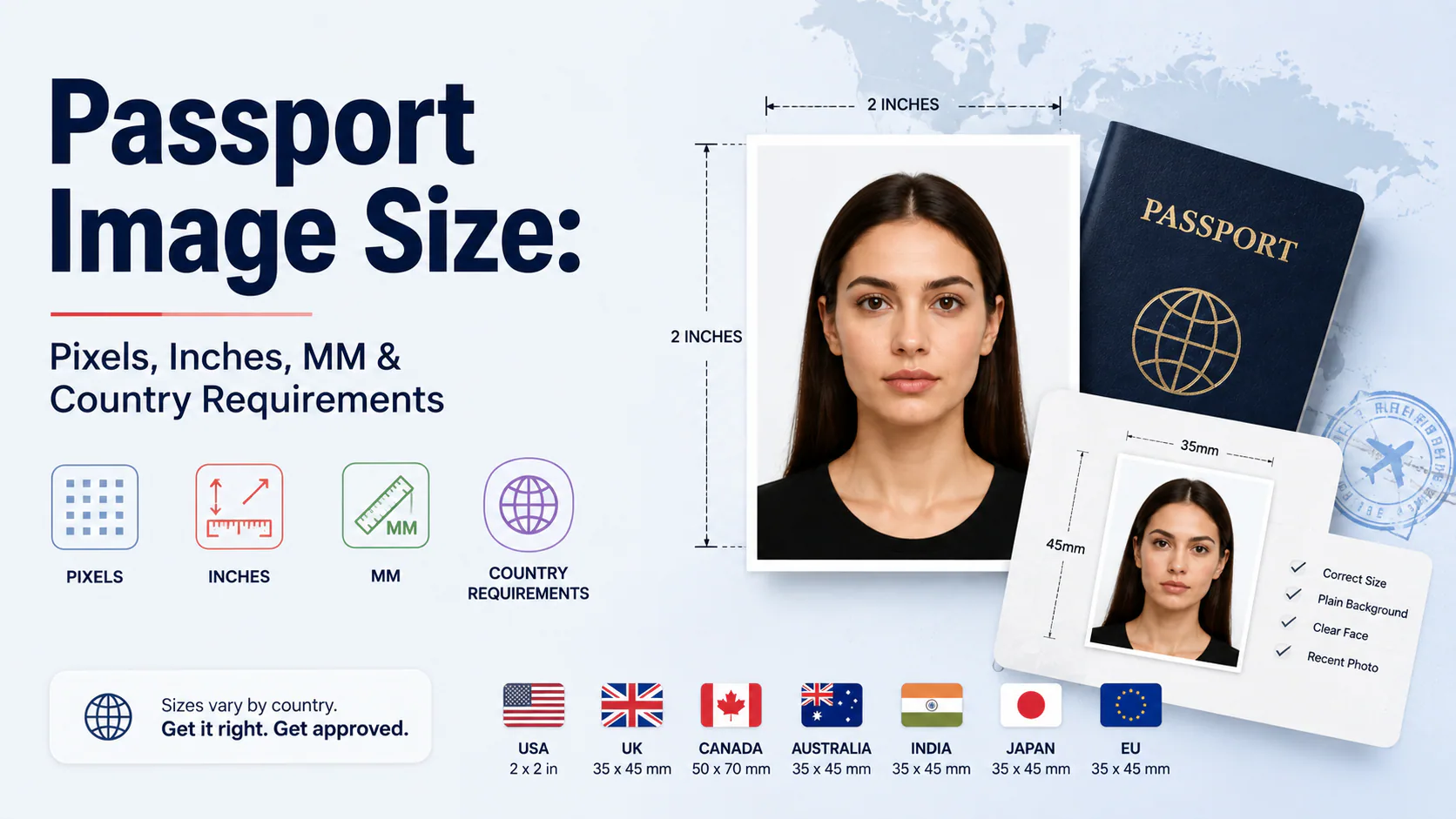
Quick answer: Passport photo dimensions depend on the issuing authority, document and submission route. Printed dimensions and digital upload dimensions must be checked separately. At 300 PPI, a 2 × 2 inch print corresponds to 600 × 600 pixels, while a 35 × 45 mm print corresponds to approximately 413 × 531 pixels. These are print conversions, not universal upload rules.
A US passport photo maker can apply these dimensions and formatting checks to the uploaded photo.
There is no universal passport-photo size. Use the PhotoOmni document selector to choose the issuing country and exact document before creating the crop, pixel dimensions and print-ready output.
Passport Size Photo Dimensions: Inches, Centimeters and Pixels
The following are unit conversions, not universal acceptance rules. Width is listed before height.
| Format | Inches | Centimeters | Millimeters |
|---|---|---|---|
| 2-inch square | 2 x 2 | 5.08 x 5.08 | 50.8 x 50.8 |
| 35 x 45 mm portrait | Approximately 1.38 x 1.77 | 3.5 x 4.5 | 35 x 45 |
Official pages may round a 2-inch dimension to 51 mm. This rounding does not make every 51-mm template interchangeable with every upload requirement. At 300 pixels per inch, a 2-inch square corresponds to 600 x 600 pixels; that is a print-resolution calculation, not a universal portal specification.
These measurements describe the photograph, not the passport booklet. For exact printed output, check print settings. For the rectangular format and its shape, use the 35 x 45 mm guide.
Why the same photo can be "the right size" and still wrong
Pixels, inches, and millimeters aren't three independent measurements — they're the same photo described three ways, linked by one number: DPI (dots per inch). The relationship is simple:
pixels = inches × DPI
A 2×2 inch photo at 300 DPI is 600×600 pixels. That same 2×2 inch canvas at 150 DPI is only 300×300 pixels — half the resolution, same physical size. This is exactly how people end up with a photo that's technically "2×2 inches" and still gets bounced: the software they used exported at a lower DPI than the portal expects, so the pixel count comes in under the minimum even though the inch measurement on the label is correct.
The fix is to stop thinking in inches or mm alone and check the pixel dimensions specifically, since that's what most digital upload portals actually validate — not the DPI metadata, which can be missing or wrong in the file entirely.
Check the country, document and submission route
A country's passport, visa and ID card may use different photo specifications. A supplied-photo template also cannot replace a photograph taken at an official appointment. For Bangladesh and Philippine passport capture, see the country-specific answers in our requirements guide.
For Indian passport uploads that request the ICAO specification, follow the 630 × 810 pixel guidance, rather than a generic 300-PPI print conversion. Check any required prints separately against the receiving office's checklist.
Head size: the number that matters more than the frame
The outer photo size gets all the attention, but head height inside the frame is the more common rejection reason, because it's measured, not just cropped:
- US: head height 1 to 1⅜ inches (25–35mm), roughly 50–69% of the frame
- UK: crown-to-chin 29–34mm
- Canada: 31–36mm
Digital upload limits: a separate rule set from the print size
Once you're submitting through an online portal rather than printing and mailing a physical photo, a second, independent set of rules kicks in — file size and pixel range, set by the specific portal, not the passport authority's print spec:
- US DS-160 visa uploads: JPEG, 600×600 to 1200×1200 pixels, no more than 240KB; see the official digital-image requirements
- UK online uploads: JPEG, minimum 600×750 pixels, 50KB to 10MB
- Most portals: JPEG preferred; very few accept PNG, almost none accept HEIC (the iPhone default format) — worth checking before you export, since HEIC is what an iPhone saves to unless you change it
These limits exist on top of the physical-size spec, not instead of it. A photo can be perfectly sized in mm and still get bounced by an upload portal for being the wrong file format or exceeding a KB limit that has nothing to do with the photo's dimensions.
How to actually get this right
Rather than exporting at a size and hoping the DPI metadata is correct, the more reliable approach is to pick your destination country first, then generate the file at the exact pixel target for that country's spec — skipping the inches/mm conversion step entirely, since pixels are what most systems actually check. PhotoOmni's country-specific presets export directly at the correct pixel dimensions for each format above, which sidesteps the DPI-mismatch problem rather than requiring you to do the math yourself.
FAQ
Which tool should I use to convert centimetres to pixels for a passport photo?
Use a converter that asks for the intended print resolution: pixels = centimetres ÷ 2.54 × pixels per inch. For example, 5.08 cm at 300 pixels per inch equals 600 pixels. This is a print calculation, not a universal upload standard. If your portal gives pixel dimensions directly, use those instead of deriving them from centimetres.
Sources: U.S. visa digital image requirements
What's the difference between passport photo size in inches and in pixels? Inches (or mm) describe the physical print size; pixels describe the digital resolution. They're linked by DPI — the same inch measurement can correspond to very different pixel counts depending on what DPI the file was exported at.
Why did my "2×2 inch" photo get rejected if the dimensions were correct? Most likely a DPI mismatch — the file may say 2×2 inches but was exported at a lower DPI than required, so the actual pixel count falls short of the portal's minimum even though the label is technically right.
Is a US passport photo the same size as an Indian passport photo? Not usually — Indian passport photos generally use 35×45mm, while the US uses 2×2 inches (51×51mm). Some Indian visa routes do use the 51×51mm size, but the head-size tolerance still differs (India's is tighter), so matching the outer canvas alone isn't enough.
What DPI should I use for a passport photo? 300 DPI is the standard for printed passport photos. For digital-only uploads, check the specific portal's pixel requirement directly — DPI matters less there than the raw pixel dimensions the portal asks for.
Country-specific specs change and vary by document type — always confirm exact requirements with the issuing authority before submitting.
U.S. Passport Photo Size and Dimensions: Quick Answer
A U.S. passport photo must be 2×2 inches (51×51 mm). A print prepared at 300 DPI is 600×600 pixels. The head must measure 1–1⅜ inches (25–35 mm) from the bottom of the chin to the top of the head, with the eyes positioned roughly 1⅛–1⅜ inches (28–35 mm) from the bottom edge.
| Measurement | U.S. passport-photo specification |
|---|---|
| Printed dimensions | 2×2 inches |
| Millimeters | 51×51 mm |
| Common 300-DPI file | 600×600 px |
| Head height | 1–1⅜ inches / 25–35 mm |
| Background | Plain white or off-white |
| Shape | Square |
If you prefer to prepare the file online, the US passport photo maker can help check the crop, background, and passport-photo format before submission.
Common Passport-Photo Sizes by Country
| Country or region | Typical printed size | Common digital reference |
|---|---|---|
| United States | 51×51 mm / 2×2 in | 600×600 px at 300 DPI |
| United Kingdom | 35×45 mm proportions | At least 600×750 px for many online routes |
| Schengen countries | 35×45 mm | Portal-specific |
| Canada | 50×70 mm | Application-specific |
| India | Often 35×45 mm for passports; some visas use 51×51 mm | Application-specific |
The outside dimensions alone are not enough. A file can be exactly 600×600 pixels and still fail because the head is too large, too small, tilted or incorrectly positioned. Always check both the canvas and the biometric composition.
Passport Photo Size FAQ
What size are passport photos in the United States?
Exactly 2×2 inches, or 51×51 mm.
Is 600×600 pixels always a valid passport photo?
No. It is a common U.S. reference at 300 DPI, but head size, background, lighting and facial position must also comply.
Is a passport-size photo the same worldwide?
No. The U.S. uses a square format, while 35×45 mm is common internationally and Canada uses 50×70 mm.
Passport Picture Size: Diagnose the Mismatch Before Resizing
Use the symptom to decide which measurement to check. Resizing the same file repeatedly can hide the original problem.
| Symptom | Check first |
|---|---|
| The printed picture is too large or small | Physical width and height, print scaling and the size of each photo box in the layout. |
| The upload form reports a file-size error | Bytes or KB/MB, not the number of inches shown by an editor. |
| The head is too large even though the canvas is correct | The crop and head-to-frame relationship, not just the outside dimensions. |
| The image is soft after enlargement | Original detail; increasing the pixel count cannot recreate missing facial detail. |
Prepare the upload file and print layout as separate outputs. A page containing several correctly sized portraits is still the wrong file when a portal expects one original portrait. For U.S. online renewal, consult the dedicated upload page rather than treating a 600×600 print reference as a universal upload requirement.
Passport Photo Size & Pixel Converter
Convert a physical photo size to pixels with pixels = millimetres ÷ 25.4 × pixels per inch (PPI), or pixels = inches × PPI. Round to whole pixels. This calculation describes a print at a chosen resolution; it does not determine which dimensions a passport upload portal accepts.
| Photo width × height | At 300 PPI | At 600 PPI |
|---|---|---|
| 2 × 2 inches | 600 × 600 px | 1200 × 1200 px |
| 35 × 45 mm | 413 × 531 px | 827 × 1063 px |
| 50 × 70 mm | 591 × 827 px | 1181 × 1654 px |
| 33 × 48 mm | 390 × 567 px | 780 × 1134 px |
For example, 35 ÷ 25.4 × 300 gives approximately 413 pixels. Changing the PPI metadata alone does not change the file's pixel count or restore lost detail. To print an existing image, use inches = pixels ÷ PPI and verify the final width and height with a ruler.
For a portal that explicitly requests 630 × 810 px, export that exact size rather than replacing it with the 413 × 531 px print calculation. The Indian passport guide explains that distinction. Use PhotoOmni's document selector for supported preparation workflows; this table is a conversion reference, not a claim that PhotoOmni has an interactive custom-size converter.
Conversion reference checked November 10, 2026. PPI measures image pixels per printed inch; printer DPI measures printed dots.
What Is the U.S. Passport Photo Size in Centimetres?
For a printed U.S. passport photo, 2×2 inches equals exactly 5.08×5.08 cm. The official page rounds this to 51×51 mm. An exact 5×5 cm photo is slightly smaller; do not choose it merely because it looks square.
| Label in a photo editor | Exact centimetres | Practical check |
|---|---|---|
| 2×2 inches | 5.08×5.08 cm | U.S. paper passport-photo format |
| 5×5 cm | 5.00×5.00 cm | A separate metric format |
| 35×45 mm | 3.5×4.5 cm | Rectangular, not the U.S. square |
At 300 PPI, prepare a 600×600-pixel image placed at 5.08 cm square in the print layout. Print at actual size, disable fit-to-page and borderless enlargement, then measure a test copy. Changing only the DPI metadata does not add image detail or ensure correct printer scaling.
Source: State Department paper-photo measurements. For online renewal, use the original digital-photo workflow; this print conversion is not a universal upload requirement.
Related Articles
- Wallet-Size Photo Dimensions: Pixels, Inches and Passport Photo Comparison
- 3×4 Photo Size: Pixels, Inches, Uses and How to Make One Online
- Australian Visa Photo Requirements & ImmiAccount Upload Guide (2026)
About the Author
Emma Richardson is PhotoOmni’s Senior ICAO Photo Compliance Expert. With over 12 years of experience, she has helped applicants obtain more than 820,000 passport and visa photo approvals across over 100 countries and territories. She specializes in global passport photo requirements and ICAO-compliant photo verification.