
Why Was My Indian Passport Photo Rejected? How to Validate It Before You Apply
Diagnose Indian passport photo rejection issues including 630×810 dimensions, white background, face coverage, glare and unaltered-image rules.
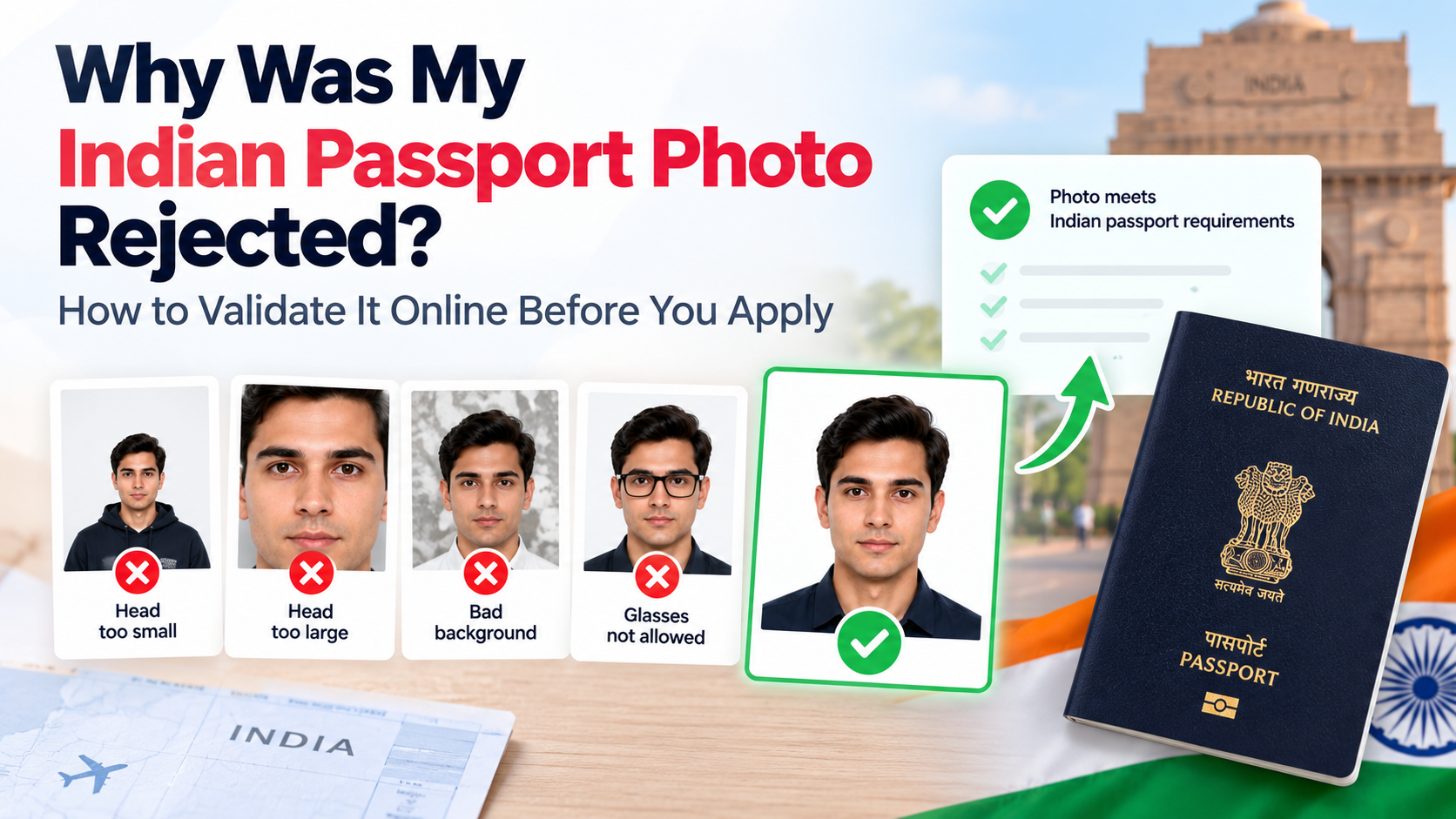
Quick answer: Under the ICAO-compliant guidance introduced from September 1, 2025, common Indian passport photo problems include the wrong 630×810-pixel dimensions, a non-white background, face coverage outside 80–85%, reflections from glasses, shadows, blur, head tilt or software alteration. Check every item separately before uploading.
Do not confuse passport requirements with the separate rules for an Indian visa photo or Indian eVisa photo. The correct specification depends on the application.
If you prefer to prepare the file online, the Indian passport photo maker can help check the crop, background, and passport-photo format before submission.
Passport Photo Size in India: Avoid Importing a U.S. Square Crop
An already cropped U.S.-style square is not a reliable starting point for a rectangular Indian passport-photo requirement. The problem is not only the outside shape: a tight crop may have removed the space needed above the head or around the shoulders.
Return to the original portrait, select the Indian passport route shown in your application, and prepare the requested framing from that source. Do not stretch a square to a rectangle or generate missing edges. If the original cannot provide the required composition, retake it.
Keep the digital export and any required print layout as separate files. A valid pixel count does not determine the physical print size by itself. The passport size guide explains the units; the printing guide helps check the finished copy.
Indian passport photo size: pixels, centimetres and renewal applications
For an ICAO-compliant passport upload, use 630 pixels wide × 810 pixels high. The Indian consulate's official photo sheet also requires an unaltered colour image with a white background. A correct pixel count does not fix an unsuitable portrait: the full head, face coverage, lighting and pose must also pass the checks above.
Why pixels cannot be converted to one universal print size
Pixels measure the digital file; centimetres and inches measure the printed copy. Their relationship depends on print resolution:
Printed width in inches = pixel width ÷ pixels per inch.
For example, a 630×810 file printed at 300 pixels per inch measures 2.1×2.7 inches, approximately 5.33×6.86 cm. That is a mathematical conversion, not an instruction to submit a print that size. If your checklist requests a 35×45 mm print, that means 3.5×4.5 cm, approximately 1.38×1.77 inches. Ask the printer to produce the physical dimensions requested by your own mission or service centre. Changing the DPI label alone does not create missing image detail.
Indian passport renewal photo checklist
Renewal applicants should check the current photo instructions rather than copy the size of the image in an old passport. The Chicago passport-services notice states that ICAO-compliant photographs have been required there since September 1, 2025.
Before submitting:
- Confirm that you selected Indian passport, rather than Indian visa, eVisa or OCI.
- Export the digital file at the exact pixel dimensions requested by your application.
- Check the upload screen for its file type and KB limit; do not assume a limit copied from another document applies.
- Confirm whether printed photos are also requested and obtain the stated number and physical size.
- Review the saved upload preview. If the crop hides the top of the head or enlarges the face incorrectly, return to the original image.
For renewal paperwork and appointments, see the separate Indian passport renewal guide. This article remains focused on preparing and diagnosing the photo.
Most Common Rejection Causes
| Problem | What the guidance requires | What to do |
|---|---|---|
| Wrong dimensions | 630×810 pixels | Export at the exact dimensions requested by the portal |
| Wrong background | White | Retake against an evenly lit white background |
| Face too small or large | Face occupies 80–85% of the photo | Reframe using the official examples |
| Glasses reflection | Eyes must be clearly visible; guidance says to remove glasses to avoid reflections | Retake without glasses when possible |
| Shadows or red eye | Uniform lighting with no distracting shadows, flash reflections or red eye | Change the lighting and retake |
| Tilt, blur or open mouth | Full front view, centred head, natural expression and mouth closed | Retake straight on |
| Digital alteration | Photo must be unaltered by computer software | Use an original compliant capture |
Step-by-Step Diagnosis
A Indian passport photo maker can apply these dimensions and formatting checks to the uploaded photo.
- Confirm the application type. Passport, visa and OCI images do not necessarily use the same specification. For OCI, use the dedicated India OCI photo requirements.
- Check exact dimensions. Confirm the file is 630 pixels wide by 810 pixels high.
- Inspect the background. It should be white, evenly lit and free of distracting shadows.
- Check framing. The full head must be visible from the top of the hair to the bottom of the chin, with the face taking up 80–85% of the photo.
- Check the eyes and glasses. Eyes must be open and clear. Remove glasses to prevent reflections or obstruction.
- Check pose and quality. Look directly at the camera, keep the head centred and upright, use a natural expression with the mouth closed, and avoid blur or red eye.
- Check the portal's on-screen file instructions. File-format and file-size limits can vary by the specific Passport Seva or mission workflow; follow the upload screen rather than relying on an old saved checklist.
What “Validate Online” Should Mean
A useful validator should report each rule separately: dimensions, framing, background, head position and visible quality problems. A generic pass/fail message is less useful because it does not identify what to fix. However, a third-party checker cannot guarantee acceptance and should not modify facial features or create an artificial likeness.
Our broader passport photo online checker guide explains what automated tools can and cannot verify.
Current Core Requirements
- colour photo at 630×810 pixels;
- white background;
- face fills 80–85% of the photograph;
- full head visible, centred and not tilted;
- eyes open and visible, no hair across the eyes;
- uniform lighting, no shadows, flash reflections or red eye;
- natural expression with mouth closed;
- no computer alteration;
- head coverings only for religious reasons, with facial features fully visible.
FAQ
Did the rules change in 2025?
Yes. Indian missions announced that ICAO-compliant photographs would be required from September 1, 2025.
Are glasses absolutely banned?
The guidance focuses on visible eyes and avoiding reflections, and advises taking glasses off to prevent them. Removing glasses is the safest approach; follow any mission-specific instruction shown in your application.
Is 630×810 exact?
The published guidance specifies 630×810 pixels. Use that exact size when the portal requests the ICAO-compliant upload.
Is the file-size limit always 10–250KB?
Do not assume one universal limit. Check the current upload screen or mission instructions for the workflow you are using.
Bottom Line
Validate the photo systematically instead of making random edits: first confirm the application type, then dimensions, white background, 80–85% face coverage, eyes, lighting, pose and the portal's current file constraints. If a photo fails because of glare, shadows or pose, retaking it is usually safer than digitally altering it.
Requirements checked against Indian government and mission ICAO-compliant photograph guidance on September 8, 2026. Confirm the current upload screen before submission.
Indian Passport Photo Requirements: Which Instruction Applies to Your Application?
Before preparing an Indian passport photo, make a short specification record from your own application. Record the document type, application location, digital upload instructions and any separate print checklist. This prevents a valid visa or OCI template from being mistaken for a passport template.
The Chicago consulate's ICAO photograph sheet specifies a 630×810-pixel image. Treat that as a digital dimension, not a universal centimetre measurement or an instruction about how many prints to submit. Match any physical copies to your mission's current checklist.
If two instructions appear inconsistent, compare their issuing authority, application route and publication date before editing. Ask the relevant mission or service centre to resolve an unclear requirement. Save the instructions with your photo file so you can reproduce the correct export, instead of testing unrelated passport, visa and OCI presets in turn.
About the Author
PhotoOmni Editorial Team
The PhotoOmni Editorial Team researches official passport, visa, immigration, and identity-photo requirements. Every guide is reviewed for practical accuracy and updated when application rules, upload specifications, or government guidance change.